
MCP server · Research
Web Search Plus MCP server
Give your AI better web search and clean page reading, with several search services working together.
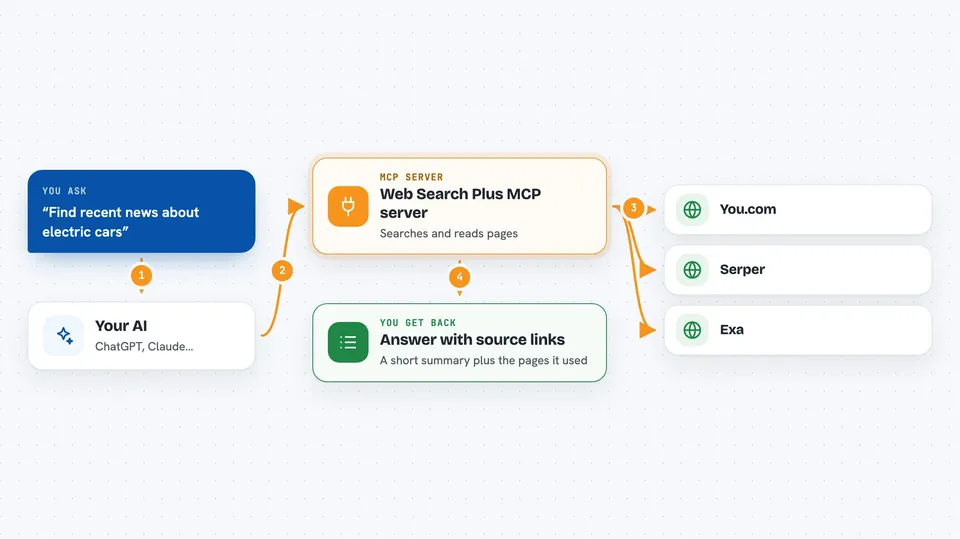
Web Search Plus is a helper that gives your AI app a proper web search and page-reading skill. It can ask several search services at once, keep the original links, and try another service if one fails. It is handy if you use ChatGPT, Claude, Cursor or a similar app and want answers that come with real sources instead of guesses.
What is an MCP server? The 30-second version
On its own, your AI can only chat with what it already knows. An MCP server is a small helper program that gives your AI a new skill or a connection to an outside service. This one connects your AI to web search and page-reading services, so when you ask a question it can actually look things up online and read the pages it finds. You install it once, and from then on your AI can use it whenever you ask.
What this MCP server does
You ask your AI a question, and the AI passes it to this helper. The helper sends your search to one or more search services, like You.com, Serper or Exa, and collects the results. If one service fails or gives nothing useful, it quietly tries another one. It can also open a web page and turn it into clean text your AI can read. Then your AI gives you back an answer with the original links attached.
 Click to zoom
What you can do with it
- Search the web and get answers with real source links
- Read a web page and turn it into clean text
- Compare results from several search services in one go
- Run a broader research search across multiple providers
- See which service was used and how the result was found
- Keep working when one search service is down, by falling back to another
What it gives back to you
You get an answer in the chat, usually a short summary plus a list of the sources it used, with their links. If you asked it to read a page, you get the cleaned-up text or a summary of it. You can also ask it to show which search service ran, so you can see how the answer was found. Nothing is changed anywhere; it only looks things up and reads pages.
Before you start
What you need
- A free account and API key from at least one search service, such as You.com, Serper or Linkup (an API key is a kind of password for apps; the site gives you one for free)
- The uv tool installed on your computer (a small free installer that runs the helper)
- An app that supports MCP servers, such as Claude Desktop, Cursor or Hermes
Good to know
It sends your search words and the page addresses you give it to outside search services, so avoid searching for private or confidential information.
Install it with your AI
Add Web Search Plus MCP server to your AI, no technical skills needed
You don't install anything by hand. You copy one prompt, paste it into an AI that can work on your computer, and it checks, installs and connects the server for you, asking you when it needs something.
Sign in to get the install prompt
Members get a ready-made prompt that lets the Claude desktop app check Web Search Plus MCP server, install it and connect it for them, step by step. You don't need any technical skills: you copy, paste and answer a few questions. Your connected AI can also find and install any of the 4,361 MCP servers here for you.
Who it's for
Anyone who uses an AI chat app for research, writing or fact-checking and wants answers backed by real web sources.


