
MCP server · Analytics
MCP Alchemy database server
by runekaagaard
Let your AI look inside your database, explain its tables, and run SQL queries for you.
MCP Alchemy is a small helper that connects your AI assistant to a database. Once it is set up, you can ask your AI questions about your data in normal words, and it will look at the actual tables and give you answers. It is handy for anyone who works with a database but does not want to write SQL by hand, or who just wants a quick explanation of what is in there.
What is an MCP server? The 30-second version
On its own, your AI can only chat with you. An MCP server is a small program you add to your AI app that gives it one new skill. This one gives your AI a direct line to a database, so it can look at the tables and run queries when you ask. You stay in the chat; the helper does the database work behind the scenes.
What this MCP server does
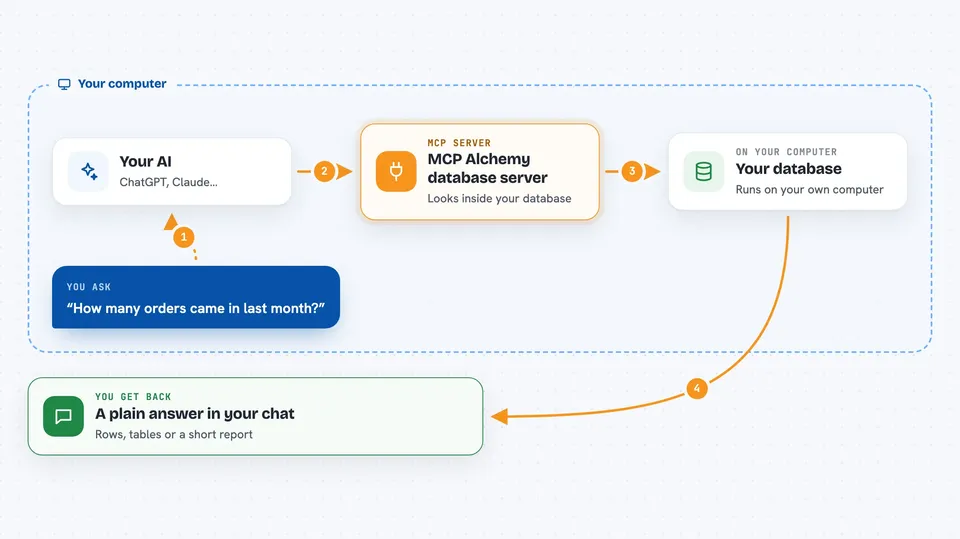
You ask your AI something about your data, like which tables exist or how many orders came in last month. The AI sends that request to MCP Alchemy, which is running quietly on your computer. MCP Alchemy talks to your database using a tool called SQLAlchemy, which knows how to speak to many different database types. The database sends back the rows, and MCP Alchemy hands them to your AI. Your AI then explains the result to you in the chat, in plain words.
 Click to zoom
What you can do with it
- List all the tables in your database
- Find tables whose names contain a word you type
- Show the columns, types, and links between tables
- Run a SQL query you or your AI wrote
- Explain what a table is for based on its structure
- Summarize large result sets into a readable report
- Export full result sets to files for deeper analysis
Try asking your AI
- “What tables are in my database?”
- “Show me the structure of the orders table and how it connects to customers.”
- “How many orders were placed last month, grouped by country?”
- “Write a query that finds customers who have not ordered in a year, then run it.”
What it gives back to you
You get answers back in the chat, written in normal sentences. For structure questions, you get a list of tables or a description of columns and links. For queries, you get the rows in a neat vertical format, with a note about how many rows came back. If the result is very large, it can be saved to a file instead of pasted into the chat.
Before you start
What you need
- The Claude desktop app or another app that supports MCP servers
- uv installed on your computer (a small tool that runs Python programs)
- A database you can reach, plus its connection details (address, username, password)
- The right database driver for your database type, added in the setup
Good to know
This server can run SQL queries on your database, and some queries can change or delete data. Only connect it to databases you are allowed to work with, and be careful with anything that writes or removes rows.
Install it with your AI
Add MCP Alchemy database server to your AI, no technical skills needed
You don't install anything by hand. You copy one prompt, paste it into an AI that can work on your computer, and it checks, installs and connects the server for you, asking you when it needs something.
Sign in to get the install prompt
Members get a ready-made prompt that lets the Claude desktop app check MCP Alchemy database server, install it and connect it for them, step by step. You don't need any technical skills: you copy, paste and answer a few questions. Your connected AI can also find and install any of the 4,609 MCP servers here for you.
Who it's for
Anyone who works with a database and wants to explore or query it through chat, such as analysts, support staff, product managers, and developers who prefer asking questions over writing SQL.


