
MCP server · Developer tools
Infrawise MCP server
by Sidd27
Lets your AI read your cloud setup and database schemas so its advice fits your real infrastructure.
Infrawise is a helper that lets your AI assistant look at your actual cloud setup and database structure before it answers. Instead of guessing, it can see your real tables, indexes, and services. It is handy for developers and anyone who works with AWS and databases alongside an AI coding assistant.
What is an MCP server? The 30-second version
On its own, your AI can only chat with you. It cannot see your cloud account or your database. An MCP server is a small helper program that gives your AI a new skill or a connection to another service. Infrawise is that helper here, and it connects your AI to your AWS services, databases, and codebase so the AI can look things up for you when you ask.
What this MCP server does
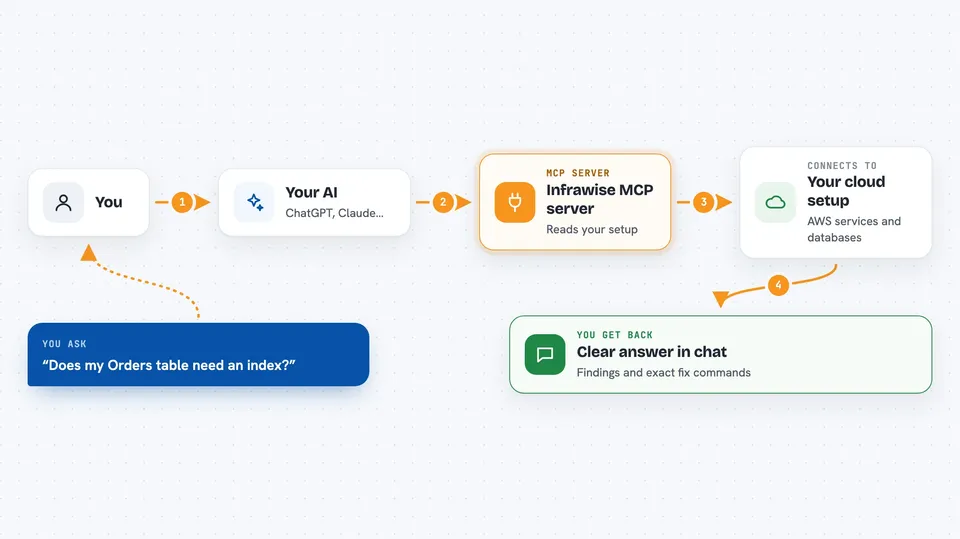
You ask your AI a question about your infrastructure, like whether a table needs an index. The AI uses Infrawise as its helper. Infrawise reads your AWS services, your database schemas, and your code, then hands back what it found. You get a clear answer in the chat, such as a finding or the exact command to fix something. It reads and reports, it does not change your cloud for you.
 Click to zoom
What you can do with it
- See your table schemas, keys, and indexes
- Spot full table scans and missing indexes
- Get the exact CREATE INDEX or GSI setup for your tables
- Check your Lambda functions, queues, and topics
- Review S3 buckets, secrets, and parameters by name
- Find which functions query which tables and how
- Export a findings report as a markdown file
Try asking your AI
- “Does my Orders table need an index, and what is the exact command?”
- “Which of my functions scan a table without a filter?”
- “Show me the schema for my users table”
- “Are any of my S3 buckets open to the public?”
What it gives back to you
You get back findings, schemas, and lists in your chat. For example, it can show a table's columns and keys, or a finding that says a scan was detected with a suggested fix. It also tells you how fresh the data is, so you know if the answer is up to date. It never shows secret values or raw log messages.
Before you start
What you need
- Node.js 22 or later (a free program you install once)
- An AWS account with access set up (the tool asks which profile to use)
- Your project folder open on your computer
- An AI editor like Claude Code, Cursor, or VS Code
Good to know
It reads your cloud and database details and can show them to your AI, so be aware of what your account and project contain before you connect it.
Install it with your AI
Add Infrawise MCP server to your AI, no technical skills needed
You don't install anything by hand. You copy one prompt, paste it into an AI that can work on your computer, and it checks, installs and connects the server for you, asking you when it needs something.
Sign in to get the install prompt
Members get a ready-made prompt that lets the Claude desktop app check Infrawise MCP server, install it and connect it for them, step by step. You don't need any technical skills: you copy, paste and answer a few questions. Your connected AI can also find and install any of the 4,609 MCP servers here for you.
Who it's for
Developers and anyone who works with AWS and databases alongside an AI coding assistant.



