MCP server · Email
Zoho Mail MCP server
by SirGreed808
Let your AI read, search and send email from your Zoho Mail account.
This is a small helper that connects your AI assistant to your Zoho Mail account. Once it is set up, you can ask your AI to check your inbox, find a message, or send a reply, all in plain chat. It is handy if you use Zoho Mail for work and want to stop switching tabs just to look something up.
What is an MCP server? The 30-second version
On its own, your AI can only chat with you. It cannot see your email or do anything outside the conversation. An MCP server is a small helper program that gives your AI one new skill. This one connects your AI to Zoho Mail, so when you ask about a message, the AI can actually go look it up or send it for you.
What this MCP server does
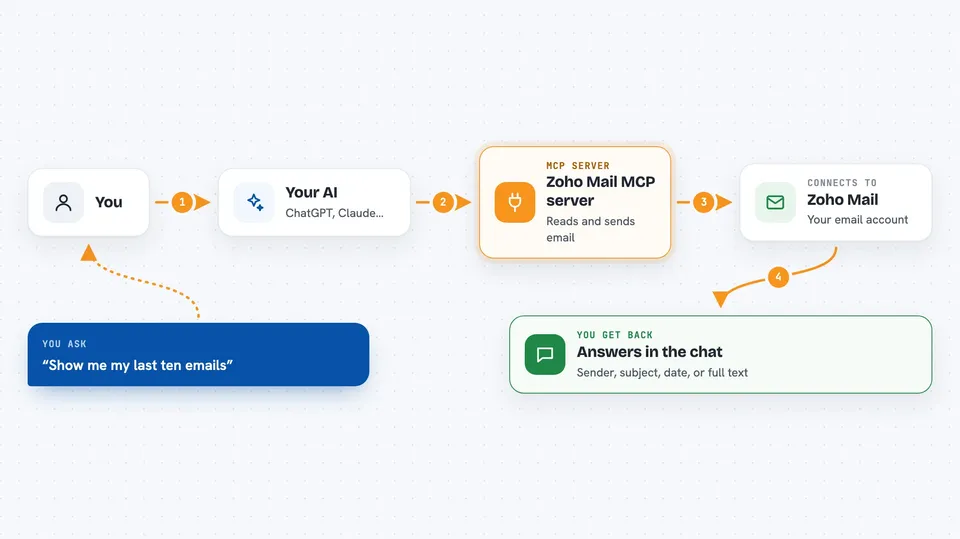
You ask your AI something about your Zoho Mail, like "show me my latest emails" or "send a note to Anna". The AI passes your request to this helper program running on your computer. The helper talks to Zoho Mail over the internet using your account details. Zoho sends back the messages or confirms the send. The AI then shows you the result in the chat in normal words.
 Click to zoom
What you can do with it
- List your recent inbox messages
- Search emails by keyword, sender or subject
- Read the full body of a specific email
- Send an email from your Zoho address
- Find a message and then reply to it in the same chat
Try asking your AI
- “Show me my last ten emails in Zoho Mail”
- “Search my inbox for anything from my boss this week”
- “Read the email about the invoice from yesterday”
- “Send an email to anna@example.com saying I will be ten minutes late”
What it gives back to you
You get answers written in the chat, not raw files. For a list, you see the sender, subject and date of each message. For a search, you see the matching emails. For a read, you see the full text of that email. For a send, the AI tells you it went out.
Before you start
What you need
- A Zoho Mail account
- Node.js 18 or newer installed on your computer
- A Zoho OAuth app, which you create for free in the Zoho API Console
- A few account codes from Zoho (client ID, client secret, refresh token and account ID) that you paste into the setup
Good to know
It can send real emails from your account, so double check the wording and the recipient before you say yes.
Install it with your AI
Add Zoho Mail MCP server to your AI, no technical skills needed
You don't install anything by hand. You copy one prompt, paste it into an AI that can work on your computer, and it checks, installs and connects the server for you, asking you when it needs something.
Sign in to get the install prompt
Members get a ready-made prompt that lets the Claude desktop app check Zoho Mail MCP server, install it and connect it for them, step by step. You don't need any technical skills: you copy, paste and answer a few questions. Your connected AI can also find and install any of the 4,361 MCP servers here for you.
Who it's for
Anyone who uses Zoho Mail for work and wants their AI assistant to handle inbox checks and replies without leaving the chat.