
MCP server · Productivity
Karea MCP server
by starecz
Let your AI create, update, and close your Karea tasks while you work.
This is a small helper that connects your AI assistant to Karea, a task manager made for developers. Once it is set up, you can talk to your AI about your tasks and it will actually change them in Karea for you. It is handy if you already keep your work in Karea and want to stop switching windows to update it.
What is an MCP server? The 30-second version
On its own, your AI can only chat. An MCP server is a small helper program that gives your AI a new skill or a connection to an app. This one connects your AI to Karea, your task list. So when you ask your AI to start a task or close one, it can go and do that in Karea for you.
What this MCP server does
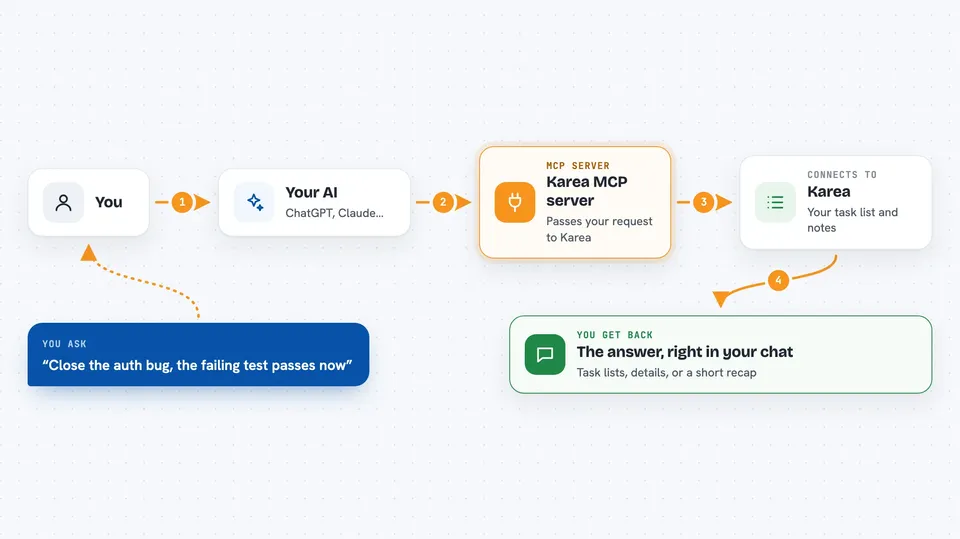
You ask your AI something about your tasks, like what you are working on or to close a task. Your AI uses this helper to talk to Karea. The helper sends the request to Karea and brings back the answer or makes the change. Then your AI tells you what happened, right there in the chat. You never have to open Karea yourself.
 Click to zoom
What you can do with it
- Create, edit, and close tasks and subtasks
- Mark a task as in progress or done
- Add open questions to a task and answer them later
- Attach links and file references to a task
- Write long notes and markdown documents on a task
- Link a task to a Jira ticket
- Get a recap of what you did over a date range
Try asking your AI
- “I'm starting on the auth bug, mark it as in progress”
- “Close the auth bug, the failing test passes now”
- “Add an open question to the login task: do we need SSO?”
- “Give me a recap of what I finished this week”
What it gives back to you
You get answers in plain chat: lists of tasks, a task's details, or a short recap of your work. When you ask for a change, it tells you what it changed, like the new status of a task. Notes and markdown documents come back as text you can read. You do not get files or downloads.
Before you start
What you need
- A Karea account
- An API key from Karea (a kind of password for apps; you get one free in your Karea settings)
- Node.js installed on your computer
- An MCP-compatible AI app like Claude Code or Cursor
Good to know
It can change and delete your tasks, notes, and projects, so check before you ask it to remove anything.
Install it with your AI
Add Karea MCP server to your AI, no technical skills needed
You don't install anything by hand. You copy one prompt, paste it into an AI that can work on your computer, and it checks, installs and connects the server for you, asking you when it needs something.
Sign in to get the install prompt
Members get a ready-made prompt that lets the Claude desktop app check Karea MCP server, install it and connect it for them, step by step. You don't need any technical skills: you copy, paste and answer a few questions. Your connected AI can also find and install any of the 4,609 MCP servers here for you.
Who it's for
Developers and technical teams who already track their work in Karea and want their AI to update it for them.





