
MCP server · Productivity
Mistral MCP server
by Swih
Turn invoices and documents into clean data, and use Mistral AI for chat, OCR, audio and images.
This is a helper that connects your AI assistant to Mistral AI, a service that can read documents, answer questions and understand images and audio. It is handy if you deal with invoices, contracts or scanned paperwork and want the details pulled out into a tidy list. You do not need to be technical to use it, but someone has to set it up once for you.
What is an MCP server? The 30-second version
On its own, your AI can only chat with you. An MCP server is a small helper program that gives your AI a new skill or a connection to another service. This one connects your AI to Mistral AI, so when you ask about an invoice or a photo, your AI can send the request to Mistral and bring the answer back to you. You just ask in normal words, and the helper does the talking behind the scenes.
What this MCP server does
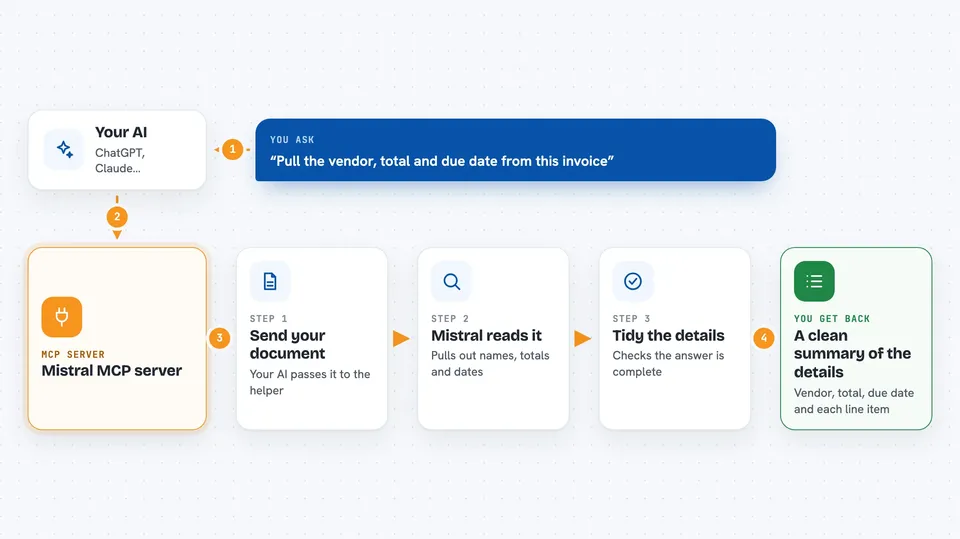
You give your AI a document, like a text invoice or a PDF, and ask it to pull out the details. Your AI passes that to this helper, which sends it to Mistral AI. Mistral reads the document and returns the vendor name, totals, line items and due dates in a structured form. The helper checks that the answer has the right shape, then hands it back to your AI, which shows it to you in the chat. For PDFs and images, it can also run OCR first to turn the picture into text.
 Click to zoom
What you can do with it
- Extract vendor, total, line items and due date from an invoice
- Read text from PDFs and images with OCR
- Ask questions about an image by giving its link or a small copy of it
- Transcribe audio recordings, with an option to tell who spoke
- Get help finishing a line of code
- Classify a document as an invoice, contract, ID or something else
- Chat with Mistral AI directly from your assistant
Try asking your AI
- “Here is a text invoice. Please pull out the vendor, the total and the due date.”
- “Read this PDF invoice and list every line item with its price.”
- “What does this image show? Here is the link.”
- “Transcribe this audio file and tell me who said what.”
What it gives back to you
You get back a readable summary and a structured version of the details, like a small table of fields with their values. For an invoice, that could be the vendor name, the total amount, the due date and each line with its quantity and price. For OCR, you get the raw text from the document. For chat or vision, you get a normal written answer in the chat.
Before you start
What you need
- A Mistral API key (a kind of password for apps; you get one from your Mistral account)
- Node.js 20 or newer and npm installed on the computer running the helper
- Enough quota on your Mistral account for the model you want to use
Good to know
It sends your documents and text to Mistral Cloud, so do not use it for anything you are not allowed to share outside your computer, and always check the extracted fields against the original before trusting them.
Install it with your AI
Add Mistral MCP server to your AI, no technical skills needed
You don't install anything by hand. You copy one prompt, paste it into an AI that can work on your computer, and it checks, installs and connects the server for you, asking you when it needs something.
Sign in to get the install prompt
Members get a ready-made prompt that lets the Claude desktop app check Mistral MCP server, install it and connect it for them, step by step. You don't need any technical skills: you copy, paste and answer a few questions. Your connected AI can also find and install any of the 4,361 MCP servers here for you.
Who it's for
Anyone who handles invoices, contracts or scanned documents and wants the details pulled out automatically, plus people who need quick OCR, audio transcription or image questions.





