
MCP server · Notes
LIFE MCP server
by TeamSafeAI
Give your AI a memory, feelings about people, and a sense of what it was working on.
LIFE is a set of helper programs that give your AI a kind of long-term memory and identity. Instead of starting every chat blank, it can remember what it learned, how it feels about people, and what it was in the middle of doing. It is handy if you use your AI for ongoing projects and want it to feel less like a stranger each time.
What is an MCP server? The 30-second version
On its own, your AI can only chat. It cannot remember yesterday or look anything up on its own. An MCP server is a small helper program that gives your AI a new skill or a connection. LIFE is a bundle of these helpers that give your AI places to store and find memories, feelings, and ongoing work, so it can pick up where it left off.
What this MCP server does
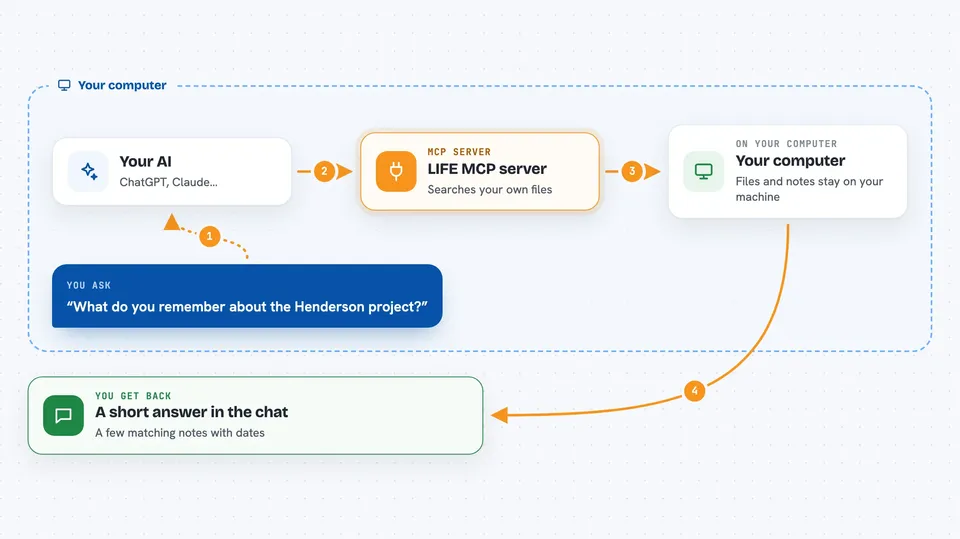
You ask your AI something, and it uses one of the LIFE helpers behind the scenes. For example, when you ask what it remembers about a project, the AI calls the memory helper, which searches a local database on your computer. When you tell it how a meeting went, the AI can save that as a memory or a feeling about a person. Then it gives you back a short answer or a list, right in the chat. Everything stays on your machine.
 Click to zoom
What you can do with it
- Save and search memories that fade if you do not revisit them
- Track how your AI feels about people, ideas, or projects
- See what work is still active and what has cooled off
- Write journal entries in the AI's own words
- Store lessons learned from past actions
- Read, write, and search files on your computer without using a terminal
- Make simple predictions that later turn into lessons
Try asking your AI
- “What do you remember about the Henderson project?”
- “Save a memory that Sarah prefers short emails on Fridays.”
- “What were we working on last time, and what is still open?”
- “Write a short journal entry about today's session.”
What it gives back to you
You get back short answers, lists, or summaries in the chat. For example, a memory search returns a few matching notes with dates. A check on relationships returns a list of people and how the AI feels about each one. When it saves something, it just tells you it saved it.
Before you start
What you need
- Python 3.8 or newer installed on your computer
- The LIFE files downloaded from GitHub
- A one-time setup run (python setup.py)
- The embedding service kept running in the background for meaning-based memory search
Good to know
It can read, write, and change files on your computer, so point it only at folders you are comfortable letting your AI touch.
Install it with your AI
Add LIFE MCP server to your AI, no technical skills needed
You don't install anything by hand. You copy one prompt, paste it into an AI that can work on your computer, and it checks, installs and connects the server for you, asking you when it needs something.
Sign in to get the install prompt
Members get a ready-made prompt that lets the Claude desktop app check LIFE MCP server, install it and connect it for them, step by step. You don't need any technical skills: you copy, paste and answer a few questions. Your connected AI can also find and install any of the 4,066 MCP servers here for you.
Who it's for
People who use their AI for long-running projects and want it to remember context, relationships, and past lessons between sessions.




