MCP server · Productivity
Writing Style Checker MCP server
Let your AI check your writing for weasel words, passive voice, hedging, and common AI writing tells.

This is a helper for your AI that looks over your writing and points out weak spots. It flags things like vague words, passive voice, filler adverbs, and phrases that show up a lot in AI-generated text. It is handy for anyone who writes emails, reports, docs, or blog posts and wants a second pair of eyes.
What is an MCP server? The 30-second version
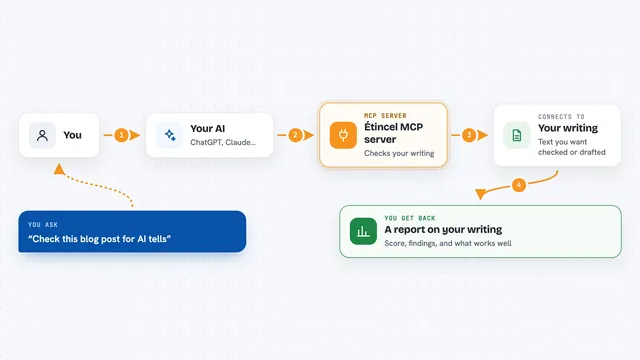
On its own, your AI can only chat with you. An MCP server is a small helper program that gives your AI a new skill or a connection to a service. This one connects your AI to the Writing Style Checker, a tool that scans text for specific writing issues. Once it is connected, you can ask your AI to check your writing and it will use this helper to do it.
What this MCP server does
You paste or type some text and ask your AI to check it. Your AI sends that text to the Writing Style Checker. The checker runs eight different scans on it: weasel words, passive voice, duplicate words, long sentences, nominalizations, hedging, filler adverbs, and AI tells. Then it sends back a list of what it found, with the exact words and where they are. Your AI shows you that list in the chat.
 Click to zoom
What you can do with it
- Check any text for weasel words like very or basically
- Find passive voice phrases in your writing
- Spot duplicate words that repeat next to each other
- Flag sentences that are too long
- Catch hedging phrases like I think or it seems
- Detect common AI writing tells like delve or rich tapestry
- Remove duplicate adjacent words and get cleaned text back
Try asking your AI
- “Check this paragraph for writing issues: The report was written very quickly and it seems like basically everyone agreed.”
- “Find all the passive voice in this email draft.”
- “Does this blog post have any AI tells in it?”
- “Fix the duplicate words in this sentence for me.”
What it gives back to you
You get back a list of issues grouped by type. Each issue shows the word or phrase, where it is in your text, and a bit of surrounding context. You also get a summary count of how many of each issue were found. If you ask it to fix duplicates, it gives you the cleaned text back.
Before you start
Good to know
This tool only points out patterns in your writing. It cannot prove who wrote something, so do not use it to accuse anyone of using AI.
Install it with your AI
Add Writing Style Checker MCP server to your AI, no technical skills needed
You don't install anything by hand. You copy one prompt, paste it into an AI that can work on your computer, and it checks, installs and connects the server for you, asking you when it needs something.
Sign in to get the install prompt
Members get a ready-made prompt that lets the Claude desktop app check Writing Style Checker MCP server, install it and connect it for them, step by step. You don't need any technical skills: you copy, paste and answer a few questions. Your connected AI can also find and install any of the 4,361 MCP servers here for you.
Who it's for
Anyone who writes for work, like editors, marketers, students, and people who write emails, reports, or documentation.