
MCP server · Productivity
MintPDF MCP server
Turn HTML, Markdown or a web page into a downloadable PDF right inside your chat.
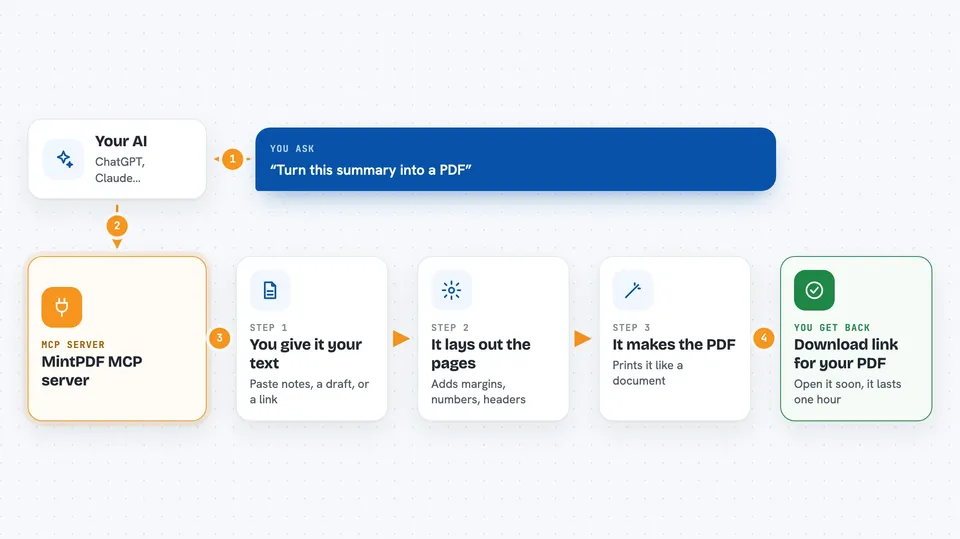
MintPDF turns text into a proper-looking PDF. You hand it HTML, Markdown or a public web address, and it sends back a link where you can grab the finished file. It is handy if you often make invoices, reports or simple documents and would rather not fight with Word layout settings.
What is an MCP server? The 30-second version
On its own, your AI assistant can only talk to you. An MCP server is a little helper program that plugs into your assistant and teaches it a new trick. Here, the helper connects your assistant to MintPDF, a service that builds PDF files. So when you say "make me a PDF", your assistant quietly passes the job to MintPDF and hands you the result.
What this MCP server does
First you tell your assistant something like "turn this summary into a PDF." Your assistant calls the generate_pdf action on this server, sending along your text. The server feeds that text to a printing engine called Chromium, applies sensible page rules, and produces a PDF file. In return, your assistant shows you a download link that stays alive for one hour. For pdf_from_url, the flow is the same, except the server fetches a public web page first and prints that instead.
 Click to zoom
What you can do with it
- Make a clean PDF from pasted notes or meeting minutes
- Convert a whole report written in Markdown into a formatted document
- Save a public blog post or article as a printable PDF
- Add page numbers, custom margins and header/footer lines to the output
- Choose paper sizes such as Letter or Legal depending on region
Try asking your AI
- “Take my weekly update below and turn it into a two-page PDF with page numbers”
- “Render this markdown draft as a letter-size landscape PDF I can attach to an email”
- “Fetch the pricing section of our website and give me a PDF version”
- “Put today's agenda into a neat PDF with my company name printed in the footer”
What it gives back to you
What lands in your chat is usually a clickable download link ending in .pdf. Behind the scenes the actual file was generated seconds earlier. Links expire after one hour, so open yours soon and save the file somewhere safe. Some setups let the raw file come through directly instead of a link.
Install it with your AI
Add MintPDF MCP server to your AI, no technical skills needed
You don't install anything by hand. You copy one prompt, paste it into an AI that can work on your computer, and it checks, installs and connects the server for you, asking you when it needs something.
Sign in to get the install prompt
Members get a ready-made prompt that lets the Claude desktop app check MintPDF MCP server, install it and connect it for them, step by step. You don't need any technical skills: you copy, paste and answer a few questions. Your connected AI can also find and install any of the 4,609 MCP servers here for you.
Who it's for
Anyone who writes reports, proposals or quick internal docs and wants a tidy PDF without wrestling with formatting software.




