
MCP server · Productivity
mdshare MCP server
by urbanmorph
Share your markdown notes as web links with permissions, comments, and version history, right from your AI chat.
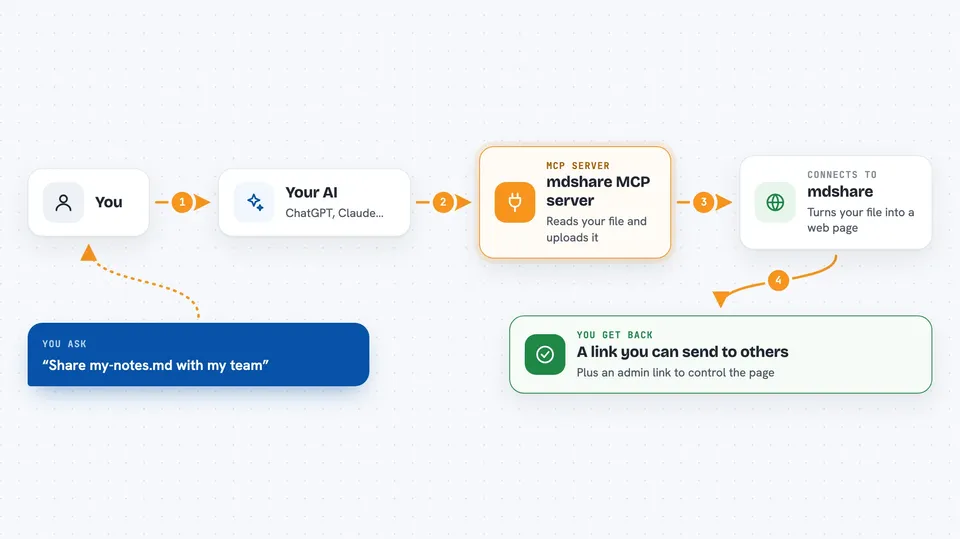
mdshare is a free service that turns a markdown file into a shareable web page with its own link. This MCP server lets your AI assistant upload and manage those markdown files for you. It is handy if you write notes, docs, or drafts in markdown and want to share them without leaving your chat.
What is an MCP server? The 30-second version
On its own, your AI can only chat with you. An MCP server is a small helper program that gives your AI a new skill or a connection to an app or service. This one connects your AI to mdshare, so when you ask it to share a markdown file, it can actually do that for you. You stay in the chat, and the helper does the work behind the scenes.
What this MCP server does
You ask your AI to share a markdown file, for example one saved on your computer. Your AI passes that request to the mdshare MCP server. The server reads the file directly from your disk and uploads it to mdshare. mdshare creates a web page for it and gives back a link you can send to others. The server can also set who is allowed to view, comment, or edit that page.
 Click to zoom
What you can do with it
- Upload a markdown file from your computer and get a shareable link
- Create links with different permission levels: view, comment, edit, or admin
- Share a draft or notes with a teammate in one step
- Manage existing shared documents from your chat
- Get the admin link so you can control the document later
Try asking your AI
- “Upload my-notes.md to mdshare and give me a link I can share with my team”
- “Share this markdown file with comment-only access”
- “Create a view-only link for the file draft.md”
- “Upload meeting-notes.md and tell me the admin URL”
What it gives back to you
You get back a link to the shared markdown page, plus the admin link if you asked for it. The link opens in a browser where anyone with permission can read, comment, or edit. If you asked for a specific permission level, the server tells you which link matches that level. Everything appears right in your chat as text you can copy.
Before you start
What you need
- A markdown file saved on your computer
- An MCP-compatible AI tool like Claude Desktop, Cursor, or Windsurf
- Node.js installed if you run the server with npx
Good to know
Sharing a document creates a public link, so make sure the file does not contain anything private before you upload it.
Install it with your AI
Add mdshare MCP server to your AI, no technical skills needed
You don't install anything by hand. You copy one prompt, paste it into an AI that can work on your computer, and it checks, installs and connects the server for you, asking you when it needs something.
Sign in to get the install prompt
Members get a ready-made prompt that lets the Claude desktop app check mdshare MCP server, install it and connect it for them, step by step. You don't need any technical skills: you copy, paste and answer a few questions. Your connected AI can also find and install any of the 4,361 MCP servers here for you.
Who it's for
Anyone who writes in markdown and needs to share drafts, notes, or docs with others, like writers, developers, students, and small teams.





