
MCP server · Email
VaEmail MCP server
by vaemail
Let your AI send emails, check if they arrived, and fix why they don't.
VaEmail is an email service made for AI agents. This MCP server plugs your AI into it, so your assistant can send emails, watch whether they arrive, and tell you what to fix when they don't. It is handy if you send order confirmations, newsletters, or any email your work depends on.
What is an MCP server? The 30-second version
On its own, your AI can only chat. An MCP server is a small helper program that gives your AI a new skill. This one connects your AI to VaEmail, an email service. Once connected, your AI can send emails and check their delivery for you, just by asking.
What this MCP server does
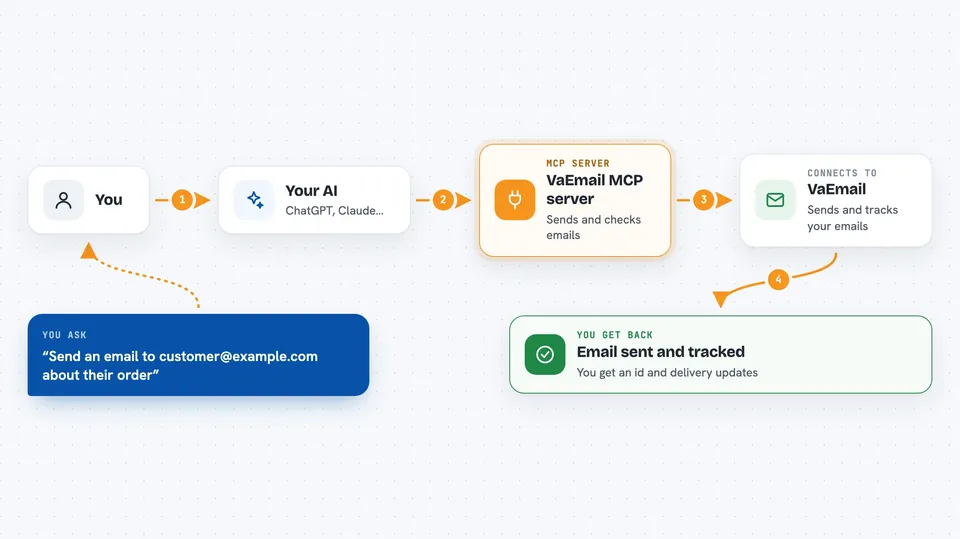
You ask your AI to send an email or check on one. Your AI uses this helper, which talks to VaEmail. VaEmail queues the email and gives back an id. Later, you can ask your AI what happened to that email, and it will look up the delivery status and any events for you.
 Click to zoom
What you can do with it
- Send a transactional email and get back an id
- Check the delivery status and events for one message
- List recent messages filtered by status, tag, or recipient
- Declare a sending domain and get the DNS records to publish
- Verify a domain and see what is authenticated
- Diagnose why your email is landing badly
- Check your quota and what is left
Try asking your AI
- “Send an email to customer@example.com with subject 'Your order is on its way' and a tracking number.”
- “What is the delivery status of message 42?”
- “List my recent messages that bounced.”
- “Why is my email not arriving? Diagnose deliverability for my domain.”
What it gives back to you
You get back plain answers in the chat: an id when you send, a status like queued or delivered, a list of recent messages, or a diagnosis with actions to fix it. For domains, you get the DNS records you still need to publish. It also tells you your quota and what is left.
Before you start
What you need
- A VaEmail account
- An API key from your VaEmail dashboard (under « Clés API »)
- Node.js 18 or newer on your computer
Good to know
It can send real emails and change your sending domains, so check what your AI is about to do before you let it run.
Install it with your AI
Add VaEmail MCP server to your AI, no technical skills needed
You don't install anything by hand. You copy one prompt, paste it into an AI that can work on your computer, and it checks, installs and connects the server for you, asking you when it needs something.
Sign in to get the install prompt
Members get a ready-made prompt that lets the Claude desktop app check VaEmail MCP server, install it and connect it for them, step by step. You don't need any technical skills: you copy, paste and answer a few questions. Your connected AI can also find and install any of the 4,609 MCP servers here for you.
Who it's for
Anyone who sends work email and wants their AI to handle sending and checking, like support teams, marketers, and developers.





