
MCP server · Research
Zero-API-Key Web Search MCP server
by wd041216-bit
Lets your AI search the web for free and check whether claims are actually supported by what it finds.
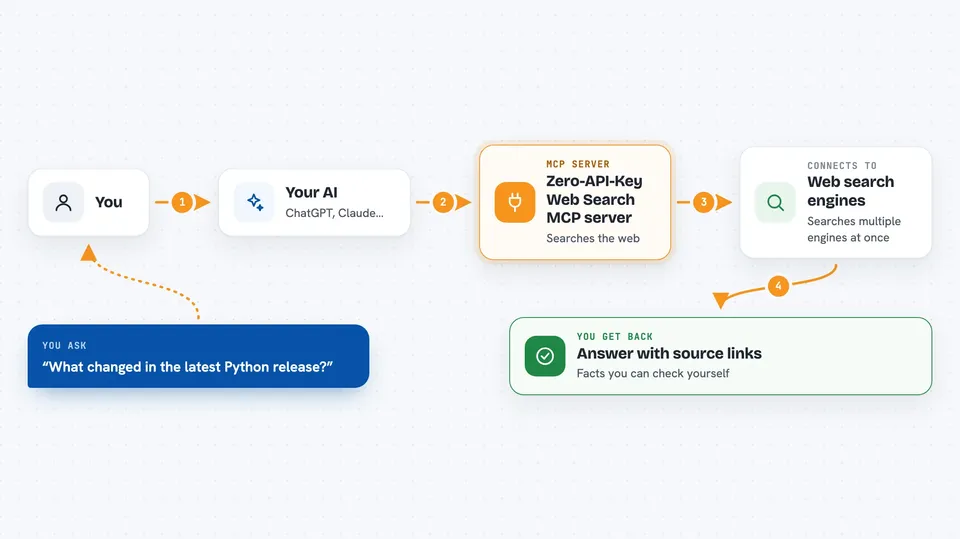
This is a small helper that gives your AI the ability to search the web without you signing up for any paid search service. It also lets your AI look at a claim and tell you whether the pages it found support it, contradict it, or say nothing about it. It is handy if you use ChatGPT or Claude for research and want answers backed by real pages instead of guesses.
What is an MCP server? The 30-second version
On its own, your AI can only chat with what it already learned during training. An MCP server is a small helper program that runs on your computer and gives your AI a new skill or a connection to something outside the chat. This one connects your AI to web search engines like DuckDuckGo, Bing, Google, Brave, Wikipedia, arXiv, YouTube and Reddit, plus a page reader. Once it is connected, your AI can look things up and read pages for you when you ask, instead of saying it cannot browse.
What this MCP server does
You ask your AI a question that needs fresh information, like what changed in a software release this week. Your AI passes your question to this helper, and the helper sends it to one or more search engines. It collects the results, drops the noisy ones, and can open the top pages to read them in full. Then it hands your AI a tidy set of findings with source links, so your AI can write you an answer that points back to where the facts came from.
 Click to zoom
What you can do with it
- Search the web across several engines at once
- Read the full text of a page instead of just the search snippet
- Check whether a statement is supported or contradicted by what it finds
- Build an evidence report with citations for a claim you give it
- List which search providers are currently available
- Clear its saved search and page cache
- Set up extra search providers when you want more coverage
Try asking your AI
- “Search the web for the latest Python 3.13 release notes and summarize what changed”
- “Is it true that Python 3.13 is the latest stable release? Check the sources and tell me”
- “Browse this page and pull out the main points: https://example.com/article”
- “Give me an evidence report on whether GPT-5 has been released, with links”
What it gives back to you
You get back a short list of results with titles, links and snippets, or a longer summary if your AI read the pages. For claim checks you get a verdict like supported, conflicted or not enough evidence, plus the sources it used. Everything appears in the chat as normal text, so you can read it and click the links yourself.
Before you start
What you need
- Python installed on your computer
- The zero-api-key-web-search package installed (the setup command is one line)
- No search API key needed for the free default setup
Good to know
The claim checker is a helpful signal, not a final verdict, and the project itself warns that its default settings are reasonable rather than perfectly tuned, so double-check anything important before you rely on it.
Install it with your AI
Add Zero-API-Key Web Search MCP server to your AI, no technical skills needed
You don't install anything by hand. You copy one prompt, paste it into an AI that can work on your computer, and it checks, installs and connects the server for you, asking you when it needs something.
Sign in to get the install prompt
Members get a ready-made prompt that lets the Claude desktop app check Zero-API-Key Web Search MCP server, install it and connect it for them, step by step. You don't need any technical skills: you copy, paste and answer a few questions. Your connected AI can also find and install any of the 4,361 MCP servers here for you.
Who it's for
Anyone who uses ChatGPT or Claude for research, fact-checking or staying up to date and wants real sources without paying for a search subscription.


