
MCP server · Analytics
SmartDB MCP server
by wenb1n-dev
Let your AI look at your databases, run SQL, check their health and suggest faster queries.
SmartDB is a helper that connects your AI assistant to your databases. It works with MySQL, PostgreSQL, Oracle, SQL Server, MariaDB and Dameng, and you can point it at more than one at the same time. It is handy if you often need to check tables, run a query or ask why a report is slow, but you would rather ask in plain words than click around a database tool.
What is an MCP server? The 30-second version
On its own, your AI can only chat. An MCP server is a small helper program that gives your AI a new skill or a connection to another app. This one is a helper for databases: you set it up with your database details once, and then your AI can reach those databases for you. When you ask a question, the AI sends the request through this helper, and the helper talks to the database.
What this MCP server does
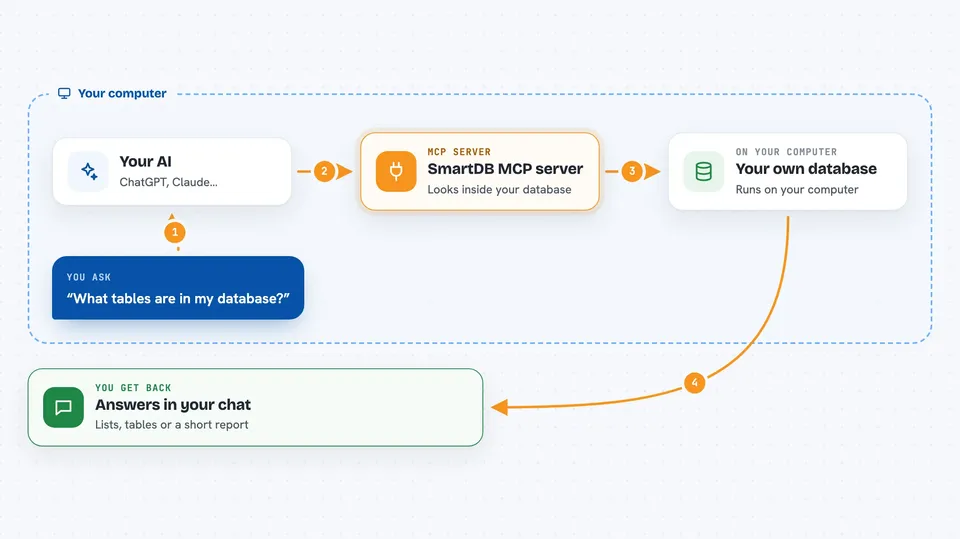
You ask your AI something like which tables exist, or what a table looks like. The AI uses this helper to send the right request to your database. The helper connects using the details you gave it, runs the query or check, and brings the answer back. You then see the result in the chat, as a list, a table, or a short explanation. For slower queries, it can also look at the plan and suggest how to make them faster.
 Click to zoom
What you can do with it
- List the tables in a database, or search for tables by name or description
- Show the structure of one or more tables
- Show the indexes on a table
- Run SQL queries and, if allowed, insert, update or delete rows
- Check the health of a database, including connections, locks and running state
- Ask for a SQL query to be written for your database type
- Get suggestions to make a slow SQL query faster
Try asking your AI
- “What tables are in my default database?”
- “Show me the structure of the orders table”
- “Run this query and show me the first 20 rows: SELECT * FROM customers WHERE country = 'DE'”
- “Why is this query slow, and how can I make it faster?”
What it gives back to you
You get answers in the chat, usually as a list of table names, a table of columns and types, or the rows from your query. Health checks come back as a short report with what looks fine and what needs attention. SQL optimization gives you suggestions in plain words, often with an example of a better query. If your setup allows changes, it will also tell you what it changed.
Before you start
What you need
- A database you can connect to, with its address, port, username and password
- Python and pip, or Docker, depending on how you want to run it
- A configuration file that lists your database connections
Good to know
If a connection is set to writer or admin, the AI can change or delete data, so use readonly for anything you only want to look at.
Install it with your AI
Add SmartDB MCP server to your AI, no technical skills needed
You don't install anything by hand. You copy one prompt, paste it into an AI that can work on your computer, and it checks, installs and connects the server for you, asking you when it needs something.
Sign in to get the install prompt
Members get a ready-made prompt that lets the Claude desktop app check SmartDB MCP server, install it and connect it for them, step by step. You don't need any technical skills: you copy, paste and answer a few questions. Your connected AI can also find and install any of the 4,609 MCP servers here for you.
Who it's for
Anyone who works with data and wants to ask questions about databases in plain words, such as analysts, support engineers, product managers and developers.


