
MCP server · Notes
Jarvis Orb memory server
by whynowlab
Give your AI a lasting memory of your projects and decisions, plus a small glowing orb that shows what it is thinking.
Jarvis Orb is a memory helper for your AI. It stores the things you tell it, like decisions, project details and preferences, so you do not have to repeat yourself in every new chat. It also comes with a small floating orb on your desktop that lights up while your AI is thinking.
What is an MCP server? The 30-second version
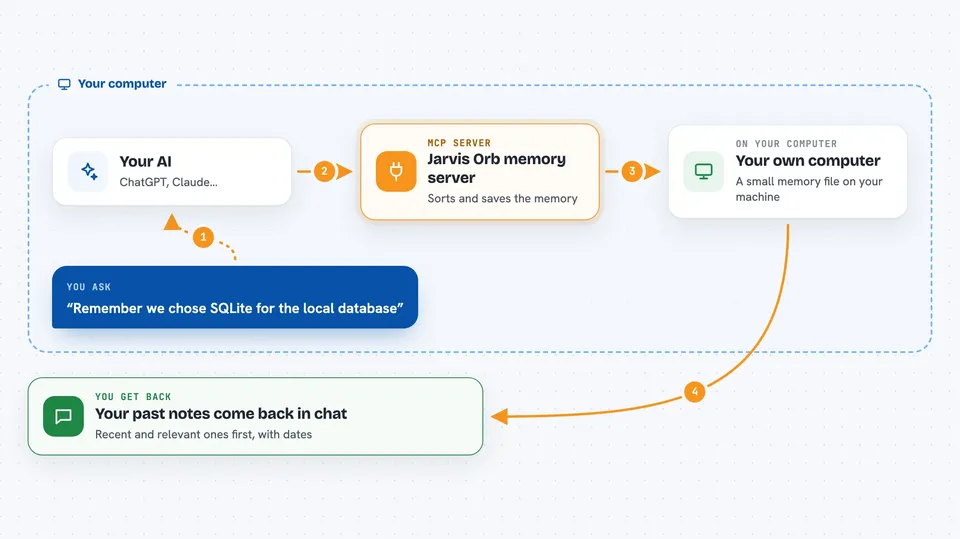
On its own, your AI can only chat. It forgets everything the moment you close the window. An MCP server is a small helper program that gives your AI a new skill. Jarvis Orb is that helper here, and its skill is remembering. It keeps a memory file on your own computer, and your AI can save things to it and look things up whenever you ask.
What this MCP server does
You tell your AI something worth remembering, like a decision or a project detail. The AI sends it to Jarvis Orb, which sorts it into one of four memory types and stores it in a small file on your computer. Later, when you ask a question, the AI searches that memory and brings back the most relevant pieces, with recent things shown first. If a new memory clashes with an older one, Jarvis Orb points that out so you can decide which one is right. If you have the orb app running, it glows and pulses on your screen while all this happens.
 Click to zoom
What you can do with it
- Save decisions, preferences and project notes so they survive between chats
- Search your past memories and get the most recent and relevant ones first
- Track projects, people and decisions as items with a history of changes
- Spot when a new decision clashes with an older one
- Link people to projects and decisions so you can see how they connect
- Watch a small orb on your desktop show what the AI is doing in real time
Try asking your AI
- “Remember that we decided to use SQLite for the local database.”
- “What did we work on last week?”
- “We should switch to Redis for caching. Does that clash with anything we decided before?”
- “Show me the current state of the billing project and how it got there.”
What it gives back to you
You get answers in the chat, written in normal sentences. For a search, that is usually a short ranked list of past memories with dates. For a project question, you get the current state plus a short history of how it changed. When you save something, you get a brief confirmation that it was stored.
Before you start
What you need
- A Mac, Windows or Linux computer (the desktop orb does not work on Linux yet)
- Python 3 installed on your computer
- Claude Code, Cursor or another tool that supports MCP servers
- About a minute to run the install command from the README
Good to know
Everything is stored in a file on your own computer, so keep in mind that anything you ask the AI to remember stays there until you delete it.
Install it with your AI
Add Jarvis Orb memory server to your AI, no technical skills needed
You don't install anything by hand. You copy one prompt, paste it into an AI that can work on your computer, and it checks, installs and connects the server for you, asking you when it needs something.
Sign in to get the install prompt
Members get a ready-made prompt that lets the Claude desktop app check Jarvis Orb memory server, install it and connect it for them, step by step. You don't need any technical skills: you copy, paste and answer a few questions. Your connected AI can also find and install any of the 4,066 MCP servers here for you.
Who it's for
People who work on long projects with an AI and are tired of re-explaining the same context every session.




