MCP server · Productivity
Road Poneglyph plan review server
Your AI reviews a plan and points out the assumptions, risks and gaps you forgot to write down.
Road Poneglyph is a small helper that makes your AI look at a plan and tell you what is missing from it. Instead of praising what you wrote, it hunts for the things you never said out loud. It is handy for anyone who has to hand a plan to other people, like project leads, product managers and team coordinators.
What is an MCP server? The 30-second version
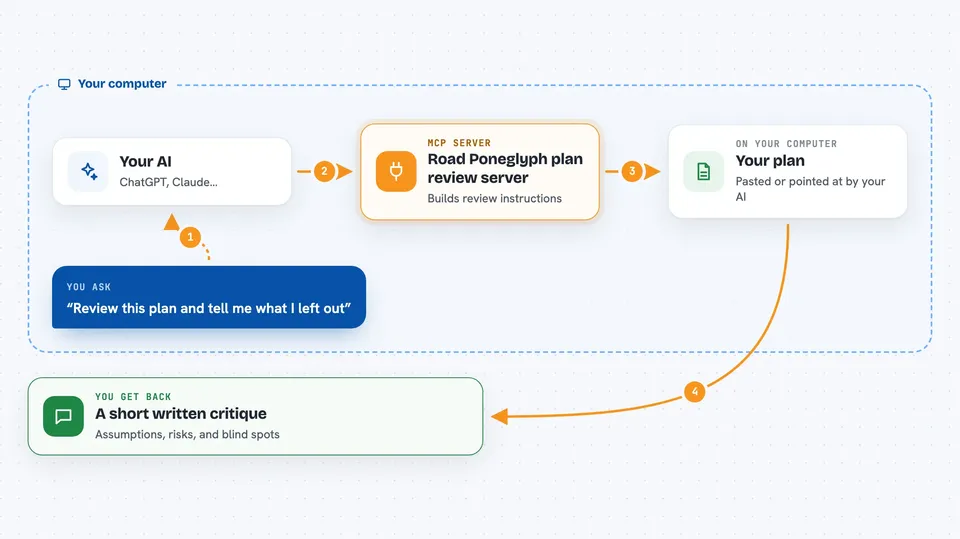
On its own, your AI can only chat about what you paste into the window. An MCP server is a small helper program that gives your AI one extra skill or one extra connection. This helper adds a plan-review skill: you give it a plan, and it walks your AI through a structured pre-mortem. It does not call any other service and it does not need a password, it just changes how your AI looks at your plan.
What this MCP server does
You paste or point your AI at a plan, and you ask it to read the poneglyph. The AI passes your plan to this helper, which hands back a carefully built set of review instructions. Your AI then follows those instructions and writes the analysis itself. You get back three short sections about what your plan quietly assumes, what technical risks it skips, and what could go wrong while you actually try to ship it.
 Click to zoom
What you can do with it
- Spot assumptions your plan treats as facts without proof
- List technical and architecture risks the plan does not mention
- Point out operational and execution blind spots
- Review plans for software projects or other kinds of projects
- Run the same review on a plan again after you fix things
- Get a short structured critique instead of a vague opinion
Try asking your AI
- “Read the poneglyph on this launch plan and tell me what I left out.”
- “Here is our migration plan. Run a pre-mortem and list the hidden risks.”
- “Review this product plan as a Marketing project and show the gaps.”
- “What assumptions is this plan quietly relying on?”
What it gives back to you
You get a written analysis in your chat, split into three parts: unstated assumptions, omitted technical risks, and execution blind spots. Each part is a short list of points your AI pulled from your plan. Nothing is saved anywhere and no files are created, it is just text in the conversation.
Before you start
What you need
- Python 3.10 or newer on your computer
- An MCP client such as Claude Desktop, Claude Code or Cursor
- A plan you want reviewed, pasted into the chat
Good to know
It only points out gaps in the plan you give it, so treat its output as a checklist to think about, not as a final verdict on your plan.
Install it with your AI
Add Road Poneglyph plan review server to your AI, no technical skills needed
You don't install anything by hand. You copy one prompt, paste it into an AI that can work on your computer, and it checks, installs and connects the server for you, asking you when it needs something.
Sign in to get the install prompt
Members get a ready-made prompt that lets the Claude desktop app check Road Poneglyph plan review server, install it and connect it for them, step by step. You don't need any technical skills: you copy, paste and answer a few questions. Your connected AI can also find and install any of the 4,609 MCP servers here for you.
Who it's for
Project leads, product managers, founders and anyone who writes plans and wants a second pair of eyes before sharing them.