
MCP server · Notes
XMemo Memory MCP server
by yonro
Give your AI a lasting memory so it remembers your facts, projects and preferences across chats.
XMemo is a memory service for AI assistants. It lets your AI save things you tell it and bring them back later, so you do not have to repeat yourself in every new chat. It is handy if you work with ChatGPT-style tools or coding assistants all day and want them to remember your context.
What is an MCP server? The 30-second version
On its own, your AI can only chat. It forgets everything the moment you close the window. An MCP server is a small helper that gives your AI a new skill, and here it connects your AI to XMemo, a memory service that belongs to you. Once it is connected, your AI can look things up in your memory or save new things there when you ask.
What this MCP server does
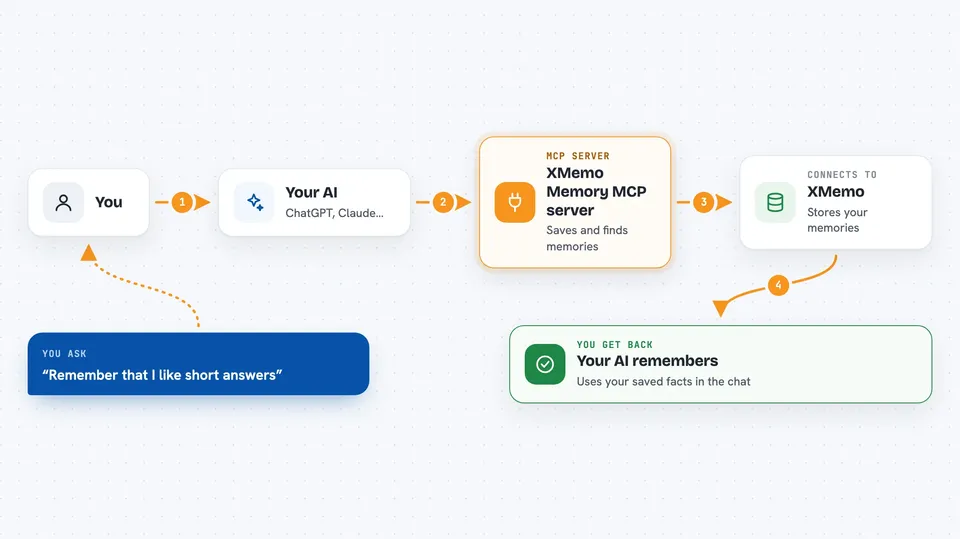
You tell your AI something worth keeping, like a preference or a project detail. Your AI passes that to XMemo through this helper. XMemo stores it under your account, with a note about which agent wrote it and which project it belongs to. Later, in a different chat or a different tool, you ask your AI about that topic, and it asks XMemo for the relevant memories and answers you. You can also search, list and remove memories when you want to tidy up.
 Click to zoom
What you can do with it
- Save facts, preferences and decisions your AI should remember
- Search your saved memories by topic or keyword
- Recall focused context for the task you are working on right now
- Keep project notes and to-do items tied to a specific project
- Resume where you left off after restarting a session
- List and remove memories you no longer need
- Share the same memory across several AI tools you use
Try asking your AI
- “Remember that I always want short answers with no jargon.”
- “What do you know about the Acme project?”
- “Save this decision: we are going with the blue design for the homepage.”
- “Recall anything I have told you about my writing style.”
What it gives back to you
You get answers in plain chat text. When your AI searches, it shows the memories it found, usually as a short list with the fact and where it came from. When it saves something, it confirms what was stored. When it recalls context, it folds that context into its reply so the answer fits your situation.
Before you start
What you need
- An XMemo account (the service is at xmemo.dev)
- Node.js 20 or later if you want to run the local helper
- A connected AI client that supports MCP, such as Claude Desktop, Cursor or Codex
Good to know
Your AI can save and delete memories in your account, so check what it stored before you rely on it, and remove anything you would rather not keep.
Install it with your AI
Add XMemo Memory MCP server to your AI, no technical skills needed
You don't install anything by hand. You copy one prompt, paste it into an AI that can work on your computer, and it checks, installs and connects the server for you, asking you when it needs something.
Sign in to get the install prompt
Members get a ready-made prompt that lets the Claude desktop app check XMemo Memory MCP server, install it and connect it for them, step by step. You don't need any technical skills: you copy, paste and answer a few questions. Your connected AI can also find and install any of the 4,066 MCP servers here for you.
Who it's for
People who use AI assistants every day for writing, planning or coding and are tired of repeating the same background details in every new chat.




