
MCP server · Notes
story-cli MCP server
Lets your AI browse, write and tidy up a folder of Markdown stories, notes or docs for you.
story-cli is a free tool that keeps a folder of Markdown files (stories, papers, notes or tutorials) neat and organised. It comes with a small helper that lets your AI assistant read and write inside that folder for you. It is handy if you write a lot and want your AI to help without copying text back and forth by hand.
What is an MCP server? The 30-second version
On its own, your AI can only chat. An MCP server is a small helper program that gives your AI a new skill or a connection to something outside the chat. This one connects your AI to a story-cli folder on your computer, so the AI can look inside it, read chapters, write new text and update the settings. You still ask in plain words; the helper does the file work behind the scenes.
What this MCP server does
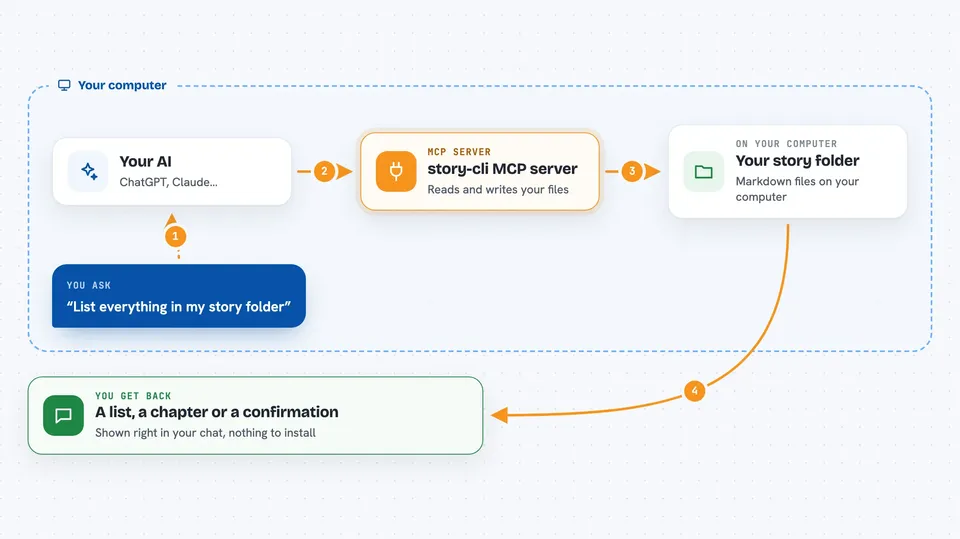
You ask your AI something like list my stories or add a new chapter. The AI passes your request to this helper, which runs the story-cli commands inside your folder. The helper reads or writes the Markdown files and the small config files that go with them. Then it sends the result back to the chat, so you see a list, a summary or a confirmation that the change was made. You never have to touch the terminal yourself.
 Click to zoom
What you can do with it
- List the stories, papers or notes in your folder
- Read a chapter or a whole entry
- Create a new story or note with a title
- Write or append text to a chapter
- Update the settings of an entry, like its type or status
- Rebuild the README files that index your content
- Check that your folder follows the rules and get word counts
Try asking your AI
- “List everything in my story folder and tell me which series are unfinished”
- “Create a new story called The Long Winter and give it a short summary”
- “Read the last chapter of my notes on interviews and suggest what to add next”
- “Rebuild the README files and tell me the total word count”
What it gives back to you
You get answers in the chat: lists of entries, the text of a chapter, word and chapter counts, or a short note that a file was created or changed. When it rebuilds READMEs, it tells you what was updated. If something is wrong in your folder, it points out the problem instead of guessing.
Before you start
What you need
- Node.js version 22 or newer on your computer
- A folder set up with story-cli (you can run story init to make one)
- An AI app that can use MCP servers, like Claude Desktop or Cursor
Good to know
This helper can read and change every file in the folder where you run it, so only point it at a folder you trust and keep a backup or use Git.
Install it with your AI
Add story-cli MCP server to your AI, no technical skills needed
You don't install anything by hand. You copy one prompt, paste it into an AI that can work on your computer, and it checks, installs and connects the server for you, asking you when it needs something.
Sign in to get the install prompt
Members get a ready-made prompt that lets the Claude desktop app check story-cli MCP server, install it and connect it for them, step by step. You don't need any technical skills: you copy, paste and answer a few questions. Your connected AI can also find and install any of the 4,361 MCP servers here for you.
Who it's for
Writers, students and researchers who keep their stories, notes or papers as Markdown files and want an AI to help manage them.



