AI tool
Aider
Aider is an AI pair programmer that edits code directly in your local git repo via the terminal. It integrates with any editor, supports multiple languages, and works with popular LLMs like GPT-4o and Claude 3.5 for seamless coding assistance.
About Aider
Aider is an AI-powered pair programming tool that integrates seamlessly into your terminal environment. It enables developers to interact with large language models (LLMs) to edit their local git repositories directly, enhancing coding workflows without leaving the command line interface.
Review
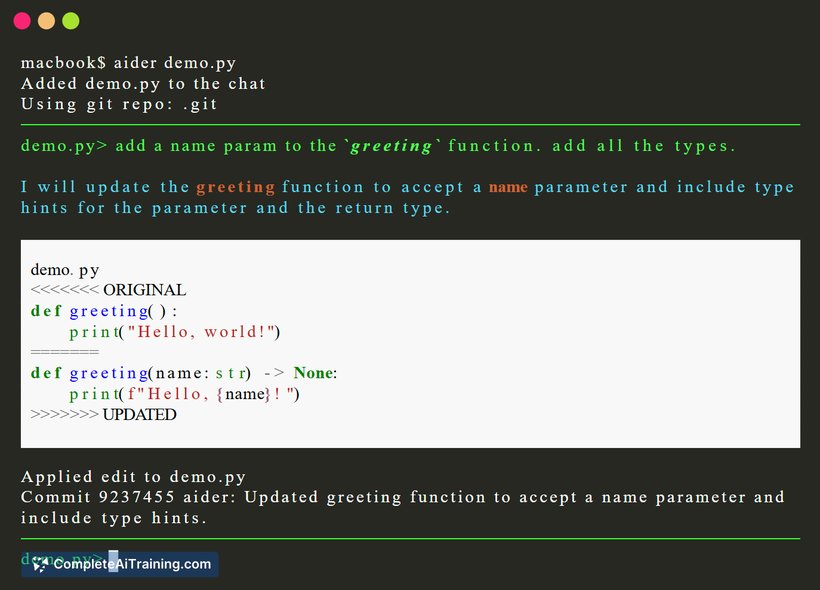
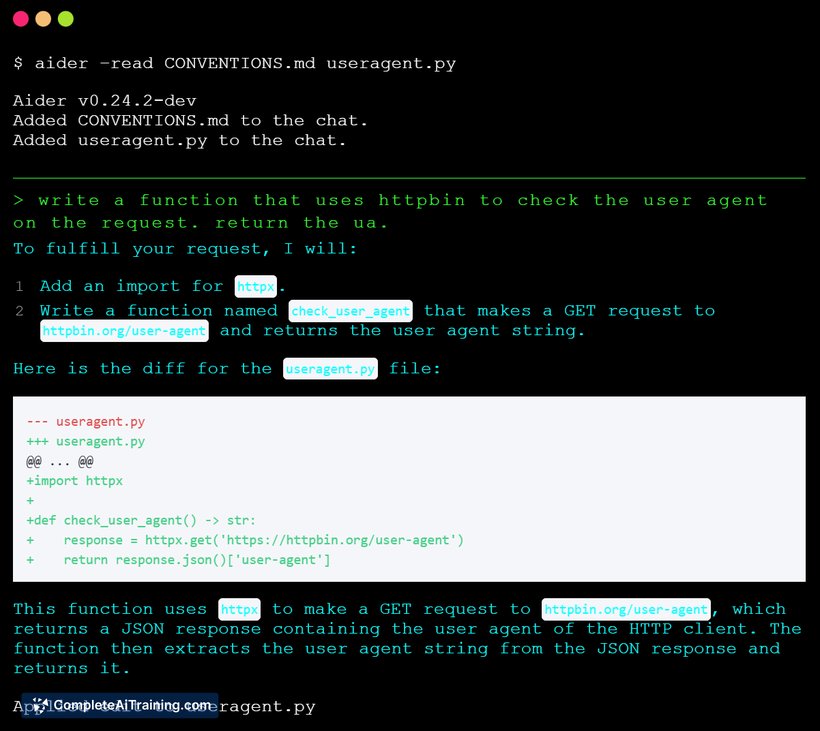

Aider brings AI-assisted code editing into the terminal, allowing developers to collaborate with AI on their existing codebases via natural language commands. Supporting multiple LLMs and programming languages, the tool streamlines coding tasks by applying AI-generated edits directly to files and automating git commits with descriptive messages.
Key Features
- Terminal-based AI pair programming that works within local git repositories.
- Compatibility with various large language models, including GPT-4o, Claude 3.5 Sonnet, DeepSeek R1, and local models.
- Allows users to specify files to edit and describe desired changes in natural language.
- Applies AI-generated code edits directly to source files and supports iterative review and refinement.
- Automatic git commits with meaningful commit messages to maintain version control hygiene.
Pricing and Value
Aider is an open-source tool available for free, making it accessible to individual developers and teams without upfront cost. Its value lies in accelerating coding processes within the terminal, reducing context switching, and improving commit quality through automated messages. This combination makes it especially suitable for developers comfortable with command-line workflows who want to integrate AI assistance without adopting separate GUI tools.
Pros
- Integrates directly into the terminal, preserving developers’ existing workflow.
- Supports multiple LLMs and programming languages, offering flexibility in AI assistance.
- Open-source and free to use, encouraging community contributions and transparency.
- Automates git commits with clear messages, helping maintain good version control practices.
- Enables iterative code editing with natural language instructions for efficient collaboration.
Cons
- Primarily suited for users comfortable working in terminal environments, which may limit accessibility for some developers.
- Currently focuses on file-level edits, with limited support for multi-file or project-wide refactoring.
- Requires familiarity with LLM-based tools and natural language prompts to maximize effectiveness.
Overall, Aider is an excellent fit for developers who prefer coding in the terminal and want a streamlined AI-assisted editing experience integrated into their local git workflow. It is particularly useful for programmers looking to improve productivity without leaving the command line or adopting complex new interfaces. Teams seeking open-source solutions for AI pair programming may also find Aider valuable as it continues to evolve.
Jobs Aider suits
We checked Aider against 500+ jobs; these get the most out of it.
Alternatives to Aider
Other tools that do the same main job. Our AI compared Aider with similar tools and kept the ones you could use instead.