
MCP server · Notes
NocturnusAI MCP server
by Auctalis
Keeps your AI's memory short and tidy by remembering only the facts that changed since last time.
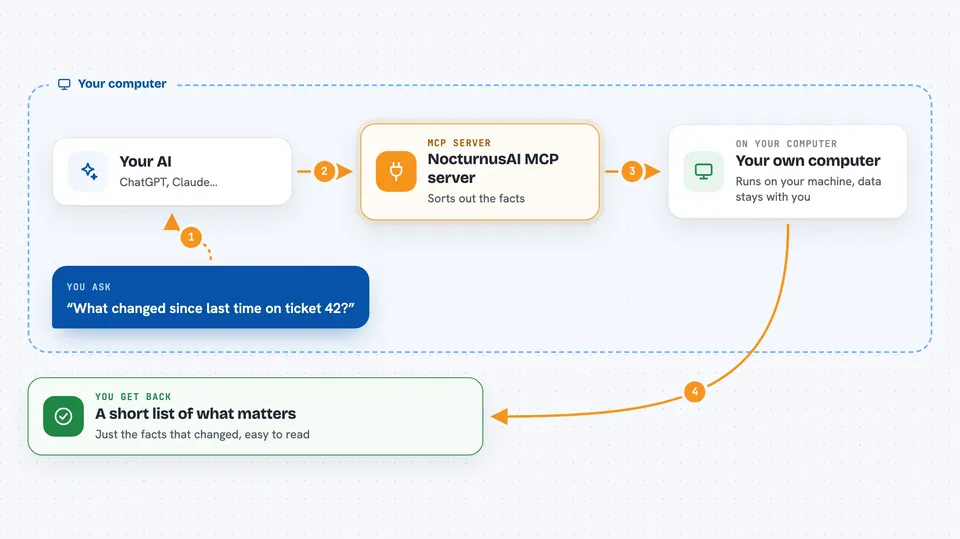
NocturnusAI is a helper that sits between your AI and a long conversation. Instead of re-reading the whole chat every time you ask something, it keeps a neat list of facts and only sends your AI what is new or different. It is handy if you work with long chats, tickets, or support threads where the history gets huge and expensive.
What is an MCP server? The 30-second version
On its own, your AI can only chat with what you paste in front of it. An MCP server is a small helper program that gives your AI a new skill or a connection to another tool. This one connects your AI to NocturnusAI, a memory and reasoning service that runs on your own computer. When you ask something, your AI can call this helper to fetch a short, cleaned-up summary of the important facts instead of the whole history.
What this MCP server does
You type a message to your AI as usual. Your AI passes the new turns of the conversation to this helper. The helper reads them, pulls out the plain facts (like who the customer is, what plan they are on, what was promised), and works out which facts matter for your current question. It then hands back only the facts that changed since last time. Your AI uses that short list to answer you, so the chat stays small and quick.
 Click to zoom
What you can do with it
- Turn a long chat history into a short list of facts
- Get only the facts that changed since the last turn
- Ask for facts tied to a specific goal, like whether a customer qualifies for something
- Keep separate memory for different tickets or sessions
- Clear a session when a thread is finished
- Run it on your own machine so your data stays with you
Try asking your AI
- “Summarize what we know about ticket 42 and only send me what changed since last time.”
- “Based on this support thread, is Acme Corp eligible for SLA credits?”
- “Start a new memory session called renewal-q3 and track facts about that deal.”
- “Clear the memory for ticket 42, we are done with it.”
What it gives back to you
You get back a short briefing: a list of facts, plus a small set of added and removed items compared to the previous turn. In the chat it looks like a tidy bullet list of what matters right now, not a wall of past messages. If you ask for a goal, you get the facts connected to that goal. Everything is plain text you can read.
Before you start
What you need
- The NocturnusAI server running on your computer (Docker is the easiest way)
- A free Ollama setup if you want it to read normal sentences (without it, you must write facts in a strict short form)
- The Claude desktop app or another app that supports MCP servers
Good to know
It only reasons about the facts you give it, so if the facts are wrong the answers will be wrong, and it should not be used for unsupervised medical, legal, financial, or safety decisions.
Install it with your AI
Add NocturnusAI MCP server to your AI, no technical skills needed
You don't install anything by hand. You copy one prompt, paste it into an AI that can work on your computer, and it checks, installs and connects the server for you, asking you when it needs something.
Sign in to get the install prompt
Members get a ready-made prompt that lets the Claude desktop app check NocturnusAI MCP server, install it and connect it for them, step by step. You don't need any technical skills: you copy, paste and answer a few questions. Your connected AI can also find and install any of the 4,361 MCP servers here for you.
Who it's for
People who work with long support tickets, chat threads, or customer conversations and want their AI to stay fast and focused.





