
MCP server · Notes
Beever Atlas MCP server
by Beever-AI
Ask your AI about your team's Slack, Discord, Teams or Mattermost chats and get answers with links to the original messages.
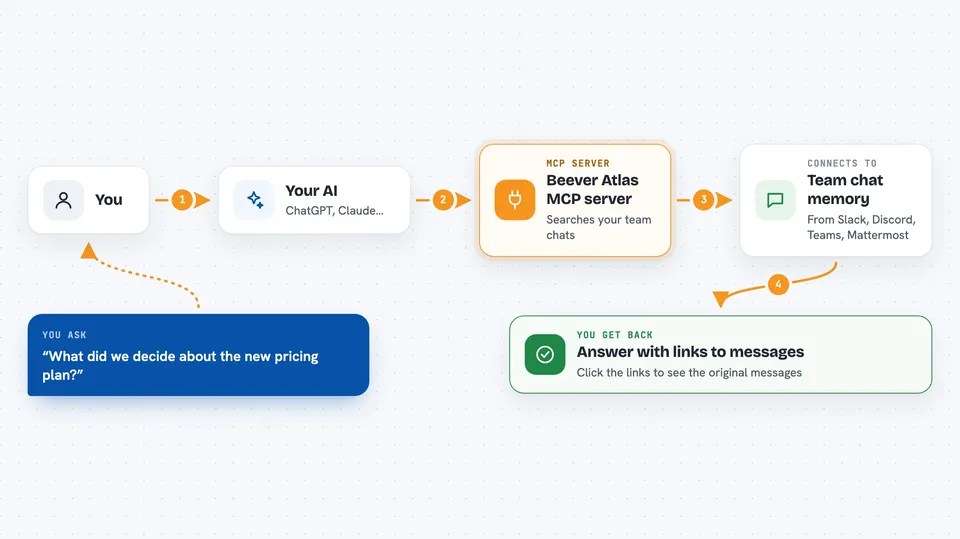
Beever Atlas is a tool that reads your team's chat messages and slowly builds a tidy wiki out of them, with topic pages, people, and decisions. This page is about its MCP server, which lets your AI assistant ask that wiki questions for you. It is handy if your team talks a lot in chat and you keep losing track of what was decided.
What is an MCP server? The 30-second version
On its own, your AI can only chat with you using what it already knows. An MCP server is a small helper program that gives your AI a new skill or a connection to another app. This one connects your AI to Beever Atlas, which is your team's chat knowledge base. So when you ask a question, your AI can look things up in your synced chats and wiki, and answer you with real information from your team.
What this MCP server does
You ask your AI a question in plain words, like what your team decided about a project. Your AI sends that question to the Beever Atlas MCP server. The server searches the wiki and chat memory that Beever Atlas has already built from your Slack, Discord, Teams or Mattermost messages. It sends back an answer with citations pointing to the original messages. Your AI then shows you that answer in the chat, so you can read it and check the sources.
 Click to zoom
What you can do with it
- Ask what your team decided about a topic and get the answer with links to the messages
- Find out who knows about a subject by searching the people mentioned in chats
- Read the auto-generated wiki page for a channel without opening the dashboard
- Search across synced channels for a keyword or phrase
- Look up when something was first discussed or last mentioned
- Get a short summary of a topic instead of scrolling months of chat history
Try asking your AI
- “What did we decide about the new pricing plan?”
- “Who on the team has worked on the mobile app?”
- “Summarise what was discussed in the engineering channel last week”
- “When did we first talk about switching databases?”
What it gives back to you
You get a written answer in your chat, in normal sentences. The answer usually includes citations, which are links back to the original Slack, Discord, Teams or Mattermost messages it came from. Sometimes you also get a short list of related topics or people. You can click the citations to check the source yourself.
Before you start
What you need
- Beever Atlas installed and running (it runs on your own computer or server using Docker)
- At least one chat workspace connected and synced in Beever Atlas, such as Slack or Discord
- A Google API key and a Jina API key, both free to get, for Beever Atlas itself to work
- An AI app that supports MCP, such as Claude Code or Cursor
Good to know
The MCP server can read your team's chat history and wiki, so only connect it to workspaces you are allowed to share with your AI tool.
Install it with your AI
Add Beever Atlas MCP server to your AI, no technical skills needed
You don't install anything by hand. You copy one prompt, paste it into an AI that can work on your computer, and it checks, installs and connects the server for you, asking you when it needs something.
Sign in to get the install prompt
Members get a ready-made prompt that lets the Claude desktop app check Beever Atlas MCP server, install it and connect it for them, step by step. You don't need any technical skills: you copy, paste and answer a few questions. Your connected AI can also find and install any of the 4,609 MCP servers here for you.
Who it's for
Teams that live in Slack, Discord, Teams or Mattermost and want a quick way to ask their AI what was said, decided, or who knows what.





