
MCP server · Productivity
Quarterback MCP server
Let your AI rank your tasks across all your projects and plan your day.
Quarterback is a free helper that helps you decide what to work on when you have many projects at once. It scores your tasks by impact, urgency, strategy, effort, and quick-win value, then suggests a plan for your day. It is handy if you juggle several projects and want your AI to help you choose, not just make to-do lists.
What is an MCP server? The 30-second version
On its own, your AI can only chat. An MCP server is a small helper program that gives your AI a new skill or a connection to an app or service. This one connects your AI to Quarterback, a task and project tool that runs on your own computer. Once connected, your AI can ask Quarterback about your tasks and projects, and Quarterback answers with real priorities and plans.
What this MCP server does
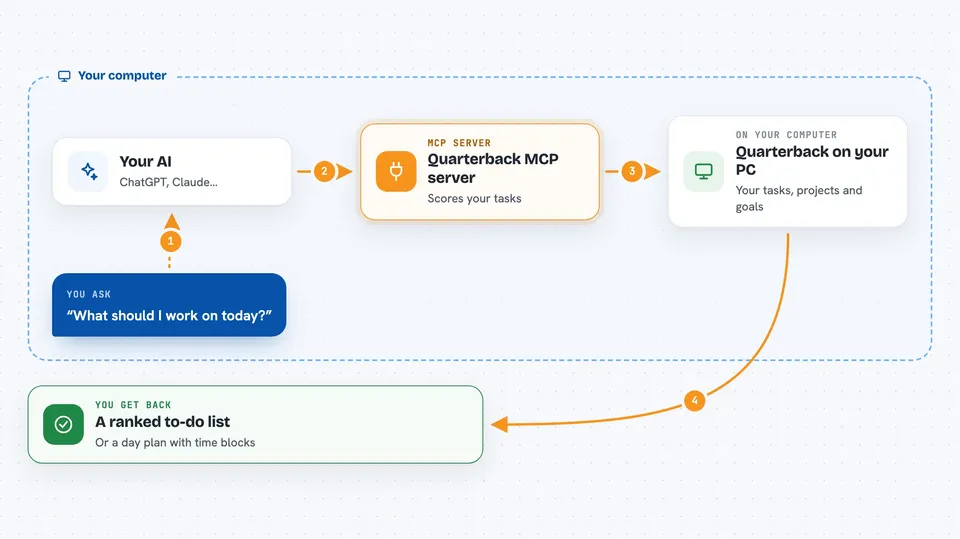
You ask your AI something like what should I work on today. Your AI sends that question to the Quarterback helper running on your computer. Quarterback looks at your tasks, projects, goals, and constraints, then scores each task with its five-factor engine. It sends back a ranked list, quick wins, conflicts, or a day plan that fits your working hours. Your AI shows you the answer in the chat.
 Click to zoom
What you can do with it
- Rank your tasks across all your projects by priority
- Find quick wins with high impact and low effort
- Spot scheduling conflicts between projects
- Plan your day around working hours, lunch, and buffer time
- Add, update, and track tasks and projects
- Analyze an article or book against your goals and constraints
- Mark tasks for an agent to pick up and run
Try asking your AI
- “What should I work on today?”
- “Show me my top priorities for this week across all projects”
- “Find me some quick wins I can finish in an hour”
- “Plan my day around my meetings and lunch break”
- “Are there any conflicts between my projects this week?”
What it gives back to you
You get back a ranked list of tasks with scores and reasons, or a day plan with time blocks. It can also return quick wins, conflict warnings, project summaries, and analysis of an article against your goals. Everything appears as normal text in your chat, and any changes you approve are saved to your local Quarterback data.
Before you start
What you need
- Python installed on your computer
- The Quarterback package installed with pip
- A Quarterback setup with your projects, goals, and tasks (the setup wizard walks you through it)
- An MCP-compatible AI client like Claude Desktop or Claude Code
Good to know
It can add, change, and delete your tasks and projects, so review before you approve big changes.
Install it with your AI
Add Quarterback MCP server to your AI, no technical skills needed
You don't install anything by hand. You copy one prompt, paste it into an AI that can work on your computer, and it checks, installs and connects the server for you, asking you when it needs something.
Sign in to get the install prompt
Members get a ready-made prompt that lets the Claude desktop app check Quarterback MCP server, install it and connect it for them, step by step. You don't need any technical skills: you copy, paste and answer a few questions. Your connected AI can also find and install any of the 4,361 MCP servers here for you.
Who it's for
People who juggle several projects at once, like freelancers, founders, consultants, and busy managers who want help deciding what to do next.





