
MCP server · Notes
Lore MCP server
by davidgut1982
Give your AI a lasting memory of how your systems work, so it stops forgetting between sessions.
Lore is a memory helper for your AI. It keeps a knowledge base, investigation notes, and a journal, so your AI can look things up instead of starting from zero every time. It is handy for engineers and small teams who keep re-explaining the same things to their AI.
What is an MCP server? The 30-second version
On its own, your AI can only chat. It forgets everything when the session ends. An MCP server is a small helper program that gives your AI a new skill or a connection to a service. This one connects your AI to Lore, a place where your team's notes and findings are stored, so your AI can read them and add to them when you ask.
What this MCP server does
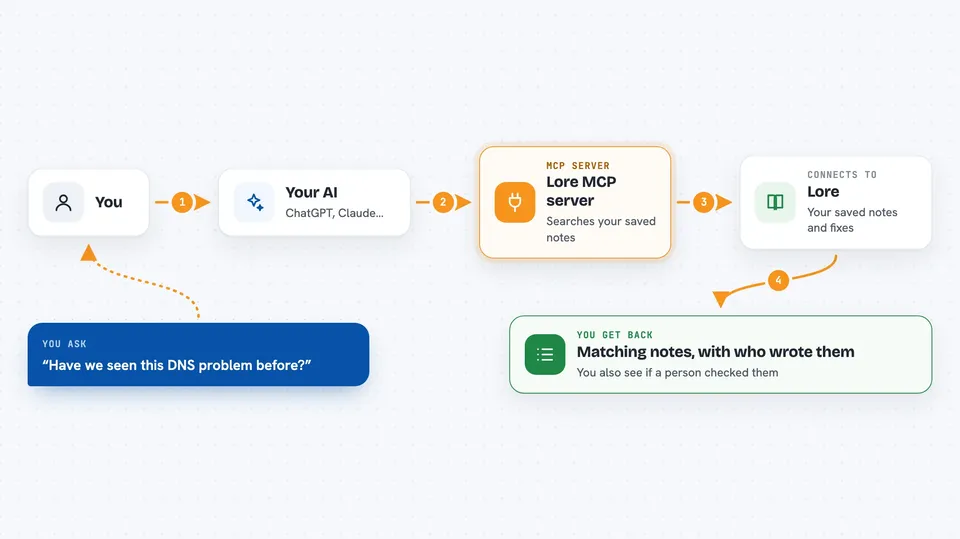
You ask your AI something like how your setup works or whether you have seen this problem before. The AI uses this helper to search Lore. Lore looks through your saved entries, investigation notes, and journal, and finds the closest matches. The AI then tells you what it found, and who wrote it and whether a human checked it. If you want, the AI can also save new notes back into Lore for next time.
 Click to zoom
What you can do with it
- Save a runbook or a gotcha into the knowledge base
- Search your notes by meaning, not just exact words
- Open an investigation and log what you tried
- Add a milestone or decision to the journal
- See who wrote an entry and whether it was verified
- Pull in a markdown file or a folder of notes
- Search across notes, investigations, and journal at once
Try asking your AI
- “Search Lore for anything about DNS problems in containers”
- “Save this fix as a knowledge base entry, author me, unverified”
- “Open an investigation called slow database after deploy and log what we tried”
- “What decisions did we journal about the database last month”
What it gives back to you
You get back a short list of matching entries with their titles, who wrote them, and whether they are verified. You can also ask for the full text of one entry. When you save something, the AI tells you it was added and gives you the ID. Everything shows up right in the chat as plain text.
Before you start
What you need
- Python installed on your computer
- The lore-knowledge-mcp package installed with pip
- An MCP client like Claude Desktop or Claude Code
Good to know
It can change or delete saved notes, and if you run the HTTP server on your network without setting LORE_API_KEY, anyone who can reach it can read and write your knowledge base.
Install it with your AI
Add Lore MCP server to your AI, no technical skills needed
You don't install anything by hand. You copy one prompt, paste it into an AI that can work on your computer, and it checks, installs and connects the server for you, asking you when it needs something.
Sign in to get the install prompt
Members get a ready-made prompt that lets the Claude desktop app check Lore MCP server, install it and connect it for them, step by step. You don't need any technical skills: you copy, paste and answer a few questions. Your connected AI can also find and install any of the 4,609 MCP servers here for you.
Who it's for
Engineers, on-call teams, and small technical teams who want their AI to remember how their systems work.





