
MCP server · Notes
EVC Team Relay MCP server
by entire-vc
Lets your AI read and write notes in your Obsidian vault through Team Relay.
This is a small helper that connects your AI assistant to your Obsidian notes, using a service called Team Relay. Once it is set up, you can ask your AI to look through your notes or add a new one, and the changes show up in Obsidian. It is handy if you keep your work notes in Obsidian and want your AI to work with them directly.
What is an MCP server? The 30-second version
On its own, your AI can only chat with you. An MCP server is a small helper program that gives your AI a new skill or a connection to an app. This one connects your AI to Team Relay, which is the service that syncs your Obsidian vault. So when you ask about a note, your AI can actually go and read it for you.
What this MCP server does
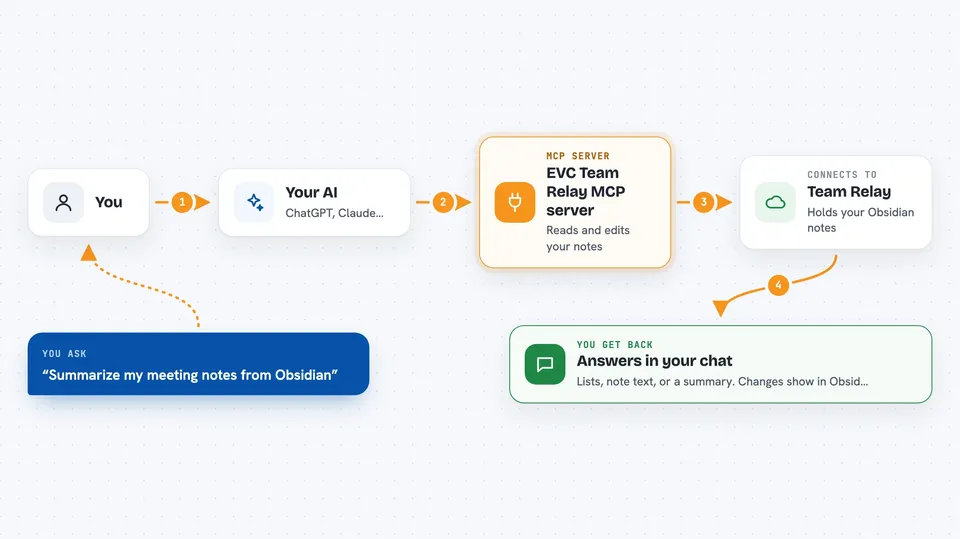
You ask your AI something about your notes, like reading a file or listing what is in a folder. Your AI passes that request to this helper program. The helper talks to your Team Relay server, which holds your Obsidian notes. The answer comes back into your chat, and any change you make through the AI appears in Obsidian too.
 Click to zoom
What you can do with it
- List the shares and folders your account can reach
- Read a note by its path and summarize it for you
- Create a new note or update an existing one
- Search across your notes when you use email and password login
- Pull the contents of a note into your chat to work with
Try asking your AI
- “List my Team Relay shares and tell me what is in my main notes folder.”
- “Read the note called meeting-notes.md and give me a short summary.”
- “Create a new note in my projects folder called weekly-update.md with these bullet points.”
- “Update my ideas.md note and add this paragraph at the end.”
What it gives back to you
You get answers in your chat: lists of files, the text of a note, or a short summary your AI writes from it. When you ask it to create or update a note, it tells you it did so, and the note shows up in Obsidian. You do not get files downloaded to your computer, just the content in the conversation.
Before you start
What you need
- A running Team Relay instance (self-hosted or hosted)
- A user account on the Relay control plane
- An agent key from the Obsidian plugin settings, or an email and password
- Python 3.10 or newer with uv or pip
Good to know
It can create and change notes in your Obsidian vault, so check what it wrote before you rely on it, and keep in mind that deleting notes is not supported yet.
Install it with your AI
Add EVC Team Relay MCP server to your AI, no technical skills needed
You don't install anything by hand. You copy one prompt, paste it into an AI that can work on your computer, and it checks, installs and connects the server for you, asking you when it needs something.
Sign in to get the install prompt
Members get a ready-made prompt that lets the Claude desktop app check EVC Team Relay MCP server, install it and connect it for them, step by step. You don't need any technical skills: you copy, paste and answer a few questions. Your connected AI can also find and install any of the 4,609 MCP servers here for you.
Who it's for
People who keep their notes in Obsidian and want their AI assistant to read and update those notes for them.



