
MCP server · Productivity
Feishu / Lark MCP server
by EthanQC
Let your AI send Feishu messages as you, and read chats, docs, tables, calendars and tasks.
This is a helper that connects your AI assistant to Feishu (also called Lark). Once it is set up, your AI can send messages that look like they came from you, not from a bot, and also read your group chats, documents, tables, calendars and tasks. It is handy if you use Feishu at work and want your AI to do small chores there for you.
What is an MCP server? The 30-second version
On its own, your AI can only chat with you. An MCP server is a small helper program that gives your AI a new skill or a connection to an app. This one connects your AI to Feishu, so it can look things up or do things there when you ask. You set it up once, and then you just talk to your AI in plain words.
What this MCP server does
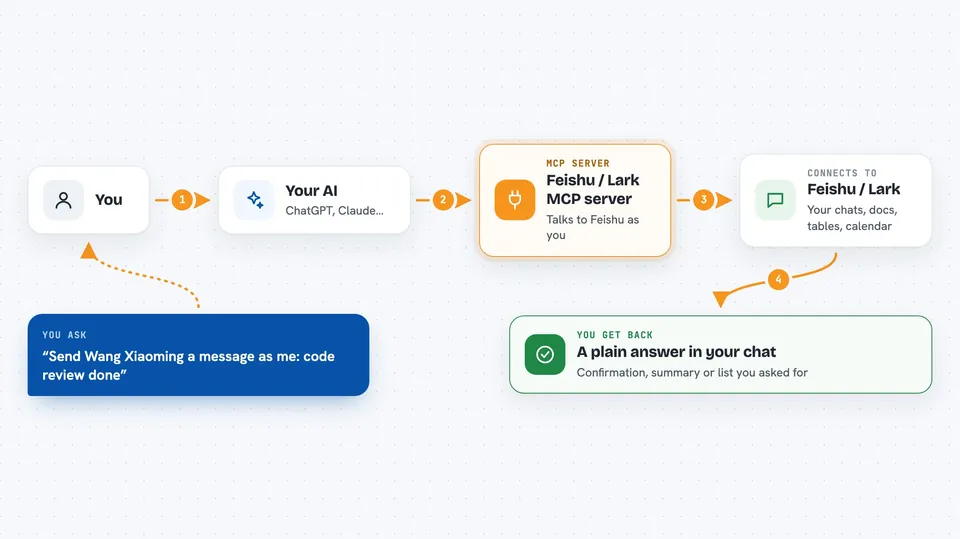
You type a request in your AI chat, like asking it to message a colleague or summarise a group. Your AI passes that request to this helper program. The helper then talks to Feishu using your own account details, which you set up beforehand. Feishu sends back the result, and the helper hands it to your AI. Your AI then shows you the answer or confirms what it did.
 Click to zoom
What you can do with it
- Send a Feishu message to a person or a group as yourself
- Read recent messages in a group chat or a private chat
- Summarise a busy group and post a digest
- Search your contacts and groups by name
- Read and create Feishu documents
- Work with Bitable tables, wiki pages and Drive folders
- Check your calendar, tasks and OKR progress
Try asking your AI
- “Send Wang Xiaoming a message as me: I finished the code review, there are 3 small notes”
- “Summarise what the Engineering group discussed after 9am today and post it to the Daily channel”
- “Find the document called Q3 planning and give me a short summary”
- “What is on my calendar tomorrow afternoon”
What it gives back to you
You get back plain answers in the chat: a confirmation that a message was sent, a summary of a conversation, a list of documents or contacts, or details from a table or calendar. Sometimes it shows the exact text it sent so you can check. If something failed, it tells you what went wrong in everyday words.
Before you start
What you need
- A Feishu (or Lark) account
- Node.js version 18 or newer on your computer
- A Feishu app ID and app secret from a self-built app (for most features)
- A Feishu login cookie from your browser (only for sending messages as yourself)
Good to know
It can send messages and change or create things in your Feishu account, so check what your AI is about to do before you say yes, and keep your login cookie private.
Install it with your AI
Add Feishu / Lark MCP server to your AI, no technical skills needed
You don't install anything by hand. You copy one prompt, paste it into an AI that can work on your computer, and it checks, installs and connects the server for you, asking you when it needs something.
Sign in to get the install prompt
Members get a ready-made prompt that lets the Claude desktop app check Feishu / Lark MCP server, install it and connect it for them, step by step. You don't need any technical skills: you copy, paste and answer a few questions. Your connected AI can also find and install any of the 4,361 MCP servers here for you.
Who it's for
Office workers who use Feishu at work and want their AI to handle small messaging, reading and lookup tasks for them.





