
MCP server · API
ForgeMesh Utility Grid MCP server
Lets your AI search and use 400+ small utility APIs, paying a few cents per call in crypto.
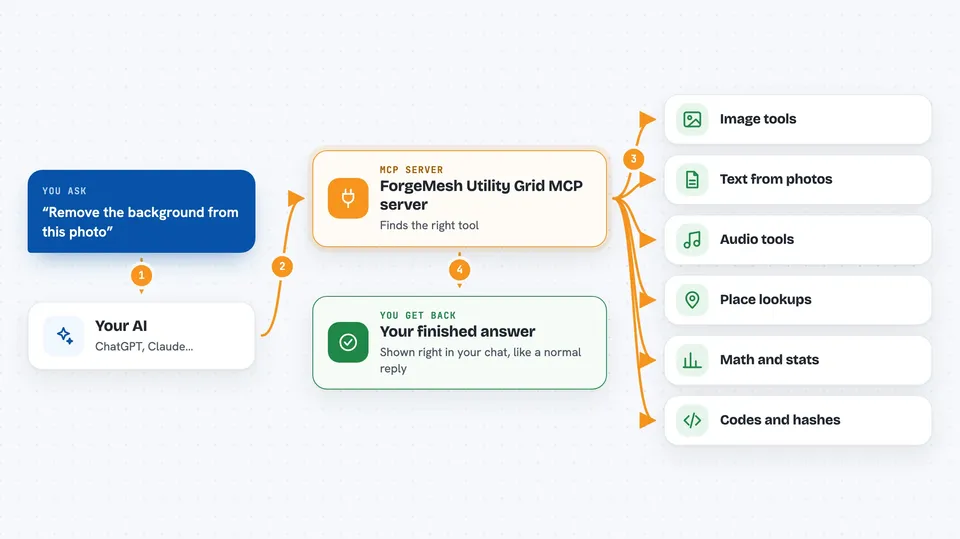
This is a helper that gives your AI access to a big catalog of small online tools: reading text off images, removing image backgrounds, converting audio, looking up zip codes, doing math, and much more. It is handy if you often need a quick one-off utility and don't want to sign up for a dozen different websites. You browse the catalog for free, and you only pay a tiny amount when you actually run one of the tools.
What is an MCP server? The 30-second version
On its own, your AI can only chat with you. An MCP server is a small helper program that gives your AI a new skill or a connection to an outside service. This one connects your AI to the ForgeMesh Utility Grid, a collection of over 400 small web tools. Once it is set up, you can just ask your AI in plain words, and it will look up the right tool and run it for you.
What this MCP server does
You ask your AI for something, like removing the background from a photo or reading the text in a scanned receipt. The AI uses this helper to search the ForgeMesh catalog and find the matching tool. The helper then calls that tool on the web, handles a small crypto payment in the background, and brings the result back. You see the answer or the finished file right in your chat. Browsing and searching the catalog is always free; only running a tool costs a little.
 Click to zoom
What you can do with it
- Remove the background from an image
- Read text out of a photo or scanned document (OCR)
- Convert or transcribe audio files
- Look up zip codes, airports, country info, or holidays
- Do statistics, matrix math, or geometry calculations
- Generate QR codes, hashes, or UUIDs
- Check the weather or sun and moon times for a place
Try asking your AI
- “Remove the background from this image: https://example.com/photo.jpg”
- “Read the text in this scanned receipt and give it to me as plain text”
- “What is the weather forecast for zip code 10001?”
- “Convert this audio file to mp3”
- “Make me a QR code for https://mycompany.com”
What it gives back to you
You get back whatever the chosen tool produces: a cleaned-up image, a block of extracted text, a number, a short list, or a small file. The AI shows it to you in the chat, sometimes as a link to the result. If a payment was made, the response also includes a small note about the cost. Everything looks like a normal reply from your AI.
Before you start
What you need
- The Claude desktop app or another app that supports MCP servers
- Node.js installed on your computer (the free software that runs the helper)
- A crypto wallet with a small amount of USDC on the Base network, only if you want to run the paid tools (browsing is free without one)
- The private key for that wallet, which you paste into the setup as WALLET_PRIVATE_KEY
Good to know
The paid tools spend real money from your wallet (a few cents each), so keep an eye on the prices and only add a wallet with a small balance.
Install it with your AI
Add ForgeMesh Utility Grid MCP server to your AI, no technical skills needed
You don't install anything by hand. You copy one prompt, paste it into an AI that can work on your computer, and it checks, installs and connects the server for you, asking you when it needs something.
Sign in to get the install prompt
Members get a ready-made prompt that lets the Claude desktop app check ForgeMesh Utility Grid MCP server, install it and connect it for them, step by step. You don't need any technical skills: you copy, paste and answer a few questions. Your connected AI can also find and install any of the 4,609 MCP servers here for you.
Who it's for
Anyone who often needs quick one-off utilities like OCR, image cleanup, audio conversion, or lookups and wants their AI to handle it without opening ten different websites.


