
MCP server · Notes
NoteDiscovery MCP server
by gamosoft
Let your AI search, read, create and tag notes in your own self-hosted NoteDiscovery knowledge base.
NoteDiscovery is a note-taking app you run yourself, where your notes are plain text files on your own computer or server. It comes with a small helper that lets your AI assistant work with those notes directly. It is handy if you keep a personal wiki or a second brain and want your AI to look things up or write things down for you.
What is an MCP server? The 30-second version
On its own, your AI can only chat with you. An MCP server is a small helper program that gives your AI a new skill or a connection to an app, here to your NoteDiscovery notes. Once it is connected, your AI can look things up in your knowledge base or make changes there when you ask. You do not need to understand how it works under the hood. You just talk to your AI like normal.
What this MCP server does
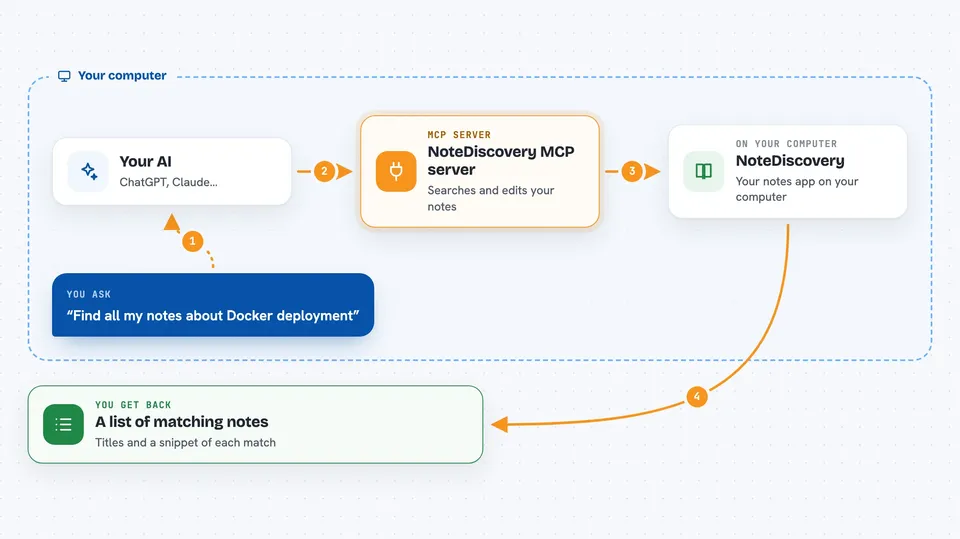
You ask your AI something about your notes, like finding everything about a project. The AI passes that request to this helper program. The helper talks to your NoteDiscovery app, which holds your markdown files. NoteDiscovery searches or changes the notes and sends the answer back. Your AI then shows you the result in the chat, as a list, a summary or a confirmation that it made the change.
 Click to zoom
What you can do with it
- Search your notes for a word or topic
- Create a new note from a request
- Edit or append text to an existing note
- List notes by tag, like urgent or project
- Move notes into folders to organize them
- Show how your notes are connected in the knowledge graph
- Read a note and summarize it for you
Try asking your AI
- “Find all my notes about Docker deployment”
- “Create a meeting notes template for tomorrow”
- “Add this thought to my daily journal”
- “List all notes tagged with urgent”
What it gives back to you
You get answers in plain chat: lists of matching notes, short summaries, or the text of a note you asked for. When the AI creates or changes something, it tells you what it did, like the name of the new note or the folder it moved things to. If it searched, you see the titles and a snippet of each match. Everything stays in the conversation, so you can ask follow-up questions.
Before you start
What you need
- A NoteDiscovery instance running and reachable, usually at http://localhost:8000
- Docker installed if you use the one-line setup from the README
- An MCP-compatible AI tool like Claude Desktop or Cursor
Good to know
This helper can change your notes, so it can create, edit, move or overwrite files in your knowledge base when you ask it to.
Install it with your AI
Add NoteDiscovery MCP server to your AI, no technical skills needed
You don't install anything by hand. You copy one prompt, paste it into an AI that can work on your computer, and it checks, installs and connects the server for you, asking you when it needs something.
Sign in to get the install prompt
Members get a ready-made prompt that lets the Claude desktop app check NoteDiscovery MCP server, install it and connect it for them, step by step. You don't need any technical skills: you copy, paste and answer a few questions. Your connected AI can also find and install any of the 4,361 MCP servers here for you.
Who it's for
People who keep their own notes or personal wiki and want an AI assistant to search and update them without leaving the chat.



