
MCP server · Browser automation
Perplexity Comet MCP server
by hanzili
Lets your AI hand web browsing and research tasks to the Perplexity Comet browser and bring back the results.
This is a small helper that connects your AI assistant to the Perplexity Comet browser. Instead of your AI trying to click around the web itself, it asks Comet to do the browsing and just waits for the answer. It is handy if you want your AI to research something online or log into a site and check things for you.
What is an MCP server? The 30-second version
On its own, your AI can only chat with you using what it already knows. An MCP server is a small helper program that gives your AI a new skill or a connection to another app. This one connects your AI to the Perplexity Comet browser, so when you ask for something on the web, your AI can pass the job to Comet and get the result back.
What this MCP server does
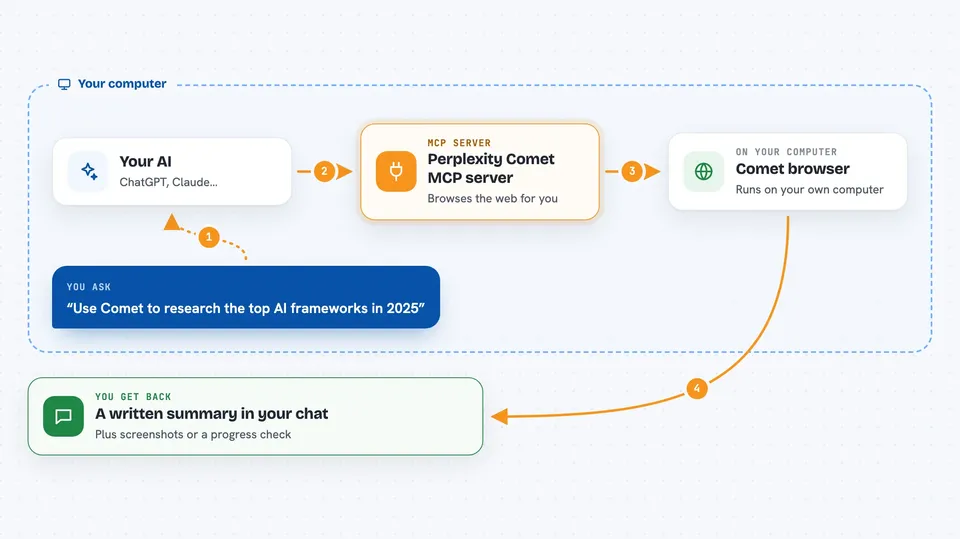
You ask your AI something that needs the web, like researching a topic or checking a site you are logged into. Your AI sends that request to this helper, which talks to the Comet browser on your computer. Comet does the actual browsing: opening pages, logging in, clicking, and searching. When Comet is done, the result comes back through the helper and your AI shows it to you in the chat. For long jobs, your AI can check in on progress instead of waiting the whole time.
 Click to zoom
What you can do with it
- Research a topic on the web and get a written summary back
- Log into a site you use and check your notifications or messages
- Take a screenshot of whatever page Comet is currently on
- Check on a long research task while it is still running
- Stop a browsing task that is taking too long
- Switch Comet between search, research, labs, and learn modes
Try asking your AI
- “Use Comet to research the top AI frameworks in 2025”
- “Log into my GitHub and check my notifications”
- “Take a screenshot of the page Comet is on right now”
- “Switch Comet to research mode and look into electric car prices”
What it gives back to you
You get answers in your chat, usually as a written summary of what Comet found. For long tasks, you can ask for a progress check and get a short status update. Screenshots come back as an image of the current page. If Comet changed something on a site, like logging in, you just see the result described in the chat.
Before you start
What you need
- The Perplexity Comet browser installed on your computer
- Node.js 18 or newer
- Claude Code or another app that can use MCP servers
- On WSL2, mirrored networking turned on so it can reach Comet on Windows
Good to know
Comet can log into your accounts and act on websites as you, so only ask it to do things you are comfortable with it doing on your behalf.
Install it with your AI
Add Perplexity Comet MCP server to your AI, no technical skills needed
You don't install anything by hand. You copy one prompt, paste it into an AI that can work on your computer, and it checks, installs and connects the server for you, asking you when it needs something.
Sign in to get the install prompt
Members get a ready-made prompt that lets the Claude desktop app check Perplexity Comet MCP server, install it and connect it for them, step by step. You don't need any technical skills: you copy, paste and answer a few questions. Your connected AI can also find and install any of the 4,361 MCP servers here for you.
Who it's for
People who use Claude Code and want their AI to handle web research or logged-in browsing without leaving their coding or writing work.


