
MCP server · API
TokenLab MCP server
by hedging8563
Lets your AI compare AI model prices and run text, image, video and other AI jobs through TokenLab.
This is a helper that connects your AI assistant to TokenLab, an online service that runs many different AI models in one place. Once it is connected, your AI can look up which models exist, compare their prices, and send jobs to them for you. It is handy if you use several AI models and want your assistant to pick and run them without you opening lots of websites.
What is an MCP server? The 30-second version
On its own, your AI can only chat with you. An MCP server is a small helper program that gives your AI a new skill or a connection to another service. This one connects your AI to TokenLab, so it can look up models, check prices, and run AI jobs there when you ask. You stay in the chat, and the helper does the talking to TokenLab behind the scenes.
What this MCP server does
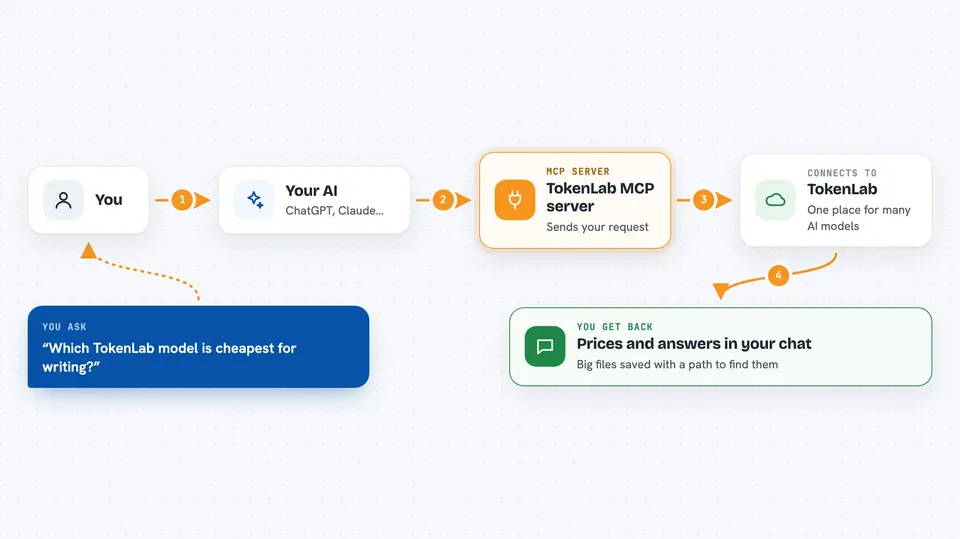
You ask your AI something, like which model is cheapest for writing, or ask it to make an image. Your AI uses this helper to talk to TokenLab. The helper sends the request to TokenLab's service and waits for the answer. Then it hands the result back to your AI, which shows it to you in the chat. For bigger jobs like video or music, it gives you a task number you can check on later.
 Click to zoom
What you can do with it
- Compare prices across AI models before you pick one
- See which models TokenLab offers and what each one can do
- Run text chats and questions through many different models
- Generate or edit images, video, music, speech and 3D
- Turn audio into text and text into speech
- Create embeddings, rerank results and translate text
- Check on long-running jobs and fetch the finished files
Try asking your AI
- “Which TokenLab models are cheapest for summarising long documents?”
- “Make an image of a red bicycle in a park and save it for me”
- “Turn this meeting recording into text”
- “Translate this paragraph into French using a low-cost model”
What it gives back to you
You get answers in the chat: lists of models with their prices, written replies from a model, or summaries of what happened. Small images and audio come back right in the chat. Bigger files, like video or 3D results, are saved to a folder and you get a path plus the file type and size. Long jobs give you a task number you can ask about again later.
Before you start
What you need
- Node.js 18 or newer if you run it with npx
- A TokenLab account and API key for the paid AI jobs (an API key is a kind of password for apps; TokenLab gives you one in your dashboard)
- The Claude desktop app or another app that supports MCP servers
Good to know
The paid AI jobs cost money on your TokenLab account, and some tools can change or delete workspace settings, so check before you approve them.
Install it with your AI
Add TokenLab MCP server to your AI, no technical skills needed
You don't install anything by hand. You copy one prompt, paste it into an AI that can work on your computer, and it checks, installs and connects the server for you, asking you when it needs something.
Sign in to get the install prompt
Members get a ready-made prompt that lets the Claude desktop app check TokenLab MCP server, install it and connect it for them, step by step. You don't need any technical skills: you copy, paste and answer a few questions. Your connected AI can also find and install any of the 4,609 MCP servers here for you.
Who it's for
People who use several AI models and want their assistant to compare prices and run jobs for them without juggling many websites.


