
MCP server · Productivity
Hushvert MCP server
by hushvert
Lets your AI convert documents, PDFs, and video files into other formats for you.
Hushvert MCP is a small helper that lets your AI convert files for you, like turning a Word document into a PDF or a PDF back into Word. It is handy if you work with office files and videos and do not want to install extra software on your computer. You just ask in plain words and the file gets converted.
What is an MCP server? The 30-second version
On its own, your AI can only chat with you. An MCP server is a small helper program that gives your AI a new skill or a connection to another service. This one connects your AI to Hushvert, an online file conversion service. Once it is connected, your AI can send a file to Hushvert and bring the converted file back to you when you ask.
What this MCP server does
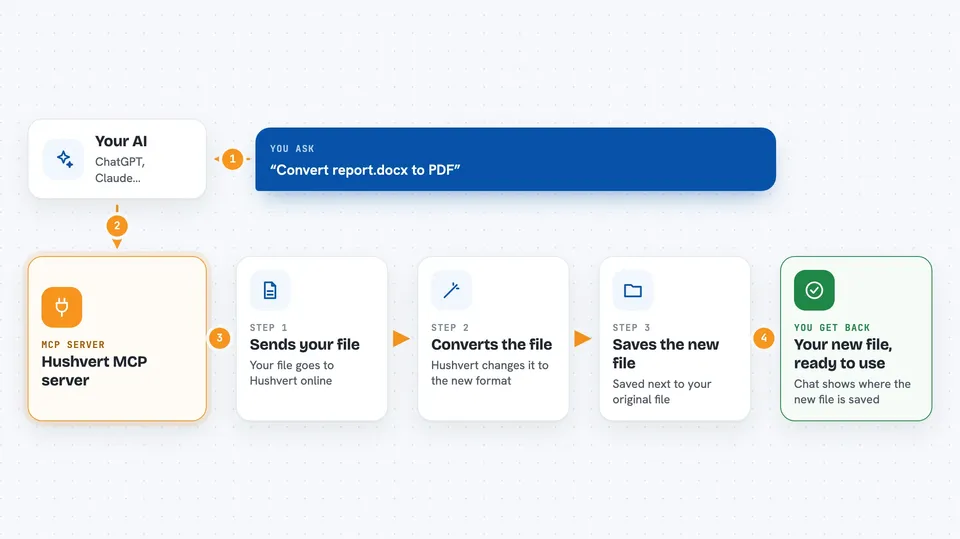
You tell your AI something like convert report.docx to PDF. Your AI uses this helper, and the helper sends the file to the Hushvert online service. Hushvert does the conversion and sends the result back. The helper then saves the new file next to your original one, and tells your AI where it is. For big video files it may take longer, so the helper can check back until the conversion is finished.
 Click to zoom
What you can do with it
- Convert Word, PowerPoint, and Excel files to PDF
- Convert a PDF back into a Word document
- Change video files like mov, mkv, or avi into mp4
- Turn an mp4 video into a gif
- Convert documents between formats like markdown, html, and epub
- Check how many free conversions you have left
- List which file formats are supported
Try asking your AI
- “Convert report.docx to PDF with hushvert”
- “Turn this PDF into a Word document”
- “Change my presentation.pptx into a PDF”
- “Check how many conversions I have left”
What it gives back to you
You get a short answer in the chat, usually the path to the new file and a note that it is done. For big video files it may first say the conversion is still running, then finish it when you ask again. You can also ask for a list of supported formats or your remaining free conversions. The new file is saved on your computer next to the original.
Before you start
What you need
- A Hushvert account and an API key from hushvert.com/developers/keys (a kind of password for apps; the site gives you one after you confirm your email)
- Node.js installed on your computer (a free tool that lets this helper run)
- An AI app that supports MCP servers, like Claude Code, Cursor, Cline, or Zed
Good to know
Conversions use your Hushvert account and may cost credits after the free monthly allowance, so it is worth checking your balance before converting a lot of files.
Install it with your AI
Add Hushvert MCP server to your AI, no technical skills needed
You don't install anything by hand. You copy one prompt, paste it into an AI that can work on your computer, and it checks, installs and connects the server for you, asking you when it needs something.
Sign in to get the install prompt
Members get a ready-made prompt that lets the Claude desktop app check Hushvert MCP server, install it and connect it for them, step by step. You don't need any technical skills: you copy, paste and answer a few questions. Your connected AI can also find and install any of the 4,361 MCP servers here for you.
Who it's for
Office workers and anyone who often needs to change file formats, like turning Word documents into PDFs or videos into mp4, without installing extra software.





