
MCP server · Notes
RAG MCP server
by jaimenbell
Lets your AI search your own documents and answer with quoted passages and sources.
This is a small helper that gives your AI a memory of your own documents. You point it at a folder of notes or files, and later you can ask questions and get answers backed by the actual passages. It is handy for anyone who keeps a pile of notes and wants their AI to search them instead of guessing.
What is an MCP server? The 30-second version
On its own, your AI can only chat with what it already knows or what you paste in. An MCP server is a small helper program that gives your AI one new skill. This helper connects your AI to a folder of your own documents. When you ask a question, your AI asks this helper to look through that folder and hand back the most relevant passages.
What this MCP server does
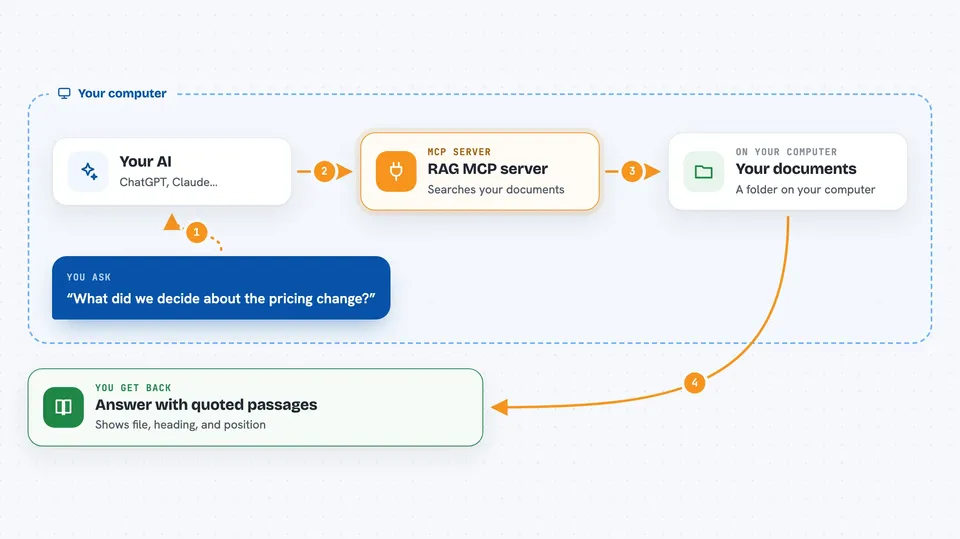
You point the helper at a folder of your documents once, and it reads and indexes them. After that, when you ask your AI a question, the AI sends that question to this helper. The helper searches the indexed documents and finds the closest matching passages. It returns those passages along with where each one came from, like the file name and heading. Your AI then uses those passages to answer you, so you can check the source yourself.
 Click to zoom
What you can do with it
- Search your own notes and documents by meaning, not just exact words
- Get answers that quote the actual passages they came from
- See the file name, heading, and position of every passage
- Limit a search to just your regular notes or just your handoff notes
- Keep the index up to date without re-reading everything each time
- Ask follow-up questions and search again with a different wording
Try asking your AI
- “What did we decide about the pricing change?”
- “Search my notes for anything about the onboarding checklist”
- “Find the passage where we talked about the server outage last month”
- “Look through my handoff notes and tell me what was left open”
What it gives back to you
You get back a short list of matching passages, each with the file it came from, the heading it sat under, and its position in the file. Your AI then writes an answer in the chat using those passages, often quoting the exact lines. If nothing matches, you get a clear empty result instead of an error. If something is wrong with your question or setup, you get a plain message explaining what to fix.
Before you start
What you need
- Python installed on your computer
- A folder of documents you want to search, in markdown format
- A one-time setup step to build the search index from that folder
Good to know
It only reads your documents and does not change or delete anything, but it can see every file inside the folder you point it at, so choose that folder carefully.
Install it with your AI
Add RAG MCP server to your AI, no technical skills needed
You don't install anything by hand. You copy one prompt, paste it into an AI that can work on your computer, and it checks, installs and connects the server for you, asking you when it needs something.
Sign in to get the install prompt
Members get a ready-made prompt that lets the Claude desktop app check RAG MCP server, install it and connect it for them, step by step. You don't need any technical skills: you copy, paste and answer a few questions. Your connected AI can also find and install any of the 4,361 MCP servers here for you.
Who it's for
People who keep a lot of personal or team notes and want their AI to search those notes and show its sources.





