
MCP server · Email
iCloud Mail MCP server
Let your AI search, read, file and draft replies in your iCloud Mail, without marking anything as read.
This is a small helper that connects your AI assistant to your iCloud Mail account. Once it is set up, you can ask your AI to find messages, summarise a conversation, save an attachment or prepare a draft reply. It is handy if you get a lot of mail and want help sorting through it without clicking around.
What is an MCP server? The 30-second version
On its own, your AI can only chat. It cannot see your inbox or your files. An MCP server is a small helper program that gives your AI one new skill, here the ability to talk to your iCloud Mail. You ask a question in plain words, the AI passes it to this helper, and the helper goes and looks in your mailbox for you.
What this MCP server does
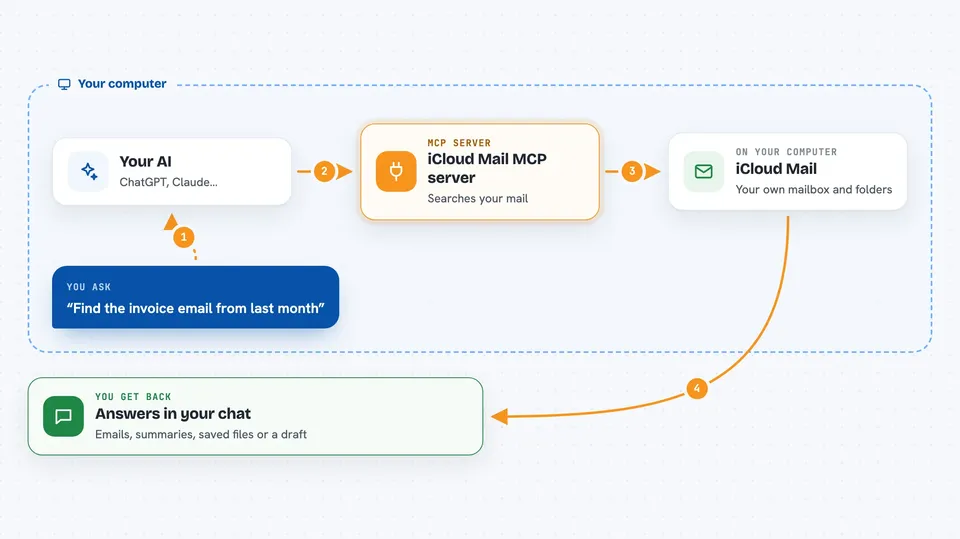
You type a request, like find the invoice from last month. Your AI sends that request to this helper running on your own computer. The helper logs into your iCloud Mail and searches your folders. It brings back the matching messages, or a summary, or saves an attachment to a folder on your machine. Then your AI shows you the result in the chat.
 Click to zoom
What you can do with it
- Search every folder, not just your inbox
- Read a full email with its attachments listed
- Rebuild a whole conversation into one thread
- Save attachments to a folder on your computer
- Draft a reply into your Drafts folder for you to review
- File messages into folders using your own rules
- Check unread counts per folder
Try asking your AI
- “Find all emails from my accountant in the last three months”
- “Summarise the thread with the Acme team and tell me who still owes a reply”
- “Save the PDF attached to the latest invoice email to my Downloads folder”
- “Draft a short reply to Sarah saying I will send the report on Friday”
What it gives back to you
You get answers in the chat: lists of matching emails with sender, subject and date, short summaries, or the full text of a message. If you ask for attachments, it saves the files to your computer and tells you the file paths. If you ask for a draft, it appears in your Drafts folder in iCloud. Nothing is marked as read unless you ask.
Before you start
What you need
- An iCloud account with two-factor authentication turned on
- An app-specific password from Apple (a special password just for apps, you create it on the Apple account website)
- Python 3.11 or newer and the tool uv installed on your computer
Good to know
It can send email and move messages, so check the exact wording or the exact list of messages before you approve those actions.
Install it with your AI
Add iCloud Mail MCP server to your AI, no technical skills needed
You don't install anything by hand. You copy one prompt, paste it into an AI that can work on your computer, and it checks, installs and connects the server for you, asking you when it needs something.
Sign in to get the install prompt
Members get a ready-made prompt that lets the Claude desktop app check iCloud Mail MCP server, install it and connect it for them, step by step. You don't need any technical skills: you copy, paste and answer a few questions. Your connected AI can also find and install any of the 4,361 MCP servers here for you.
Who it's for
Anyone who lives in their iCloud inbox and wants help finding, sorting or summarising mail, especially busy professionals and small business owners.





