MCP server · Research
Zotero MCP server
by kaliaboi
Let your AI look through your Zotero library, find papers, and read your collections for you.

This is a small helper that connects your AI assistant to your Zotero library, the place where you save papers, articles, and research sources. Once it is set up, you can just ask your AI to find something or tell you what is in a collection, and it will look it up in Zotero for you. It is handy for students, researchers, and anyone who keeps a lot of reading material in Zotero.
What is an MCP server? The 30-second version
On its own, your AI can only chat with you. It cannot see your Zotero library or anything else on the internet unless you give it a way in. An MCP server is a small helper program that gives your AI a new skill, and here that skill is talking to your Zotero Cloud library. So when you ask a question about your saved papers, the AI hands the request to this helper, the helper asks Zotero, and the answer comes back to you in the chat.
What this MCP server does
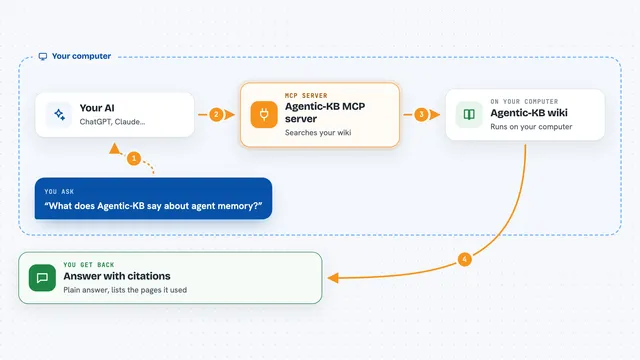
You ask your AI something about your Zotero library, like what is in a certain collection or whether you saved a particular paper. The AI passes your request to this helper program. The helper talks to Zotero over the internet using your own account details. Zotero sends back the matching collections, papers, or details, and the helper passes them to your AI. Your AI then shows you the answer in plain language in the chat.
 Click to zoom
What you can do with it
- List all the collections in your Zotero library
- Show you the items inside a specific collection
- Pull up the details of a particular paper
- Search your whole library for a topic or title
- Show you the papers you added most recently
Try asking your AI
- “What collections do I have in my Zotero library?”
- “List the papers in my Reading List collection.”
- “Search my library for anything about machine learning.”
- “What did I add to Zotero in the last week?”
What it gives back to you
You get answers in plain text in the chat. That might be a list of your collections, a list of papers in one collection, the details of a single paper, or the results of a search. The AI writes it out for you, so you do not have to open Zotero yourself.
Before you start
What you need
- A Zotero account with your library saved in Zotero Cloud
- A Zotero API key (a kind of password for apps; you create one for free on the Zotero website)
- Your Zotero user ID (a number you get from Zotero using your API key)
- Node.js installed on your computer to run the helper
Good to know
This helper can read your Zotero library, so keep your API key private and only share it with apps you trust.
Install it with your AI
Add Zotero MCP server to your AI, no technical skills needed
You don't install anything by hand. You copy one prompt, paste it into an AI that can work on your computer, and it checks, installs and connects the server for you, asking you when it needs something.
Sign in to get the install prompt
Members get a ready-made prompt that lets the Claude desktop app check Zotero MCP server, install it and connect it for them, step by step. You don't need any technical skills: you copy, paste and answer a few questions. Your connected AI can also find and install any of the 4,609 MCP servers here for you.
Who it's for
Students, researchers, and anyone who keeps a lot of reading material in Zotero and wants to ask their AI about it.