
MCP server · Notes
SAGE MCP server
by l33tdawg
Give your AI a long-term memory that remembers things across chats and checks each memory before saving it.
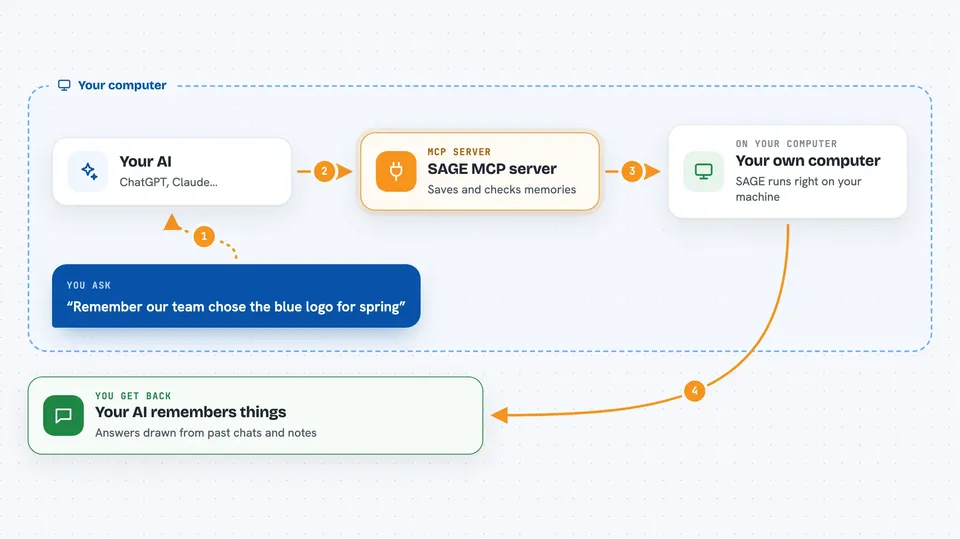
SAGE is a memory helper for your AI. It lets your AI remember facts, decisions, and tasks from one conversation to the next, instead of starting fresh every time. It is handy if you use ChatGPT or Claude for ongoing work and keep having to repeat yourself.
What is an MCP server? The 30-second version
On its own, your AI can only chat. It forgets everything the moment you close the window. An MCP server is a small helper program that gives your AI a new skill or a connection to another tool. SAGE is that helper here: it runs on your own computer and gives your AI a place to store and look up memories. When you ask your AI to remember or recall something, it quietly talks to SAGE for you.
What this MCP server does
You tell your AI something worth keeping, like a project decision or a preference. Your AI sends that to SAGE, which saves it as a memory with a note about where it came from and how confident it is. Before the memory is accepted, SAGE checks it, either with your own signed approval on a personal setup or with a group vote on a shared setup. Later, when you ask a related question, your AI searches SAGE for the right memories and uses them to answer. Memories can also fade over time if they are not used, so old and stale notes do not pile up forever.
 Click to zoom
What you can do with it
- Save a fact, decision, or preference so your AI remembers it later
- Search past memories by meaning, not just exact words
- Assign a task to a specific AI helper and track its status
- Send a request to another AI helper and read the reply
- See a list of open tasks that do not expire
- Check the confidence score attached to a memory
- Review and recover memories from a snapshot
Try asking your AI
- “Remember that our team decided to use the blue logo for the spring campaign.”
- “What did we decide about the pricing page last month?”
- “Assign a task to the research helper to summarize the latest customer feedback.”
- “Show me all open tasks that have not been finished yet.”
What it gives back to you
You get answers in plain chat text, drawn from memories SAGE found for you. It can also show lists, like open tasks or recent memories, with short details such as who saved them and how confident the memory is. When your AI saves something, it usually just tells you it is done. If a memory is held for review, SAGE tells you it is waiting.
Before you start
What you need
- A computer where you can install SAGE (Windows, Mac, or Linux)
- The SAGE desktop app or the SAGE program built from source
- An AI app that supports MCP, like Claude Desktop or Claude Code
Good to know
SAGE stores memories on your own computer and can share them with other AI helpers you connect, so be careful about what private information you ask it to remember.
Install it with your AI
Add SAGE MCP server to your AI, no technical skills needed
You don't install anything by hand. You copy one prompt, paste it into an AI that can work on your computer, and it checks, installs and connects the server for you, asking you when it needs something.
Sign in to get the install prompt
Members get a ready-made prompt that lets the Claude desktop app check SAGE MCP server, install it and connect it for them, step by step. You don't need any technical skills: you copy, paste and answer a few questions. Your connected AI can also find and install any of the 4,066 MCP servers here for you.
Who it's for
People who use an AI assistant for long-running work and want it to remember context, decisions, and tasks between sessions.




