
MCP server · Notes
BrainTube MCP server
by lildaddyo
Lets your AI search and cite everything you have saved: videos, podcasts, articles, PDFs and notes.
BrainTube is a place where you save things you watch, read and listen to, and it turns them into a knowledge base you can search. This MCP server connects that knowledge base to your AI chat, so your AI can look things up in your own saved material. It is handy if you collect a lot of videos, podcasts or articles and keep forgetting where you heard something.
What is an MCP server? The 30-second version
On its own, your AI can only chat with you using what it already knows. An MCP server is a small helper that gives your AI one extra skill or one extra connection. This one connects your AI to your BrainTube account, so it can search your saved videos, podcasts, articles, PDFs and notes. When you ask a question, the AI goes and checks your own library instead of guessing.
What this MCP server does
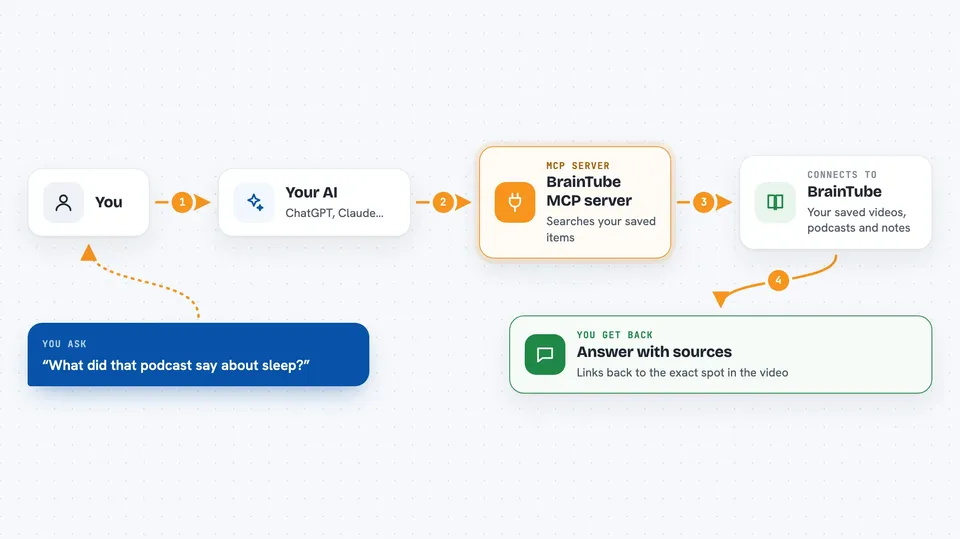
You ask your AI something like what did that podcast say about sleep. The AI passes your question to this BrainTube helper. The helper searches your saved items in BrainTube, both by meaning and by keywords. It sends the matching parts back, along with where they came from, down to the exact moment in a video. Your AI then writes the answer for you in the chat, with the sources attached.
 Click to zoom
What you can do with it
- Search everything you have saved in BrainTube by meaning or by keyword
- Get answers with citations back to the original video, podcast or article
- Jump to the exact timestamp in a video where something was said
- Save a new note, article or web page into BrainTube from your chat
- Explore related items and connections across your saved material
- See your recent activity and what topics you keep coming back to
- Resurface older saved items you may have forgotten about
Try asking your AI
- “What did I save about habit formation? Give me the sources.”
- “Find the part of that podcast where they talk about pricing.”
- “Save this article summary to my BrainTube notes.”
- “What have I been saving about AI agents lately?”
What it gives back to you
You get answers written in plain language, based on your own saved items. Alongside the answer you get citations pointing back to the source, including the exact moment in a video or podcast. If you ask it to save something, it confirms that the item was added. You can also get lists of related items or a short view of your recent activity.
Before you start
What you need
- A BrainTube account (free to create at brain-tube.com)
- A BrainTube API key, which is a kind of password the site gives you
- An AI app that supports MCP servers, such as Claude or Cursor
Good to know
Your AI can read everything you have saved in BrainTube and can also add new items, so keep your API key private and only connect apps you trust.
Install it with your AI
Add BrainTube MCP server to your AI, no technical skills needed
You don't install anything by hand. You copy one prompt, paste it into an AI that can work on your computer, and it checks, installs and connects the server for you, asking you when it needs something.
Sign in to get the install prompt
Members get a ready-made prompt that lets the Claude desktop app check BrainTube MCP server, install it and connect it for them, step by step. You don't need any technical skills: you copy, paste and answer a few questions. Your connected AI can also find and install any of the 4,361 MCP servers here for you.
Who it's for
People who save a lot of videos, podcasts and articles and want their AI to actually use that material, like researchers, writers, students and curious learners.





