
MCP server · Coding
Terminal MCP server
by LukeLamb
Let your AI run terminal commands, read and write files, and manage long-running jobs on your own computer.
This is a small add-on for Claude Desktop on Linux (and it also works on macOS). It gives Claude the ability to use your computer's terminal, look at your files, and start long jobs in the background. It is handy if you want your AI to actually do things on your machine instead of just talking about them.
What is an MCP server? The 30-second version
On its own, your AI can only chat. An MCP server is a small helper program that gives your AI a new skill or a connection to something. This one connects your AI to your own computer's terminal and files, so it can run commands and read or write files for you when you ask. Think of it as handing your AI a keyboard to your machine, but only for the conversation you turn it on in.
What this MCP server does
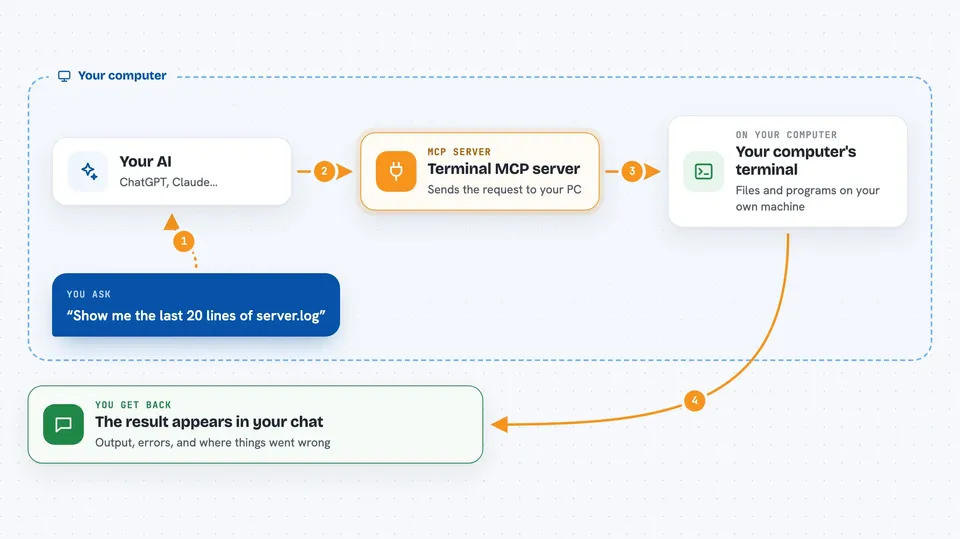
You ask your AI to do something, like list a folder or run a script. The AI uses this helper to send the command to your computer's terminal. The helper runs it with your normal user permissions and sends back what happened. You see the output, any errors, and the exit code right in the chat. For long tasks, it can start them in the background and check on them later.
 Click to zoom
What you can do with it
- Run shell commands and see the output
- Read the contents of a text file
- List what is inside a folder
- Create or overwrite a text file
- Start a long-running command in the background
- Check on a background job and read its latest output
- Stop a background job that is still running
Try asking your AI
- “List the files in my projects folder”
- “Show me the last 20 lines of server.log”
- “Create a file called notes.txt with a short summary of this chat”
- “Run npm install in the background and tell me when it finishes”
What it gives back to you
You get answers in the chat: command output, lists of files with sizes and dates, file contents, or a job id for background work. For long jobs, you can ask for the status and the last few lines of output. If a command fails, you see the error message and the exit code. Everything is also saved to a log file on your computer so the AI can look at it again later in the same conversation.
Before you start
What you need
- Claude Desktop version 0.10.0 or newer on Linux or macOS
- The Terminal.mcpb file from the Releases page
- A folder to use as the default working directory (or leave it blank for your home folder)
Good to know
This gives your AI the same access to your computer that you have in a terminal, so only install it on a machine where you are comfortable with that, and avoid it on shared or sensitive systems.
Install it with your AI
Add Terminal MCP server to your AI, no technical skills needed
You don't install anything by hand. You copy one prompt, paste it into an AI that can work on your computer, and it checks, installs and connects the server for you, asking you when it needs something.
Sign in to get the install prompt
Members get a ready-made prompt that lets the Claude desktop app check Terminal MCP server, install it and connect it for them, step by step. You don't need any technical skills: you copy, paste and answer a few questions. Your connected AI can also find and install any of the 4,609 MCP servers here for you.
Who it's for
Developers, system administrators, and anyone on Linux who wants their AI to run commands and manage files on their own machine.





