
MCP server · Notes
Obsidian MCP server
by maxkuminov
Let your AI search, read, and write notes in your own Obsidian vault, using plain markdown files you can open yourself.
This is a helper that connects your AI assistant to your Obsidian vault, the folder of notes you keep on your computer. Once it is set up, your AI can search your notes, read them, add new ones, and update them when you ask. It is handy if you use Obsidian for your own thinking and want an AI that can actually see what you have written.
What is an MCP server? The 30-second version
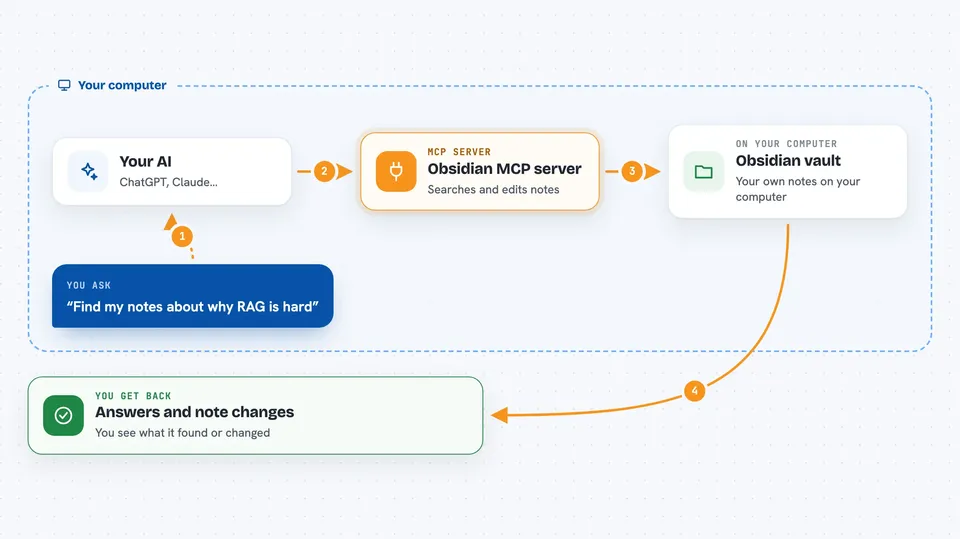
On its own, your AI can only chat with you. It cannot open your notes or remember things between conversations. An MCP server is a small helper program that gives your AI a new skill, here the ability to work with your Obsidian vault. You ask your AI something, the AI asks this helper, and the helper talks to your notes folder to find or change what you need.
What this MCP server does
You ask your AI a question or give it a task in plain English. The AI uses this helper to search your vault by keyword or by meaning, so it can find notes even when you do not remember the exact words. The helper can also read a note, follow the links between notes, and show what is connected to what. If you ask it to, it can create a new note, edit an existing one, move it, or delete it. Everything stays as normal markdown files in your vault, so you can open them in Obsidian and see exactly what the AI did.
 Click to zoom
What you can do with it
- Search your notes by keyword or by meaning
- Read a note and show its content, tags, and frontmatter
- Create a new note with the content you ask for
- Edit an existing note by replacing, appending, or changing a section
- Move a note to a new folder and update links to it
- Delete a note (it goes to a trash folder first by default)
- See which notes are linked to a note you are reading
- List your tags and how often they are used
Try asking your AI
- “Find anything I've written about why retrieval-augmented chat is hard”
- “Read my note called 2025-10-18 - OOD queries (draft).md and tag it #revisit-2026 in the frontmatter”
- “Create a new note in my Projects folder called Meeting notes 2026-01-15 with a summary of what we decided”
- “Show me what notes are connected to my note on RAG failure modes”
What it gives back to you
You get answers in the chat: lists of matching notes with short previews, the full text of a note, or a summary of what the AI found. When it changes something, it tells you what it did, like which note it edited or created. You can always open Obsidian to see the actual files and check the work yourself.
Before you start
What you need
- An Obsidian vault (a folder of markdown notes on your computer)
- A PostgreSQL database with the pgvector extension (this is a database program that stores your notes for searching)
- Python 3.12 or newer
- An embedding service: either Ollama running locally with the bge-m3 model, or an OpenAI API key
Good to know
It can create, change, move, and delete notes in your vault, so it is worth checking what it did, especially before using permanent delete.
Install it with your AI
Add Obsidian MCP server to your AI, no technical skills needed
You don't install anything by hand. You copy one prompt, paste it into an AI that can work on your computer, and it checks, installs and connects the server for you, asking you when it needs something.
Sign in to get the install prompt
Members get a ready-made prompt that lets the Claude desktop app check Obsidian MCP server, install it and connect it for them, step by step. You don't need any technical skills: you copy, paste and answer a few questions. Your connected AI can also find and install any of the 4,361 MCP servers here for you.
Who it's for
People who keep notes in Obsidian and want their AI assistant to be able to search, read, and write in that vault, especially if they like self-hosted tools and plain files they can see.





