
MCP server · Email
SMTP MCP server
by ni-c
Let your AI write and send emails from your address, with your approval before anything goes out.
This is a small helper that lets your AI assistant send email from one address you set up, like your work account. Every message is shown to you for approval before it goes anywhere, and it can only write to people you have named in advance. It is handy if you want your AI to draft and send routine mail without giving it a free pass to email anyone.
What is an MCP server? The 30-second version
On its own, your AI can only chat with you. An MCP server is a small helper program that gives your AI a new skill, in this case the ability to send email through an SMTP mail server. SMTP is just the standard way mail servers accept a message for delivery, so this helper talks that language for your AI. Once it is connected, you can ask your AI to send or reply to mail, and the helper does the actual sending after you say yes.
What this MCP server does
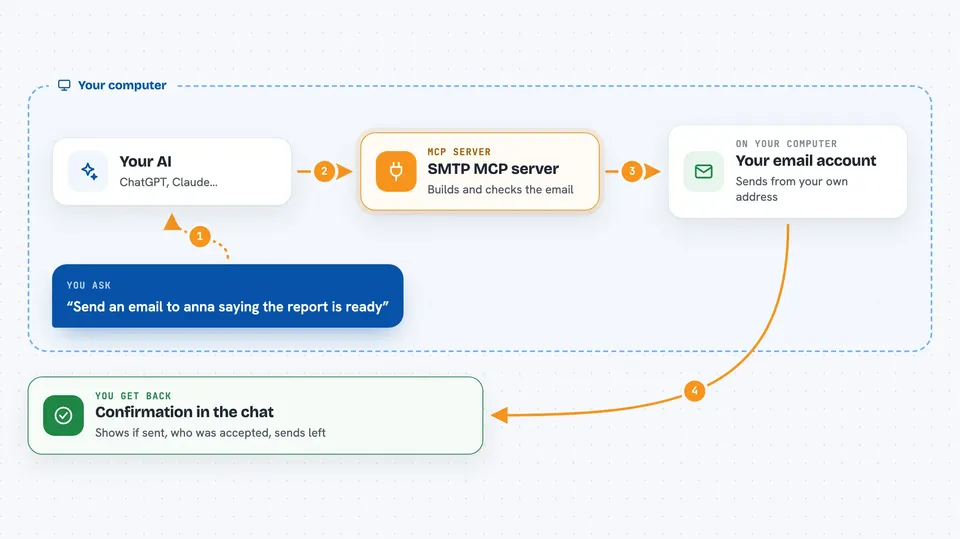
You ask your AI to send, reply to, or forward a message. The AI uses this helper to build the message, and the helper checks every recipient against a list you set up. Then it shows you the message and asks for your approval right there in the chat. If you approve, the helper connects to your mail server and hands the message over. You get back a short confirmation with the message ID and how many sends you have left this hour.
 Click to zoom
What you can do with it
- Send a new email from your configured address
- Reply to a message so it stays in the same conversation thread
- Forward a message to new people, quoting the original
- Preview exactly what a message will look like before sending
- Check which addresses the server is allowed to write to
- Test the connection to your mail server without sending anything
- See the server settings, limits, and whether sending is turned on
Try asking your AI
- “Send an email to anna@example.net saying the report is ready and I will follow up tomorrow”
- “Reply to the last message from the team list and confirm I can make Thursday”
- “Forward the invoice email to finance@example.net with a short note”
- “Preview a message to my manager about the schedule change before sending”
What it gives back to you
You get a short confirmation in the chat: whether the message was sent, the message ID, who was accepted, and who was refused. It also tells you how many sends you have left this hour. The preview tool shows you the full message exactly as it would go out, so you can check it first. Everything comes back as plain text plus a tidy set of fields your AI can read.
Before you start
What you need
- Node.js 22 or newer on your computer
- An email account you can send from, with a username and password (often an app-specific password if you use two-factor login)
- The hostname of your mail server, like smtp.example.net
- A list of allowed recipients, written as addresses or @domains
Good to know
Once a message is sent it cannot be recalled, so read the approval dialog carefully before you say yes.
Install it with your AI
Add SMTP MCP server to your AI, no technical skills needed
You don't install anything by hand. You copy one prompt, paste it into an AI that can work on your computer, and it checks, installs and connects the server for you, asking you when it needs something.
Sign in to get the install prompt
Members get a ready-made prompt that lets the Claude desktop app check SMTP MCP server, install it and connect it for them, step by step. You don't need any technical skills: you copy, paste and answer a few questions. Your connected AI can also find and install any of the 4,361 MCP servers here for you.
Who it's for
Office workers who want their AI to handle routine email from a single work address, but only to approved people and only after they approve each message.





