
MCP server · Productivity
Re:port Flow MCP server
by re-port-flow
Turn your Re:port Flow document templates into real PDFs, like invoices and contracts, straight from your AI.
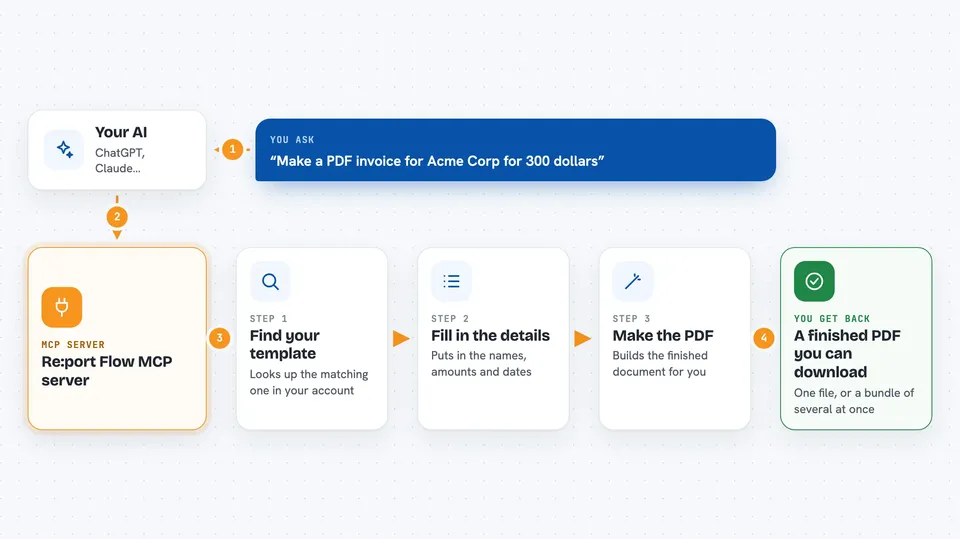
This connects your AI assistant to Re:port Flow, where your report and document templates live. Once it is set up, you can describe a document in plain words and get a finished PDF back. It is handy if you send out invoices, contracts or statements regularly and want less clicking around.
What is an MCP server? The 30-second version
On its own, your AI can only talk to you. An MCP server is a little helper program that gives your AI a new skill. This particular helper links your AI to your Re:port Flow account. So instead of chatting generally, your AI can reach into your Re:port Flow templates and make actual documents for you.
What this MCP server does
When you ask something like "make an invoice for Acme Corp", your AI sends that request through this helper to Re:port Flow. Re:port Flow finds the matching template in your workspace, checks which fields it needs filled in, and generates the PDF. You then get a link to download the file, or in some setups the file gets saved onto your computer. Your original templates stay safe because everything happens inside your own Re:port Flow account.
 Click to zoom
What you can do with it
- Generate a PDF invoice, contract or statement from a simple written request
- See which templates exist in your Re:port Flow workspace
- Check what information a chosen template expects before filling it in
- Create several PDFs at once and receive them bundled as one ZIP file
- Start a longer job in the background and grab the result later
- Browse the public template gallery and bring a starter template into your workspace
Try asking your AI
- “Using our standard invoice template, create a PDF bill for Acme Corp for three hundred dollars.”
- “Make one PDF per customer from the monthly statement template: Acme pays 120, Globex pays 240, Initech pays 75.”
- “What templates do we actually have in Re:port Flow? Show me the names.”
- “I am brand new and have no templates yet. Find me a basic receipt layout and start a draft.”
What it gives back to you
Mostly you get a downloadable PDF, shown in the chat as a clickable link. On a local setup your AI may tell you the exact spot on your disk where the file was saved. With bulk orders you get one ZIP archive holding all the separate PDFs. Sometimes you simply get a tidy summary listing what was created, along with any IDs for tracking.
Before you start
What you need
- A Re:port Flow account
- For online use: an AI app that lets you add custom connectors, such as claude.ai
- For offline/local use: Node.js 22 or newer installed on your computer
- Nothing else really, since sign-in handles itself after you connect
Good to know
Anything the AI makes ends up filed in your genuine Re:port Flow account, and copying a sample layout adds a fresh item each time, so double-check results before sharing official papers outside.
Install it with your AI
Add Re:port Flow MCP server to your AI, no technical skills needed
You don't install anything by hand. You copy one prompt, paste it into an AI that can work on your computer, and it checks, installs and connects the server for you, asking you when it needs something.
Sign in to get the install prompt
Members get a ready-made prompt that lets the Claude desktop app check Re:port Flow MCP server, install it and connect it for them, step by step. You don't need any technical skills: you copy, paste and answer a few questions. Your connected AI can also find and install any of the 4,609 MCP servers here for you.
Who it's for
Freelancers, bookkeepers, accountants and anyone in admin or operations who produces recurring paperwork like bills and agreements and would rather order those documents than build them by hand.





