
MCP server · Research
Google AI Search MCP server
by shariqriazz
Lets your AI search the web and pull answers from official docs using Google's AI models.
This is a helper that connects your AI assistant to Google's AI models so it can search the web and read official documentation for you. It is handy if you write code, follow technical guides, or need up-to-date answers that your AI would otherwise guess at. You set it up once, then just ask questions like normal.
What is an MCP server? The 30-second version
On its own, your AI can only chat with what it already learned. An MCP server is a small helper program that gives your AI a new skill or a connection to another service. This one connects your AI to Google's AI models, which can search the web and read documentation. So when you ask something current or technical, your AI can go look it up instead of guessing.
What this MCP server does
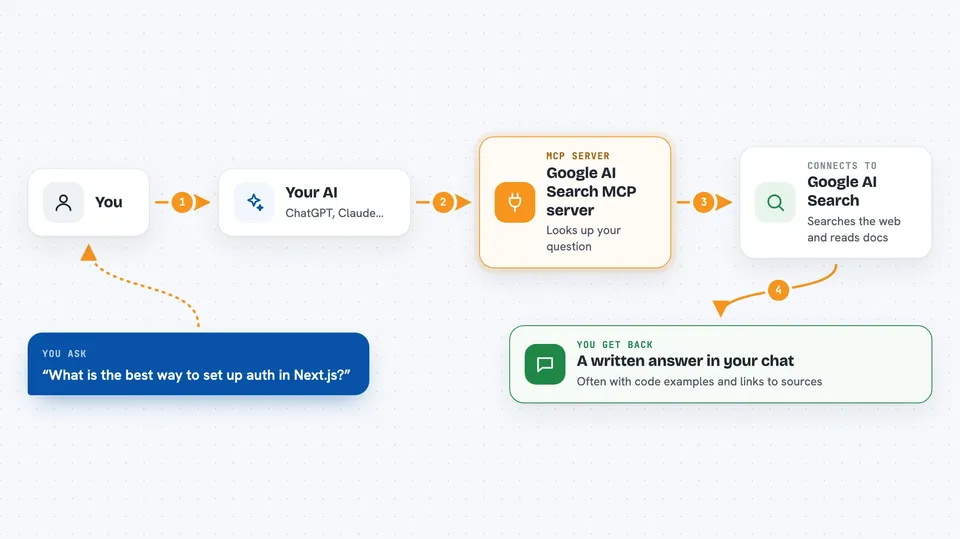
You ask your AI a question, like how a library works or what the current best practice is. Your AI passes that question to this helper. The helper sends it to Google's AI models, which search the web and read official documentation, then write an answer. Your AI shows you that answer in the chat, often with code examples or links to the sources.
 Click to zoom
What you can do with it
- Search the web for current technical answers
- Explain a topic using official documentation
- Pull code snippets at the right version
- Generate project guidelines for a stack you name
- Review your code against documented best practices
- Compare two technologies side by side
- Suggest architecture options for a use case
Try asking your AI
- “What is the current recommended way to set up authentication in Next.js?”
- “Explain how Python's asyncio works, with a simple example.”
- “Give me a code snippet for reading a CSV file in pandas 2.x.”
- “Compare PostgreSQL and MongoDB for a small internal tool.”
- “What are best practices for structuring a FastAPI project?”
What it gives back to you
You get back written answers in the chat, often with code blocks, step-by-step explanations, and links to the sources it used. Some tools return lists of options, comparisons in a table-like format, or a guidelines document you can copy. It does not change anything on your computer or in your accounts; it only reads and writes text back to you.
Before you start
What you need
- Node.js version 18 or newer
- Bun installed (a tool that runs this server)
- A Google Cloud project with billing on, if you use the Vertex AI option
- A Gemini API key from Google, if you use the Gemini option
Good to know
The answers come from AI models and web search, so treat comparisons, architecture advice, and security notes as things to double-check against the sources it cites before you rely on them.
Install it with your AI
Add Google AI Search MCP server to your AI, no technical skills needed
You don't install anything by hand. You copy one prompt, paste it into an AI that can work on your computer, and it checks, installs and connects the server for you, asking you when it needs something.
Sign in to get the install prompt
Members get a ready-made prompt that lets the Claude desktop app check Google AI Search MCP server, install it and connect it for them, step by step. You don't need any technical skills: you copy, paste and answer a few questions. Your connected AI can also find and install any of the 4,361 MCP servers here for you.
Who it's for
Developers, technical writers, and anyone who asks their AI about current software topics and wants answers backed by real sources.


