
MCP server · Analytics
PostgreSQL MCP server
by subnetmarco
Ask your AI questions about your PostgreSQL database in plain English and get answers back.
This is a small helper program that connects your AI assistant to a PostgreSQL database. PostgreSQL is a popular place where companies keep their data, like orders, customers, or products. If you have one of those databases and want to ask questions about it without writing any code, this is for you.
What is an MCP server? The 30-second version
On its own, your AI can only chat with you. It cannot see inside your company database. An MCP server is a small helper program that gives your AI a new skill, in this case the skill of talking to a PostgreSQL database. Once this helper is running and connected, your AI can look things up in your database when you ask it a question.
What this MCP server does
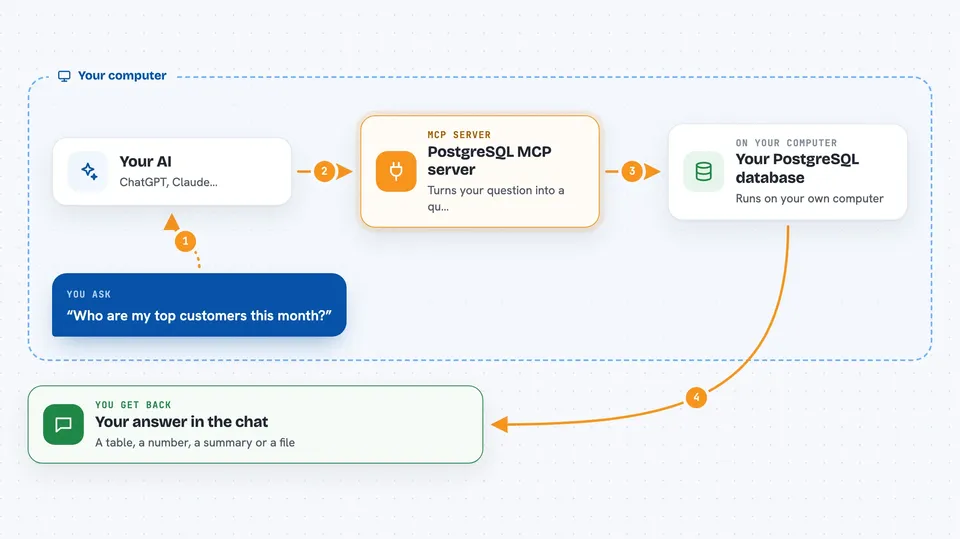
You type a question in plain English, like who are my top customers. Your AI sends that question to this helper program. The helper turns your question into a database query, runs it against your PostgreSQL database, and sends the results back. Your AI then shows you the answer in the chat, as a table, a list, or a short summary. It only reads data, it never changes or deletes anything.
 Click to zoom
What you can do with it
- Ask questions about your data in plain English
- Search for a word or name across all text columns
- Get results as a table, JSON, or CSV file
- Handle large result sets without freezing
- Look up tables, counts, and totals in your database
- Run several questions in a row
Try asking your AI
- “What tables do I have in this database?”
- “Who is the customer that has placed the most orders?”
- “How many orders were placed today?”
- “Search for john in all text fields”
What it gives back to you
You get the answer right in your chat. Depending on what you asked, that could be a table of rows, a single number, a short summary, or a CSV file you can download. If the AI writes a bad query, you get a friendly error message with a suggestion instead of a crash.
Before you start
What you need
- A PostgreSQL database you can connect to
- The connection details for that database (a link that looks like postgres://user:password@host:5432/dbname)
- An OpenAI API key if you want the AI to write the queries for you (a kind of password for apps; the OpenAI site gives you one)
- The pgmcp-server program, downloaded from the project's releases page
Good to know
It only reads your data, never changes or deletes anything, but it does send your questions to OpenAI if you use the AI feature, so avoid asking about anything you would not want to share with that service.
Install it with your AI
Add PostgreSQL MCP server to your AI, no technical skills needed
You don't install anything by hand. You copy one prompt, paste it into an AI that can work on your computer, and it checks, installs and connects the server for you, asking you when it needs something.
Sign in to get the install prompt
Members get a ready-made prompt that lets the Claude desktop app check PostgreSQL MCP server, install it and connect it for them, step by step. You don't need any technical skills: you copy, paste and answer a few questions. Your connected AI can also find and install any of the 4,609 MCP servers here for you.
Who it's for
Anyone who works with a PostgreSQL database and wants quick answers without writing SQL, like analysts, product managers, and support teams.


