
MCP server · Notes
memkeeper MCP server
by teflon07
Give your AI a long-term memory it keeps in a local file, so it can remember facts across chats.
memkeeper is a memory helper for your AI. It saves facts, decisions and preferences to a single file on your own computer, and your AI can look them up again later. It is handy if you use ChatGPT or Claude a lot and keep having to repeat yourself.
What is an MCP server? The 30-second version
On its own, your AI can only chat. It forgets everything the moment you close the window. An MCP server is a small helper program that gives your AI a new skill. This one connects your AI to memkeeper, a memory store on your own machine, so it can save and recall things for you when you ask.
What this MCP server does
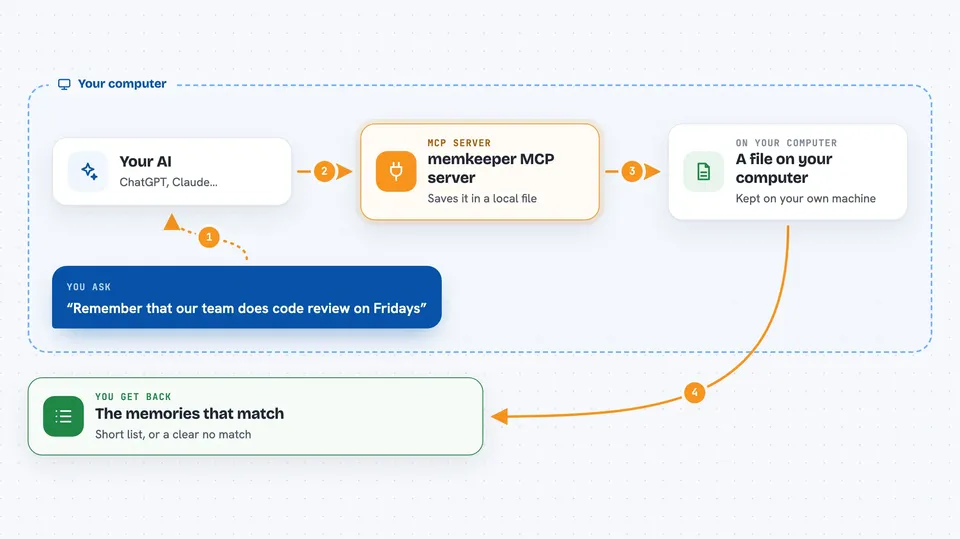
You tell your AI something worth keeping, like a preference or a decision. The AI passes it to memkeeper through this helper. memkeeper writes it into a local file on your computer. Later, when you ask a question, the AI searches that file and hands you back the memories that match. Everything stays on your machine, and no internet connection is needed.
 Click to zoom
What you can do with it
- Save a fact or preference so your AI remembers it next time
- Search your saved memories with a plain question
- Keep memories across separate chats and sessions
- Store whole documents separately and search inside them
- Find and clean up duplicate document chunks
- Back up your memory file before an upgrade
Try asking your AI
- “Remember that our team uses Friday afternoons for code review”
- “What did I tell you about the client's preferred meeting times”
- “Search my memories for anything about the Q3 budget decision”
- “Do I have any notes about how we handle refunds”
What it gives back to you
You get back a short list of matching memories, each with its text and a little context. If nothing matches well, memkeeper says so instead of guessing, so you are not handed a wrong memory. For documents, you also get the file path and which part of the file the answer came from.
Before you start
What you need
- The memkeeper program installed on your computer (the install command downloads it for you)
- About 2 GB of free space if you want the optional on-device search models (a smaller 0.6 GB option exists)
Good to know
It can delete document chunks and change your memory file, so review before pruning and keep a backup before upgrading.
Install it with your AI
Add memkeeper MCP server to your AI, no technical skills needed
You don't install anything by hand. You copy one prompt, paste it into an AI that can work on your computer, and it checks, installs and connects the server for you, asking you when it needs something.
Sign in to get the install prompt
Members get a ready-made prompt that lets the Claude desktop app check memkeeper MCP server, install it and connect it for them, step by step. You don't need any technical skills: you copy, paste and answer a few questions. Your connected AI can also find and install any of the 4,361 MCP servers here for you.
Who it's for
Anyone who uses an AI assistant daily and is tired of repeating the same background facts, especially writers, support staff, project coordinators and small teams.





