
MCP server · Productivity
killBottleneck MCP server
by tengolabs
Let your AI build and update goal maps, tasks and reminder rules on your own killBottleneck server.
This connects your AI assistant to your own killBottleneck instance, where teams draw goal maps and track tasks. Instead of clicking around the web app yourself, you describe what you want in normal words and the AI updates the map for you. Handy if you keep a lot of projects running and hate repetitive editing.
What is an MCP server? The 30-second version
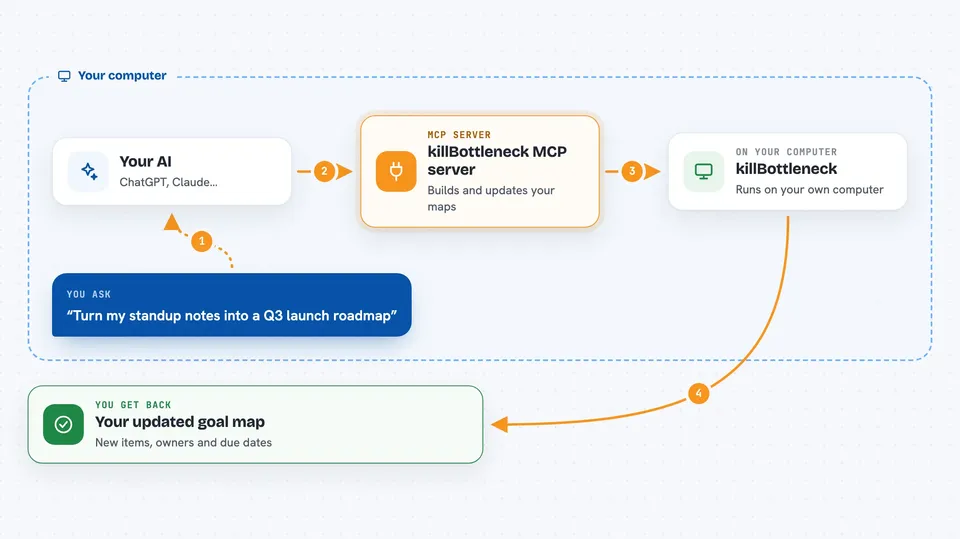
By itself, your AI can only talk to you based on what it learned during training. An MCP server is a little bridge between your AI and some real system, giving the AI hands and eyes in that system. This particular bridge points at your own killBottleneck server. So when you ask "tick off everything I finished", the AI reaches across the bridge and actually marks those items done in your live workspace.
What this MCP server does
When you send a message asking for something in killBottleneck, your AI calls this helper, which forwards the request to your server along with your personal API key. Your server checks what that key belongs to, applies the change or gathers the answer, then returns it. Back comes confirmation such as a freshly created node id or a tidy list of upcoming deadlines. If two assistants share the same document at once, yours might offer to refresh the map so everyone stays aligned.
 Click to zoom
What you can do with it
- Create a brand-new goal map straight from pasted meeting notes or voice transcriptions
- Add several steps or subgoals to an existing branch all in one shot
- Rename, move or retag individual nodes and mark progress states
- Ask who owns each part of a plan and review the overall portfolio health
- Set recurring event entries and gentle reminders tied to specific milestones
- Define simple trigger conditions that automate routine follow-up actions
Try asking your AI
- “Turn my latest standup recap into a fresh roadmap called Q3 launch readiness”
- “Under our onboarding checklist please append five extra verification stages owned by Marta”
- “Show me everybody currently working on customer-facing initiatives sorted by department”
- “Schedule a weekly sync note next Friday morning reminding Priya to submit her report draft”
What it gives back to you
Depending on the action, you receive structured confirmations listing newly minted identifiers plus links pointing back to each affected item. Queries yield compact tables showing titles owners due dates and current workflow stage values ready to scan quickly. Any errors surface translated into whichever interface tongue your profile prefers making troubleshooting straightforward regardless of location.
Before you start
What you need
- Your own killBottleneck server set up locally or online following quick instructions provided earlier
- One active application programming interface credential issued specifically for integration purposes carrying appropriate permission level requested beforehand
- Desktop variant capable accepting external extensions installed onto machine hosting primary conversational partner software package chosen freely among options available publicly documented officially supported vendors list maintained separately externally referenced documentation portal accessible
Install it with your AI
Add killBottleneck MCP server to your AI, no technical skills needed
You don't install anything by hand. You copy one prompt, paste it into an AI that can work on your computer, and it checks, installs and connects the server for you, asking you when it needs something.
Sign in to get the install prompt
Members get a ready-made prompt that lets the Claude desktop app check killBottleneck MCP server, install it and connect it for them, step by step. You don't need any technical skills: you copy, paste and answer a few questions. Your connected AI can also find and install any of the 4,609 MCP servers here for you.





