
MCP server · Notes
Obsidian MCP server (obsidian-tc)
Lets your AI read, search, and carefully edit the notes in your Obsidian vault.
This is a helper for people who keep their notes in Obsidian. It lets your AI assistant look inside your vault: read notes, search them, and make changes when you ask. It is handy if you have years of notes and want help finding or tidying them without clicking around yourself.
What is an MCP server? The 30-second version
On its own, your AI can only chat with you. An MCP server is a small helper program that gives your AI a new skill or a connection to an app. This one connects your AI to your Obsidian vault, so it can look things up and make changes there when you ask. You stay in charge: the helper checks what it is allowed to do before it touches anything.
What this MCP server does
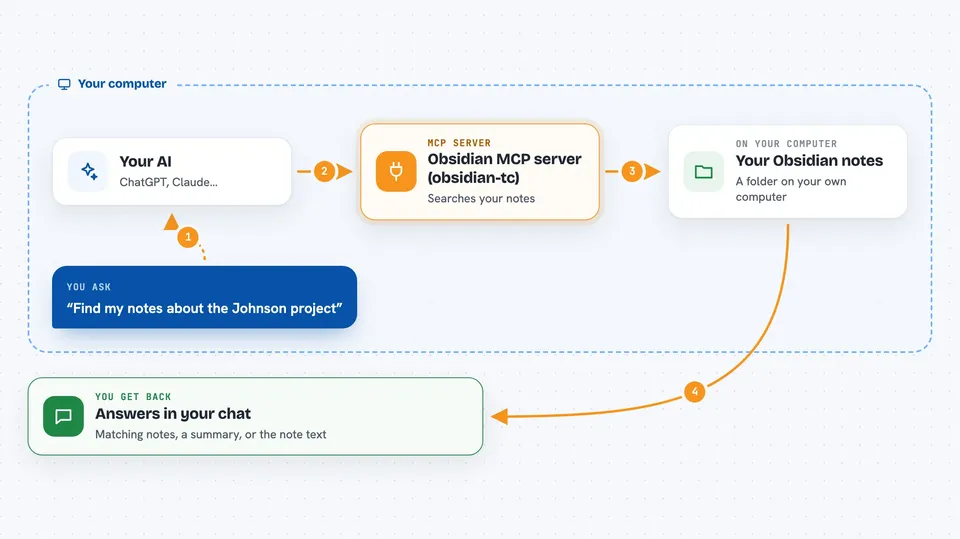
You ask your AI something about your notes, like finding a topic or reading a specific note. The AI passes that request to this helper program running on your computer. The helper opens your vault folder, searches or reads the notes you asked about, and sends the result back. Your AI then explains it to you in the chat. If you ask it to change something, the helper makes the edit and can keep a record of what it did.
 Click to zoom
What you can do with it
- Read any note in your vault by its name or path
- Search your notes by words or by meaning
- See which notes link to a note you are reading
- Write a new note or add to an existing one
- Edit a specific heading or section inside a note
- Update the tags and links in your notes
- Move or delete notes when you ask it to
Try asking your AI
- “Find all my notes about the Johnson project and summarize them”
- “What did I write last month about pricing ideas?”
- “Add a new note called Meeting 2026-03-04 with these bullet points”
- “Which notes link to my note called Reading List?”
What it gives back to you
You get answers in the chat: a list of matching notes, a short summary, or the text of a note you asked for. When it makes a change, it tells you what it changed and where. For searches, it shows the note names and the parts that matched. Everything stays in your chat window, so you can read it right away.
Before you start
What you need
- The Obsidian app with a vault folder on your computer
- Node.js 24 or newer (or Bun 1.1 or newer) if you install it that way
- A config file if you want multiple vaults, login, or folder permissions
Good to know
It can change, move, or delete notes in your vault, so keep backups and check what it is about to do before you say yes.
Install it with your AI
Add Obsidian MCP server (obsidian-tc) to your AI, no technical skills needed
You don't install anything by hand. You copy one prompt, paste it into an AI that can work on your computer, and it checks, installs and connects the server for you, asking you when it needs something.
Sign in to get the install prompt
Members get a ready-made prompt that lets the Claude desktop app check Obsidian MCP server (obsidian-tc), install it and connect it for them, step by step. You don't need any technical skills: you copy, paste and answer a few questions. Your connected AI can also find and install any of the 4,361 MCP servers here for you.
Who it's for
People who keep a lot of notes in Obsidian and want their AI to help search, read, and tidy them.





