
MCP server · Notes
Farnsworth SYNTEK memory server
by timowhite88
Give your AI a long-term memory that survives new chats, devices, and time.
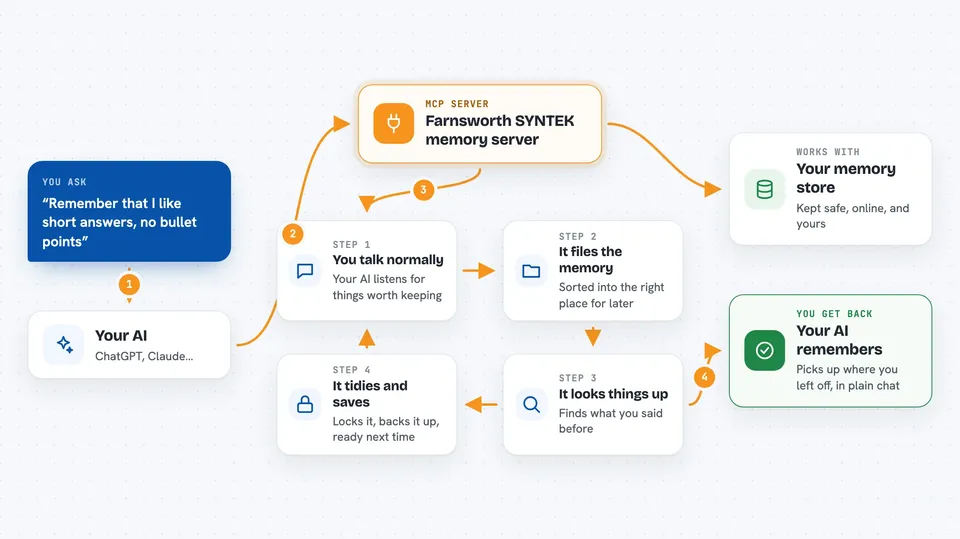
Farnsworth SYNTEK is a memory service for AI assistants. It lets your AI remember things you told it in earlier chats, instead of starting fresh every time. It is handy if you use an AI for ongoing work and are tired of repeating yourself.
What is an MCP server? The 30-second version
On its own, your AI can only chat. It forgets everything the moment you close the window. An MCP server is a small helper program that gives your AI a new skill. This one connects your AI to Farnsworth SYNTEK, a memory service, so it can save what you tell it and look it up again later.
What this MCP server does
You talk to your AI like normal. When something seems worth keeping, the AI sends it to this helper, which files it away in the right part of your memory store. Later, when you ask about something from before, the AI searches that store and pulls the relevant bits back. At the end of a session, the helper tidies everything up, locks it with a password only you hold, and saves a copy online. Next time you start a chat, your AI can pick up where you left off.
 Click to zoom
What you can do with it
- Remember facts and preferences you told your AI weeks ago
- Search your past conversations for a specific detail
- Keep a steady picture of who you are and how you like to work
- Save how-to steps your AI figured out, so it can reuse them
- Track how people, projects, and ideas connect to each other
- Start a separate line of thinking without losing the original
- Check what is stored and how much space is left
Try asking your AI
- “What did we decide about the launch date last month?”
- “Remember that I always want short answers, no bullet points.”
- “Show me everything you know about the Henderson project.”
- “Start a new branch to explore the cheaper option, keep the old one too.”
What it gives back to you
You get answers in plain chat text, drawn from things you said before. Sometimes it is a short summary, sometimes a list of related items, sometimes a straight yes or no. When it saves something new, it just tells you it is done. You do not see files or code, just the AI talking to you.
Before you start
What you need
- A paid Farnsworth SYNTEK subscription ($100 for 90 days, paid in crypto)
- The Claude Code app or another AI tool that supports MCP servers
- Node.js installed on your computer (the setup command needs it)
- A small amount of Monad crypto to cover the network fee for saving memory online
Good to know
It costs money to use, and saving memory online costs a small network fee each time, so keep an eye on your balance. Your memory is locked with a key only you hold, so if you lose that key you cannot read it back.
Install it with your AI
Add Farnsworth SYNTEK memory server to your AI, no technical skills needed
You don't install anything by hand. You copy one prompt, paste it into an AI that can work on your computer, and it checks, installs and connects the server for you, asking you when it needs something.
Sign in to get the install prompt
Members get a ready-made prompt that lets the Claude desktop app check Farnsworth SYNTEK memory server, install it and connect it for them, step by step. You don't need any technical skills: you copy, paste and answer a few questions. Your connected AI can also find and install any of the 4,361 MCP servers here for you.
Who it's for
People who use an AI assistant for long-running work and want it to remember context across sessions, like writers, researchers, and solo consultants.





