
MCP server · Productivity
NeuroDock MCP server
by tlennon-ie
Gives your AI a memory of your work, a sense of time, and a translator for confusing corporate talk.
NeuroDock is a set of helper tools that plug into Claude and give it a few new skills aimed at neurodivergent professionals. It can remember what you have been working on, help you plan your day, break big goals into small steps, and translate vague workplace phrases into plain language. It is handy if you often lose track of time, get stuck in a loop of overthinking, or find office jargon exhausting.
What is an MCP server? The 30-second version
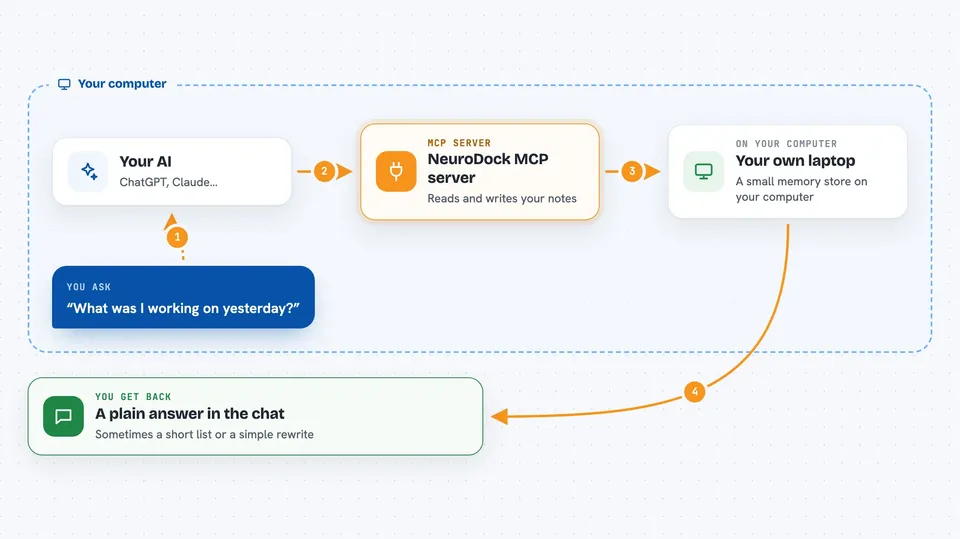
On its own, your AI can only chat with you. An MCP server is a small helper program that gives your AI a new skill or a connection to something useful. NeuroDock is a group of these helpers that run on your own computer. When you ask your AI something, it quietly calls the right NeuroDock helper, which looks things up or writes them down, then hands the answer back to your AI.
What this MCP server does
You talk to Claude the way you normally would. When your question needs memory, planning, or translation, Claude calls the matching NeuroDock helper behind the scenes. That helper reads or writes a small store on your own laptop, then sends the result back to Claude. Claude then replies to you in plain words. You never have to run commands or open anything yourself once it is set up.
 Click to zoom
What you can do with it
- Ask what you were working on yesterday and get a real answer
- Plan your morning or your day around your energy and time
- Break a vague goal into small, doable tasks
- Translate confusing corporate phrases into plain language
- Get a gentle nudge when you are stuck in a rumination loop
- Get a warning when you are heading into hyperfocus without a break
- Keep a memory of facts and people across conversations
Try asking your AI
- “What was I working on yesterday?”
- “Plan my morning.”
- “Decompose this goal into atomic tasks.”
- “What does 'let's circle back on this' actually mean?”
What it gives back to you
You get answers in the chat, in normal sentences. Sometimes it is a short list of tasks, sometimes a summary of what you did recently, sometimes a plain-language rewrite of a confusing message. The guardrail tools may add a one-line note on your next prompt if they notice a pattern, and you can always ignore it. Nothing is blocked and nothing is sent anywhere unless you turn that on.
Before you start
What you need
- Python 3.11 or newer
- Node.js 22 or newer
- Claude Desktop, Claude Code, or Cursor
- A full quit and restart of Claude after installing
Good to know
It keeps a local memory of your work and can nudge you about habits, so it is worth knowing what it stores and turning on the cloud option only if you want it.
Install it with your AI
Add NeuroDock MCP server to your AI, no technical skills needed
You don't install anything by hand. You copy one prompt, paste it into an AI that can work on your computer, and it checks, installs and connects the server for you, asking you when it needs something.
Sign in to get the install prompt
Members get a ready-made prompt that lets the Claude desktop app check NeuroDock MCP server, install it and connect it for them, step by step. You don't need any technical skills: you copy, paste and answer a few questions. Your connected AI can also find and install any of the 4,609 MCP servers here for you.
Who it's for
Neurodivergent professionals who use Claude at work and want help with memory, planning, time, and decoding workplace language.





