
MCP server · Developer tools
PiloTY MCP server
by yiwenlu66
Give your AI a real, always-open terminal it can start things in and come back to later.
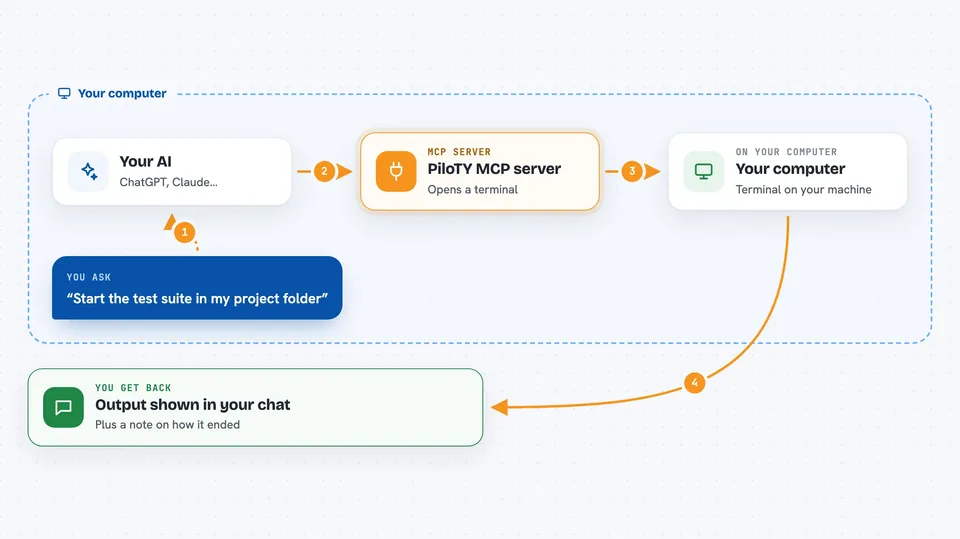
PiloTY is a helper that gives your AI its own live terminal window. Instead of running one command and forgetting everything, the AI can start something, walk away, and pick up where it left off. It is handy if you or your AI already run commands on a computer and want that to feel less like starting over every time.
What is an MCP server? The 30-second version
On its own, your AI can only chat with you. An MCP server is a small helper program that gives your AI a new skill or a connection to something else. This one connects your AI to a real terminal, the same kind of command window a person uses. So when you ask it to run something, it can actually do it there and keep that window open for next time.
What this MCP server does
You ask your AI to run something, like a build or a long test. The AI uses PiloTY to open a real terminal session and types the command in. PiloTY keeps that session alive, so the AI can check on it later, send more input, or stop it. When you ask again, the AI reuses the same session, so the folder it is in, the settings, and anything already running are still there. You get the output back in your chat.
 Click to zoom
What you can do with it
- Start a long job like a build or test run and check on it later
- Watch a log file that keeps updating, such as tail -f
- Keep a Python or debugger session open while your AI reads code
- Type passwords when a command asks for them, like sudo or SSH
- Stay logged in to a remote server across several steps
- Look at what is on the screen, not just the text, for full-screen programs
- Stop a running command with an interrupt signal
Try asking your AI
- “Start the test suite in my project folder and tell me when it finishes”
- “Open a terminal in /home/me/app and run the build, then show me the last lines”
- “Log in to my server over SSH and check how much disk space is left”
- “Keep a Python session open and try a few lines of code for me”
What it gives back to you
You get the text the terminal printed, plus a short note on how the call ended, like success or ran out of time. It also tells you what state the terminal seems to be in, for example running, waiting for a password, or sitting at a prompt. For full-screen programs you can ask for a snapshot, which shows what a person would see on the screen. Everything is shown to you in the chat.
Before you start
What you need
- An MCP client that can launch local servers, such as Codex CLI or Claude Desktop
- Python and the uv/uvx tool installed on your computer
- A computer where you are allowed to run terminal commands
Good to know
PiloTY gives your AI full, unrestricted control of a terminal on your computer, so treat it like handing over your keyboard and only use it where you are comfortable with that.
Install it with your AI
Add PiloTY MCP server to your AI, no technical skills needed
You don't install anything by hand. You copy one prompt, paste it into an AI that can work on your computer, and it checks, installs and connects the server for you, asking you when it needs something.
Sign in to get the install prompt
Members get a ready-made prompt that lets the Claude desktop app check PiloTY MCP server, install it and connect it for them, step by step. You don't need any technical skills: you copy, paste and answer a few questions. Your connected AI can also find and install any of the 4,361 MCP servers here for you.
Who it's for
Developers and technical folks who already use an AI assistant to run commands and want those commands to keep their state between steps.





