
MCP server · Notes
ChatCrystal MCP server
by ZengLiangYi
Your AI can save and search your past coding chats as notes, so it remembers what you already figured out.
ChatCrystal is a memory app for people who solve problems with AI coding assistants like Claude Code, Cursor, Codex CLI, Trae, and GitHub Copilot. It collects those scattered conversations and turns them into tidy notes you can search later. This page is about the MCP part, the piece that lets your AI read and write that memory for you.
What is an MCP server? The 30-second version
On its own, your AI can only chat. It does not remember your old conversations unless you paste them back in. An MCP server is a small helper program that gives your AI a new skill, and here the skill is talking to your own ChatCrystal library. Once it is connected, your AI can look things up in your saved notes or add a new note when you ask.
What this MCP server does
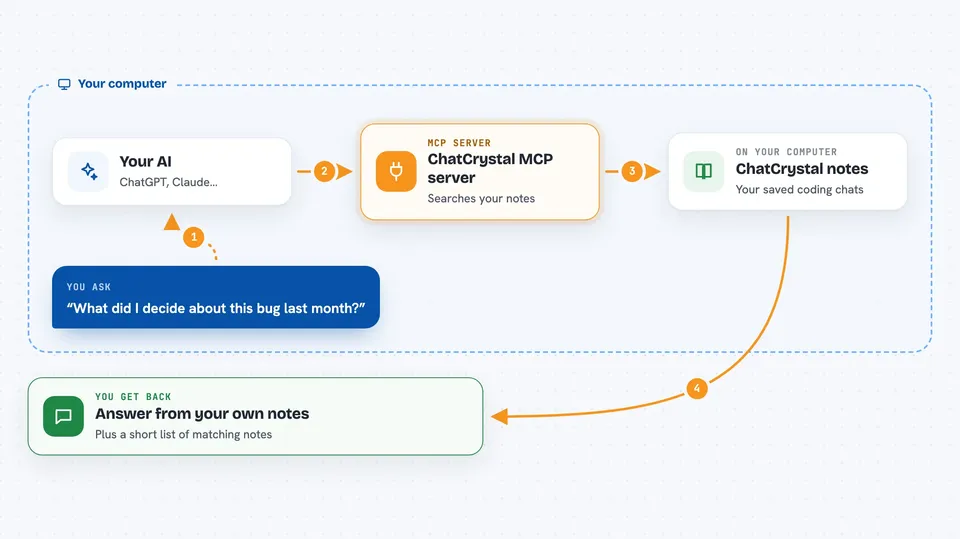
You ask your AI something like what did I decide about this bug last month. The AI uses this helper to search your ChatCrystal notes, which were built from your earlier coding chats. ChatCrystal finds the closest matches and hands them back. Your AI then reads them and answers you in the chat, or writes a new note back into your library so it is there next time.
 Click to zoom
What you can do with it
- Search your saved coding notes by meaning, not just exact words
- Recall what you concluded in an earlier AI coding session
- Write a new note back into your library so it is not lost
- Browse notes by tag to see related topics
- Pull up a specific note by its id
- Keep your AI work memory on your own machine
Try asking your AI
- “Search my notes for anything about fixing a slow database query”
- “What did I conclude last time I set up authentication in this project”
- “Save a note titled Postgres index tip with the summary we just worked out”
- “Show me my notes tagged with deploy”
What it gives back to you
You get answers in plain chat, based on your own past conversations. When it searches, you may see a short list of matching notes with their titles and summaries. When it saves, you get a short confirmation that the note was written. Nothing is shown as a file unless you ask for an export elsewhere in the app.
Before you start
What you need
- ChatCrystal installed and running on your computer (the desktop app or the command line version)
- Node.js 24 or newer if you use the command line version
- An LLM provider set up for summaries, and an embedding provider set up for search
Good to know
It reads your saved coding conversations and can write new notes into your library, so keep in mind that anything you ask it to save stays in your local ChatCrystal data.
Install it with your AI
Add ChatCrystal MCP server to your AI, no technical skills needed
You don't install anything by hand. You copy one prompt, paste it into an AI that can work on your computer, and it checks, installs and connects the server for you, asking you when it needs something.
Sign in to get the install prompt
Members get a ready-made prompt that lets the Claude desktop app check ChatCrystal MCP server, install it and connect it for them, step by step. You don't need any technical skills: you copy, paste and answer a few questions. Your connected AI can also find and install any of the 4,609 MCP servers here for you.
Who it's for
Developers and technical office workers who use AI coding assistants daily and want their past problem solving to stay searchable and private.





