
MCP server · Notes
ZenBrain memory server
by zensation-ai
Give your AI a long-term memory that remembers facts, events and habits across conversations.
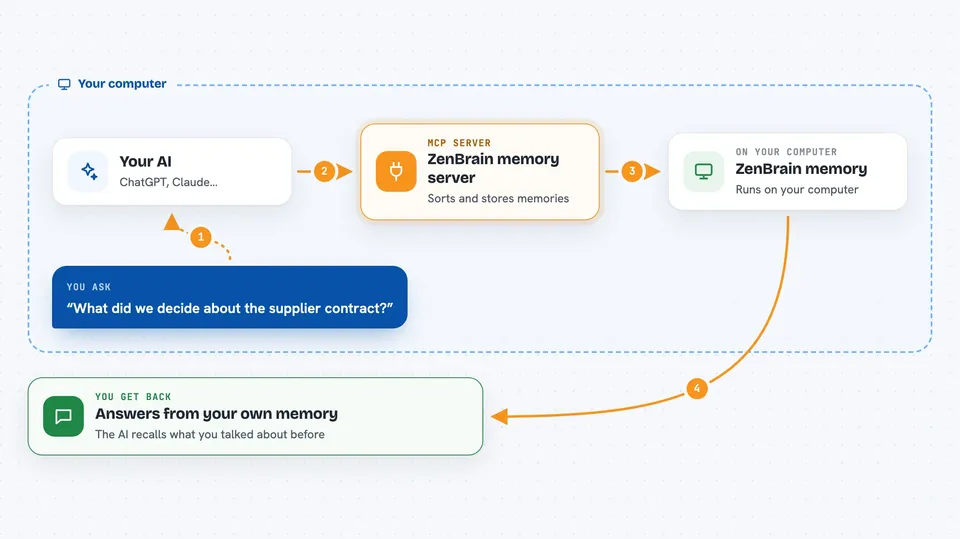
ZenBrain is a memory helper for AI assistants. Normally your AI forgets everything the moment a chat ends. With ZenBrain connected, it can keep notes about you and your work, and bring them back later when they matter.
What is an MCP server? The 30-second version
On its own, your AI can only chat with what is in front of it right now. An MCP server is a small helper program that gives your AI a new skill or a connection to something else. This one connects your AI to ZenBrain, a memory system that runs on your own computer. When you ask a question, your AI can look things up in that memory or add new things to it.
What this MCP server does
You talk to your AI as usual. When something worth remembering comes up, the AI sends it to ZenBrain through this helper. ZenBrain sorts it into the right kind of memory, such as a fact, an event or a routine. Later, when you ask about something related, the AI searches all the memory layers and pulls back what fits. Over time it also folds repeated events into steady facts, so the memory gets tidier instead of just bigger.
 Click to zoom
What you can do with it
- Remember facts about you and your projects across chats
- Recall earlier conversations when you ask about them
- Store events and routines separately from plain facts
- Search all memory layers at once for a topic
- Turn repeated events into lasting facts automatically
- Keep memory on your own machine instead of a cloud service
Try asking your AI
- “What did we decide about the supplier contract last month?”
- “Remember that our team standup moved to Tuesdays at 9.”
- “Have I mentioned before that I prefer short email drafts?”
- “What do you know about how I usually handle client complaints?”
What it gives back to you
You get answers in the chat, written in normal sentences. The AI may also show you a short list of the memories it found, or tell you that it saved something new. You will not see raw data or code unless you ask for it.
Before you start
What you need
- Node.js 22 or newer installed on your computer
- The ZenBrain package installed (npm install @zensation/algorithms)
- An AI app that can connect to MCP servers, such as the Claude desktop app
Good to know
This is a pre-1.0 package, so its public interface can still change between versions, and the README does not list ready-made MCP tools.
Install it with your AI
Add ZenBrain memory server to your AI, no technical skills needed
You don't install anything by hand. You copy one prompt, paste it into an AI that can work on your computer, and it checks, installs and connects the server for you, asking you when it needs something.
Sign in to get the install prompt
Members get a ready-made prompt that lets the Claude desktop app check ZenBrain memory server, install it and connect it for them, step by step. You don't need any technical skills: you copy, paste and answer a few questions. Your connected AI can also find and install any of the 4,066 MCP servers here for you.
Who it's for
People who use an AI assistant daily for work and are tired of repeating the same background every time.




