
Learning path
AI for land surveyors
Be the AI expert in your job. Always up to date.
Your first AI Expert certificate this week. Your AI set up in 15 minutes.

This is exactly what happens after you join. Try it: everything below reacts to your choices.
Only stored for members. Join to keep the courses you choose in your account and favorites; until then only this browser remembers them. Start for Free






Picked by our course-matching AI for land surveyors, your level and your AI, from 700+ courses. Each course ends in a short exam and an AI Expert certificate. New courses arrive every week and your suggestions update with them. Your choices are kept in this browser until you join.
For members: your personal setup prompt, with your sign-in built in. Here's what's inside.
What the setup does
- Connects your AI to your AI Coach: ChatGPT, Claude, Cowork, Microsoft Copilot and more
- Asks you a few questions about your work and saves your profile
- Gives your AI the skills, prompts and tools for land surveyors
- Writes your personal instructions and gives you today's first suggestion
What your AI gets: the land surveyor AI kit
See everything in your land surveyor AI kit: log in or sign up first → · Start for Free
Like "Check Traverse Closure and Error"
A new idea from your AI Coach every day
Let your AI do map and location maths: distances, areas, buffers, map layers and coordinate changes.
From 4,600+ connections, after a short interview about the apps you use
A complete research file for the boundary survey
From 3,900+ AI agents: hand a whole task to AI
Compares trade quotes side by side to surface unanswered scope and pricing assumptions before you award work.
From 2,400+ apps you can build, with step-by-step prompts
Not connected? The same suggestions wait for you on your dashboard under Today, with prompts to copy into any AI.
All the courses, certifications, AI tools, connections and apps for land surveyors, most relevant first. Tap the heart on anything to save it for later.
All prompt courses for land surveyors
How to talk to AI, then 8 lessons with ready-to-use prompts for land surveyors.
- 1Drafting Legal Descriptions3 prompts
- 2Explaining Findings to Clients3 prompts
- 3Checking and Analyzing Field Data3 prompts
- 4Troubleshooting Equipment and Field Problems3 prompts
- 5Preparing Survey Reports and Documentation3 prompts
- 6Researching Rules and Standards3 prompts
- 7Estimating and Quoting Survey Work3 prompts
- 8Admin and Client Communication3 prompts
All video courses for land surveyors
83 video courses our AI picked for land surveyors, most useful first. Tap the heart to save one for later.
Favorites are saved to your account: sign in or get your AI kit first.
All certifications for land surveyors
Every course ends in a short exam and an AI Expert certificate you can add to LinkedIn. Tap the heart to save the ones you're aiming for.
Favorites are saved to your account: sign in or get your AI kit first.
More certifications for land surveyorsAll connections for land surveyors
Connections let ChatGPT, Claude or Copilot look things up and get work done in other apps, like your email, calendar or bookkeeping software. These 7 fit the work of land surveyors best, well-known apps first.
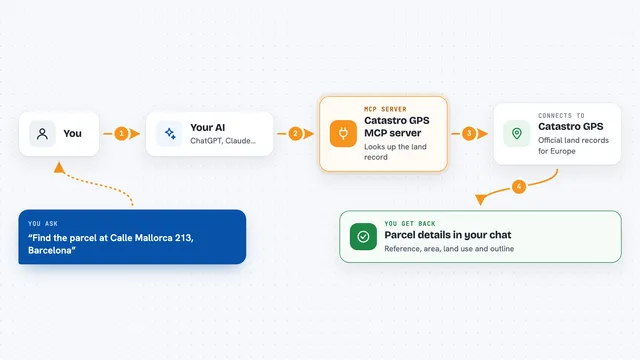
Catastro GPS MCP server
by TheHiddenPandaDevLook up official cadastral parcels across Europe by reference, point or address, with area, land use and outline.
Research Official
GIS MCP server
by mahdin75Let your AI do map and location maths: distances, areas, buffers, map layers and coordinate changes.

GNU Units MCP server
by laszlopereLets your AI convert between thousands of units and check unit math, all offline.

Go-Docs MCP server
by drolosoftLets your AI read, search and pull text from your PDFs, Word files, spreadsheets and images.
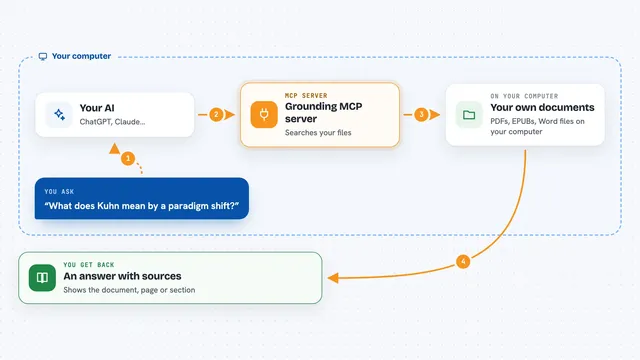
Grounding MCP server
by andyliszewskiSearch your own PDFs, EPUBs and Word files locally and get answers with page and section citations.

Ossian document search and memory server
by dockndevaiLet your AI answer questions from your team's own documents with real sources, and keep notes across chats.

Local RAG MCP server
by shinprSearch your own PDF, Word, text and Markdown files from your AI chat, all on your own computer.










































































About this learning path
6 topicsAI for Land Surveyors: Measure, Map, and Explain
Land surveyors are asked to do more with less time. You measure, map, and document, but you also answer client questions, research rules, and write reports. AI can help with the writing and checking parts, so you can focus on the field work and the judgment calls that need your eye.
This learning path brings together setup questions, connecting your AI, skills for the job inside your AI, this prompt course, and video courses picked for survey work. You will also see the certifications those courses offer, so you can show what you have learned.
Why AI Matters Now
Boundary disputes, construction deadlines, and legal reviews all demand fast, accurate answers. AI can draft the first version of a legal description, check a closure, or explain an easement, so you start from a solid draft instead of a blank page.
Clients and attorneys expect plain language. AI helps you translate technical findings without losing the details that matter.
What This Path Includes
You start with setup questions to get your AI tool ready for survey work. Then you connect your AI to the files and notes you use every day.
The path includes this prompt course, plus video courses chosen for land surveyors. Each video course comes with a certification you can add to your professional profile.
How It Saves You Time
Instead of rewriting a client email three times, you ask your AI for a first draft and edit it once. Instead of hunting through regulations, you ask for a plain summary and check the source.
The time adds up. A few saved hours each week means you can take on more surveys or leave the office before dark.
How It Protects Your Career
AI does not replace your license or your judgment. It handles the repetitive writing and checking, so you can focus on decisions that require a surveyor's eye.
When you use AI well, you become the person who catches errors early, explains findings clearly, and keeps projects moving. That is value clients notice.
How to Start Tomorrow
Pick one task from your day, like drafting a status update or checking a closure. Try one prompt from the course and see how it feels.
Then add a second task. The path is built to fit around your work, not the other way around.
Frequently asked questions
Do I need to be technical to use AI?
No. If you can write an email or fill out a survey form, you can write a prompt. The course starts with simple questions and builds from there.Will AI make mistakes in legal descriptions?
AI can make mistakes, so you always check its work against the deed, the field data, and your state rules. Think of it as a fast first draft, not a final answer.What if my state has strict rules about AI?
The path includes a section on researching rules and standards. You will learn how to ask for plain summaries of state regulations and ALTA standards, then verify them yourself.How long does the learning path take?
Most surveyors move through the path in a few weeks, fitting lessons around field work and office days. You can go faster or slower depending on your schedule.
At a glance
What you get
- 3 step setup process
- Relevant courses for your job (700+ available)
- A certificate per course
- AI Coach
- 15-minute AI setup in ChatGPT, Claude, Copilot and more