
Learning path
Learning AI as a Notary
Notaries keep signings clear and records strong. This path shows how AI can help you prepare identity checks, certificates, journals, and client messages with care.

Your path
Everything in the Notary AI kit, in the order that makes sense. Members tick off each step and see their progress.
Set up your AI
We guide you through each click.
Let skills do your everyday tasks
Connect your apps and pick your AI apps
Hand whole tasks to AI agents
Build your own tools
Keep growing
Everything for notaries
All the courses, certifications, AI tools, MCP servers and apps for notaries, most relevant first. Open any list to see more.
Take the prompt courses
A short framework course to learn how to ask, then 8 lessons with ready-to-use prompts for notaries.
Start with this framework: how to talk to AI
TIDD-EC fits notary work because its Do, Don't, and precise instructions keep you compliant when verifying ID and logging a journal entry.
Then your prompt course for notariesWatch the video courses or add them to your Favorites for later
83 video courses our AI picked for notaries, most useful first. Save the ones you want to watch later with the heart.
Favorites are saved to your account: sign in or get your AI kit first.
Show all 83 video courses
Get certified, or add certifications to your Favorites
Every course ends in an exam and a certificate you can add to LinkedIn. Save the certifications you are aiming for with the heart.
Favorites are saved to your account: sign in or get your AI kit first.
More certifications for notariesShow all 24 certifications
Try the AI tools for notaries
1 AI tools our AI matched to the work of notaries, best fit first. Each review shows what it does, its alternatives and the jobs it suits.
Favorites are saved to your account: sign in or get your AI kit first.
Connect your AI to the apps notaries use
MCP servers let ChatGPT, Claude or Copilot look things up and get work done in other apps, like your email, calendar or bookkeeping software. These 3 fit the work of notaries best, well-known apps first.
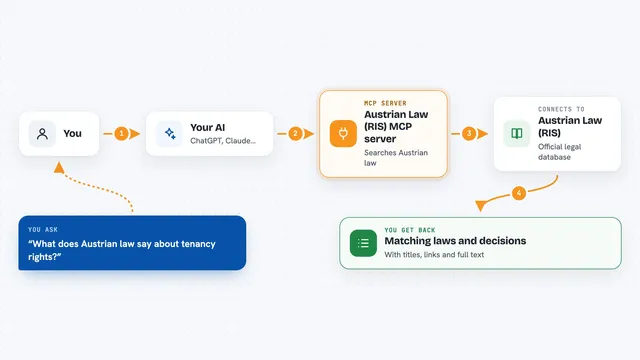
Austrian Law (RIS) MCP server
by philroxLets your AI look up Austrian federal and state laws, court decisions and legal gazettes for you.

Nexus Legal MCP server
by djtelladoLets your AI run legal analysis, drafting, case-law search and cross-border comparisons for Spanish, Latin American and European law.
ResearchNo install
Normativa Colombia MCP server
by AngelthebestoneConsulta leyes y sentencias colombianas desde tu asistente de IA, sin abrir el navegador.
Build your own AI apps for notaries
Apps you build yourself with your own AI, no coding needed and no monthly fee. Our AI picked the one that fits the work of notaries.















































































About this learning path
6 topicsAI Help For Notaries, Step By Step
You already know the rules, the people, and the paperwork. This path helps you use AI as a careful assistant for the parts that repeat, so you can spend more attention on the signer in front of you.
It starts with setup questions, then connecting your AI, then job skills inside your AI. You also get this prompt course, video courses chosen for notary work, and the certifications that come with those courses.
Why AI Matters Now
Notary work is changing. Signers expect quick answers, schedules shift, and records must stay accurate. AI can help you draft plain explanations, check lists, and journal notes while you stay responsible for every act.
Used well, AI gives you a second set of eyes. It does not replace your commission, your state rules, or your judgment.
What The Path Includes
The path begins with setup questions and connecting your AI tool. Then you practice skills for the job inside your AI.
You also get this prompt course, video courses picked for notary work, and the certifications that come with those courses. Everything is built for busy working notaries.
How It Saves Time
You can draft identity check scripts, certificate wording, client messages, and journal notes in minutes. You review each draft and make it fit the signer and the document.
The time saved goes back into careful signing, travel, and the human moments that matter.
How It Protects Your Career
The path keeps you inside notary limits. It helps you use consistent identity checks, complete certificates, and accurate records.
It also reminds you to protect private information and avoid legal advice. AI supports your decisions. It does not make them.
How To Start
Start with the setup questions. Connect ChatGPT, Claude, or Gemini using the simple steps. Then open the prompt course and try one lesson at a time.
Practice with a blank form or a made-up example. Keep real signer details out of your prompts. Add your state rules and your own review to every answer.
Frequently asked questions
Can AI make notarial decisions for me?
No. AI can help you draft wording and check steps, but you decide whether to notarize. You must follow your state rules and your own judgment.Will this path teach me the law?
It gives plain guidance and practical prompts, not legal advice. Always check your state rules and commission requirements before you act.Do I need to be technical?
No. Setup questions and simple steps show you how to connect ChatGPT, Claude, or Gemini and use it slowly. You can start with one prompt and grow from there.How do I protect signer privacy?
Keep personal details out of prompts. Use placeholders and general examples. Follow your state privacy and record rules at all times.